https://shimano-steps.com/
222 223
https://shimano-steps.com/
E6000 MANUALE8000 CONCEPT E8000 MANUAL E6000 CONCEPT
Code
Situation where the error
occurred
Operational restriction
when an error is being
displayed
Remedy
E014
The speed sensor may be
installed in the wrong
position.
Power assistance is not
provided during riding.
Amend the position of the speed sensor and the
magnet unit, turn on the power and rotate the
crank clockwise until the error resolves
(maximum: approx. 100 rotations).
E020
A communication error
between the battery and
drive unit was detected.
Power assistance is not
provided during riding.
Check that the cable between the drive unit and
battery is properly connected.
If the cable is damaged, replace it with a new
one.
E030
Total number of gears
setting for the motor unit
does not match the number
of gears in the internal
geared hub.
Power assistance is not
provided during riding.
Configure the motor unit so that the total
number of gears setting matches the number of
gears in the internal geared hub.
E031
The chain tension may not
yet be adjusted or the
crank may not be installed
in the proper position.
The assist functions do not
work. (Power gear shifting
does not work.)
Amend the chain tension and the installation
angle of the crank, and then select “Yes” in
response to W031, which displays when the
power is turned on for the first time.
E033
The current firmware is not
compatible with this
system.
Power assistance is not
provided during riding.
Connect to E-TUBE PROJECT, then update the
firmware for all units to the latest version.
E043
An error was detected in
the firmware for the cycle
computer.
Power assistance is not
provided during riding.
Restore the firmware for the cycle computer
using E-TUBE PROJECT.
Battery Level and Error Indication
Error indication
type
Indication condition
Lighting pattern
*1
Recovery
System error
Communication error with the
bicycle system
Make sure that the cable is not loose or
improperly connected.
If the situation does not improve, consult us.
Temperature
protection
If the temperature exceeds the
guaranteed operating range,
the battery output is turned off.
Leave the battery in a cool place away from
direct sunlight until the internal temperature
of the battery decreases sufficiently.
If the situation does not improve, consult us.
Security
authentication
error
This is displayed if a genuine
drive unit is not connected.
This is displayed if any of the
cables are disconnected.
Connect a genuine battery and drive unit.
Check the condition of the cables.
If the situation does not improve, consult us.
Charging error
This is displayed if an error
occurs during charging.
Remove the charger from the battery and
press the power button, if an error appears,
consult us.
Battery
malfunction
Electrical failure inside the
battery
Connect the charger to the battery and then
remove the charger. Press the power button
with only the battery connected.
If an error appears with only the battery
connected, consult us.
*1
: No light : Lights up : Flashing
List of Warnings
Code
Situation where the error
occurred
Condition for removing the
operational restriction when a
warning is being displayed
Remedy
W010
The temperature of the
drive unit is high.
The level of assistance may
decrease.
Stop using the assist function until the
temperature of the drive unit drops.
If the situation does not improve, consult us.
W011
The traveling speed cannot
be detected.
The maximum speed up to
which power assistance is
provided may decrease.
(Power assistance is provided
up to 25 km/h in top gear.)
Check that the speed sensor is properly
installed.
W012
The crank may be installed
in the wrong direction.
-
Install the crank in the correct direction, then
turn on the power again.
W030
Two or more assist switches
are connected to the
system.
Gear shifting is not available
for power gear shifting
derailleurs.
Change the assist switch to the gear shifting
switch, or connect only one assist switch and
turn on the power again.
If the situation does not improve, consult us.
-
A communication error
between the drive unit and
the motor unit was
detected.
Gear shifting is not available
for power gear shi
fting
derailleurs.
Check that the cable is properly connected
between the drive unit and the motor unit.
If the situation does not improve, consult us.
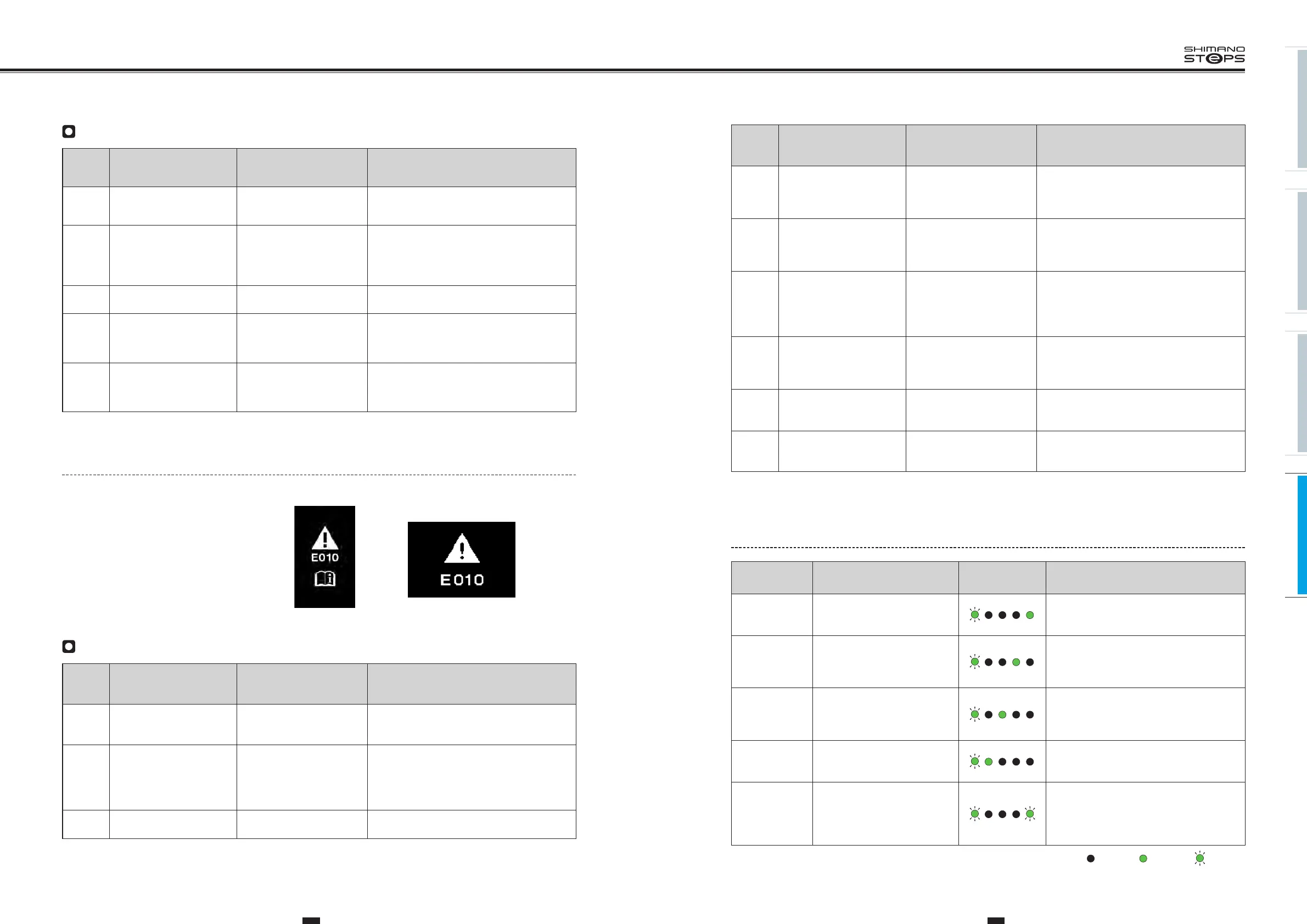
Error Message On The Cycle Computer
If an error message is displayed on the entire screen,
follow one of the procedures below to reset the display.
•
Press the power button of the battery.
•
Remove the battery from the holder.
<SC-E6000><SC-E6010>
List of Errors
Code
Situation where the error
occurred
Operational restriction
when an error is being
displayed
Remedy
E010
A system error was
detected.
Power assistance is not
provided during riding.
Press the power switch of the battery to turn on
the power again.
If the situation does not improve, consult us.
E012
The initialization of the
torque sensor failed.
Power assistance is not
provided during riding.
With your foot off the pedal, press the power
switch of the battery to turn on the power
again. Refer to ”MEASURING AND ADJUSTING
THE CHAIN TENSION” (page 161), then check
that the chain tension is appropriate.
E013
An error was detected in
the drive unit’s firmware.
Power assistance is not
provided during riding.
Restore the firmware for the drive unit using
E-TUBE PROJECT.


 To Next Page
 Loading...



