https://shimano-steps.com/
224 225
https://shimano-steps.com/
E6000 MANUALE8000 CONCEPT E8000 MANUAL E6000 CONCEPT
Battery
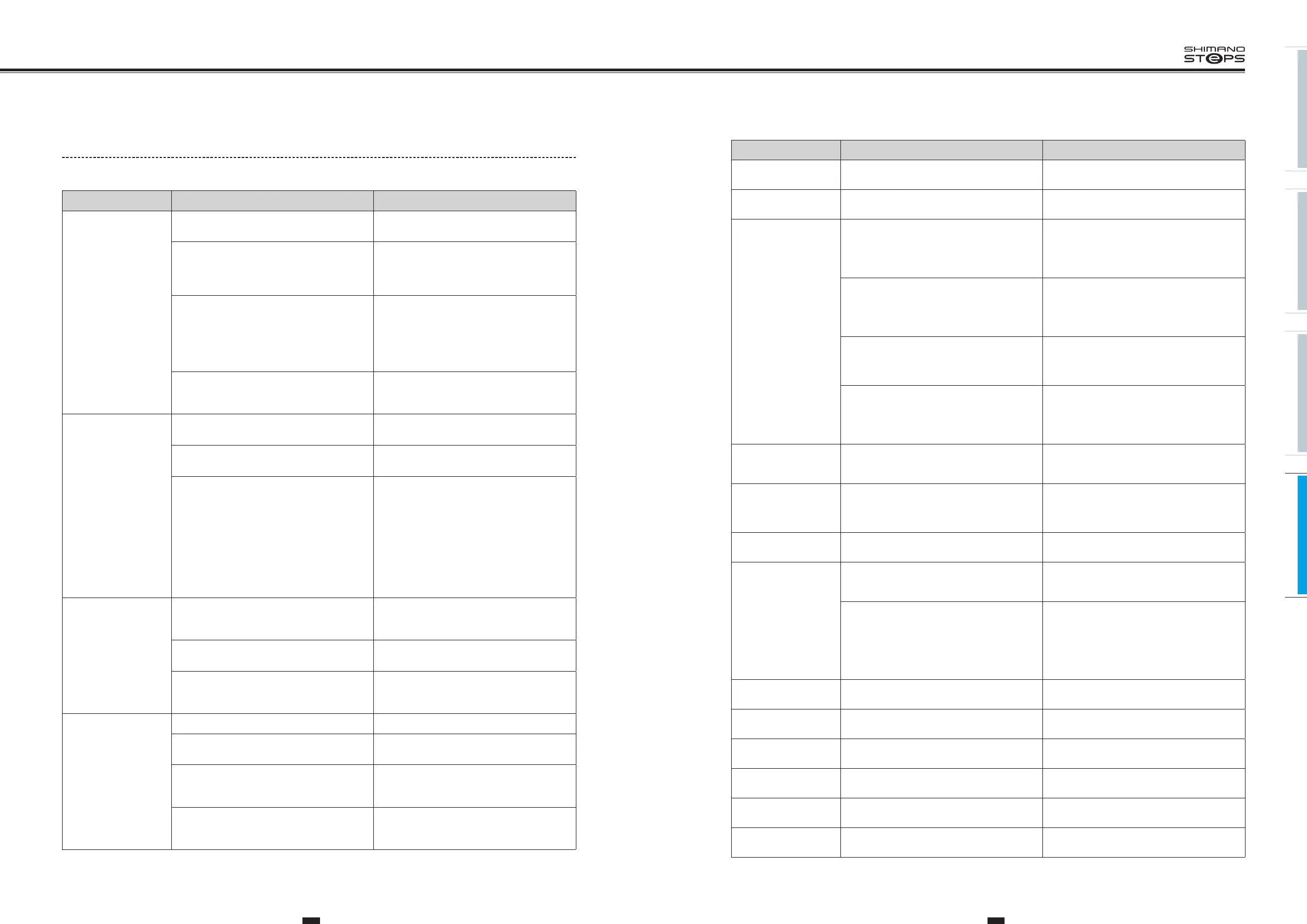
Symptom Cause / Possibility Remedy
All the five battery level
indicators stay on.
The firmware version of the drive unit may be
out-of-date.
Consult us.
The battery quickly loses
its charge.
The battery may be at the end of its service life. Replace the battery with a new one.
The battery cannot be
recharged.
Is the power plug of the charger securely
inserted into the electrical outlet?
Disconnect and then reconnect the power plug
of the charger, and then repeat the recharging
operation.
If the battery still cannot be recharged, consult
us.
Is the recharging plug of the charger securely
inserted into the battery?
Disconnect and then reconnect the recharging
plug of the charger, and then repeat the
recharging operation.
If the battery still cannot be recharged, consult
us.
Is the charging adapter securely connected to
the charging plug, or to the battery charger
port?
Securely connect the charging adapter to the
charging plug or to the battery charger
connector
, and charge again. If the battery still
does not charge, consult us.
Is the connecting terminal for the battery
charger
, charging adapter, or battery dirty?
Wipe the connection terminals with a dry cloth
to clean them, and then repeat the recharging
operation.
If the battery still cannot be recharged, consult
us.
The battery does not
start recharging when
the charger is connected.
The battery may be at the end of its service life. Replace the battery with a new one.
The battery and charger
are becoming hot.
The temperature of the battery or charger may
exceed the operating temperature range.
Stop recharging, wait for a while and then
recharge again. If the battery is too hot to touch,
it may indicate a problem with the battery.
Consult us.
The charger is warm.
If the charger is being used continuously to
charge batteries, it may become warm.
Wait a while before using the charger again.
The LED on the charger
does not illuminate.
Is the recharging plug of the charger securely
inserted into the battery?
Check the connection for any foreign objects
before reinserting the charging port. If there is
no change, consult us.
Is the battery fully charged?
If the battery is fully charged, the LED on the
battery charger turns off, but this is not a
malfunction. Disconnect and then reconnect the
power plug of the charger, and then repeat the
recharging operation.
If the LED on the charger still does not
illuminate, consult us.
The battery cannot be
removed.
Consult us.
The battery cannot be
inserted.
Consult us.
Fluid is coming out from
the battery.
Consult us.
An abnormal odor can
be detected.
Stop using the battery immediately and consult
us.
Smoke is coming out
from the battery.
Stop using the battery immediately and consult
us.
The replaced battery
does not work.
The firmware of the drive unit may not be
compatible with the battery.
Consult us.
Trouble Shooting for Each Function/Unit
Assist function
Symptom Cause / Possibility Remedy
Assistance is not being
provided.
Is the battery sufficiently charged?
Check the battery charge. If the battery is nearly
spent, recharge it.
Are you riding on long slopes in summer
weather or riding for a long time carrying a
heavy load?
The battery may be overheating.
Turn of
f the power, wait for a while and then
check once more.
The drive unit (DU-E6000 / DU-E6001 / DU-E6050
/ DU-E6010 / DU-E6002 / DU-E6012), cycle
computer (SC-E6000 / SC-E6010) or assist switch
(SW-E6000 / SW-E6010) may be connected
incorrectly or there may be a problem with one
or more of them.
Consult us.
Is the speed too high?
Check the Cycle Computer display. Assistance is
not provided at speeds of
25 km/h or more.
Assistance is not being
provided.
Are you pedaling?
The bicycle is not a motorbike, so you need to
operate the pedals.
Is the assist mode set to "OFF"?
Set the assist mode to "HIGH". If you still do not
feel that assistance is being given, consult us.
Is the system power ON?
If you have performed the steps below and still do
not feel the assistance, contact the place of
purchase.
<SC-E6010>
Press and hold the cycle computer power button
for 2 seconds, or press the battery power button
to turn the power ON.
<SC-E6000>
Press the battery power button to turn the power
ON.
Assist traveling distance
is too short.
The traveling distance may become shorter
depending on road conditions, the gear position
and whether the light are ON or OFF.
Check the battery charge. If the battery is nearly
spent, recharge it.
The battery characteristics will drop during
winter weather.
This is not a sign of a problem.
The battery is a consumable part. Repeated
recharging and long periods of use will cause the
battery to deteriorate (lose its performance).
If the distance that can be traveled on a single
charge is very short, replace the battery with a
new one.
Pedaling is stiff.
Are the tires inflated to a sufficient pressure?
Use a pump to add air.
Is the assist mode set to OFF?
Set the assist mode to "HIGH". If you still do not
feel that assistance is being given, consult us.
The battery may be running low.
After charging the battery well, check the level
of assistance again. If you still do not feel that
assistance is being given, consult us.
Did you turn on the power with your foot placed
on the pedal?
Turn on the power again without putting
pressure on the pedal. If you still do not feel that
assistance is being given, consult us.


 To Next Page
 Loading...



