https://shimano-steps.com/
44 45
https://shimano-steps.com/
E6000 MANUALE8000 CONCEPT E8000 MANUAL E6000 CONCEPT
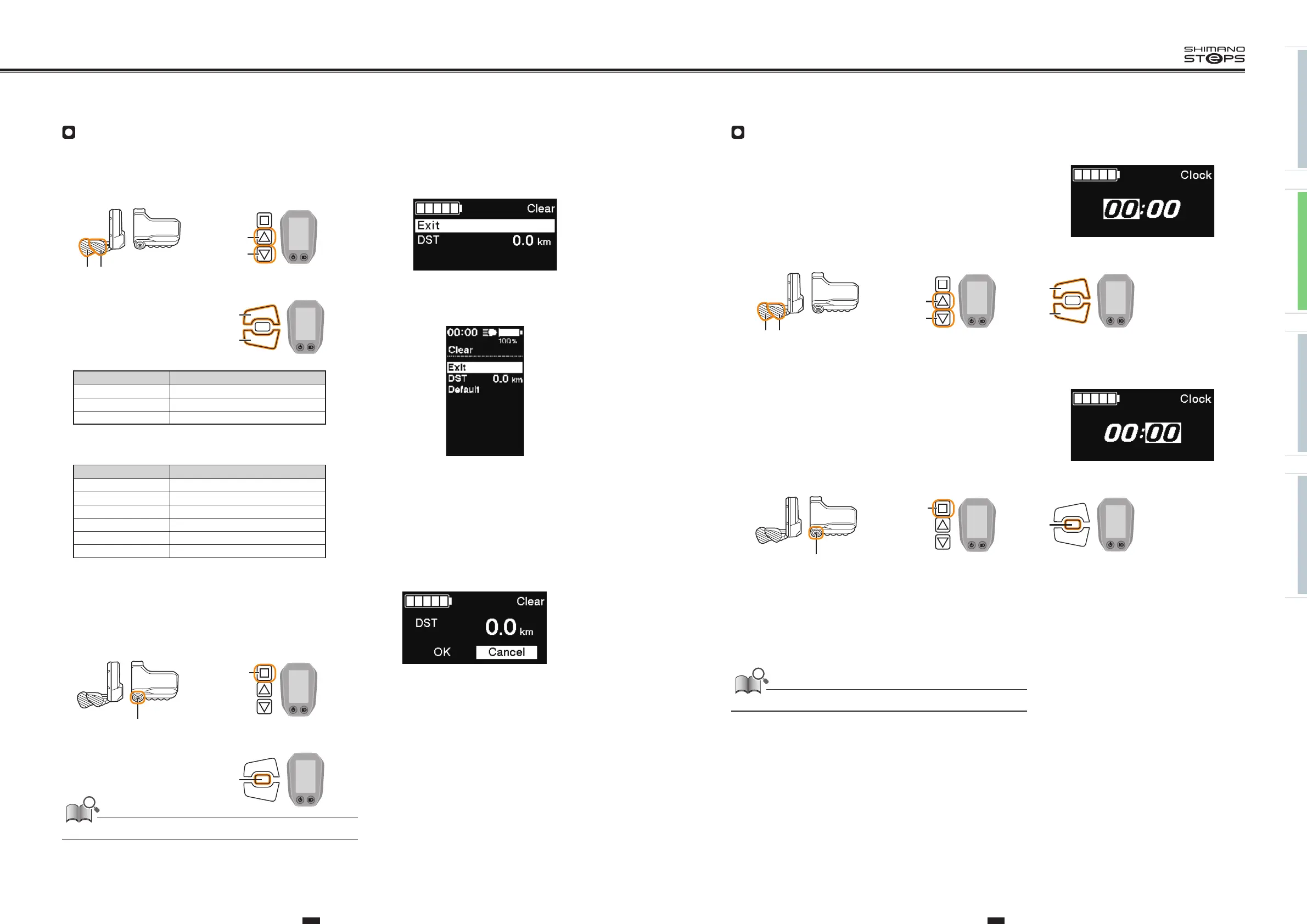
Clear
Reset the traveling distance to default.
1. Press X or Y to select [DST].
SC-E8000/SC-E6010
Items Details
Exit Return to the setting menu screen
DST Clearing the traveling distance
Default<SC-E6010> Reset the SC display setting to default
SC-E6010
Default value set in the SC display setting
Items Default value
Backlight ON
Beep ON
Unit km
Language English
Brightness 3
Font color White
<SC-E8000>
<SC-E6010>
2. To reset traveling distance, select [OK] using X or Y and press A
to confirm.
After resetting, the screen will automatically return to the menu
list screen.
• A reset confirmation screen is not displayed on SC-E6010.
When the traveling distance is cleared, TIME, AVG and MAX are also cleared.
X
Y
SW-E6000/SC-E6010
XY
SW-E8000-L/SC-E8000
X
Y
SW-E6010/SC-E6010
A
SW-E6000/SC-E6010
A
SW-E8000-L/SC-E8000
A
SW-E6010/SC-E6010
Clock
Configure the "Clock" setting.
1. Press X or Y to adjust the time.
• Press X to increase the numbers.
•
Press Y to decrease the numbers.
X
Y
SW-E6000/SC-E6010
XY
SW-E8000-L/SC-E8000
X
Y
SW-E6010/SC-E6010
2. Pressing A enables the set value and moves you to the minutes
setting.
A
SW-E6000/SC-E6010
A
SW-E8000-L/SC-E8000
A
SW-E6010/SC-E6010
3. Press X or Y to set the minutes.
4.
Pressing A enables the set value and takes you back to the
Setting menu screen.
You can change the numbers quickly by holding down X or Y.






 To Next Page