https://shimano-steps.com/
124 125
https://shimano-steps.com/
E6000 MANUALE8000 CONCEPT E8000 MANUAL E6000 CONCEPT
BT-E6010
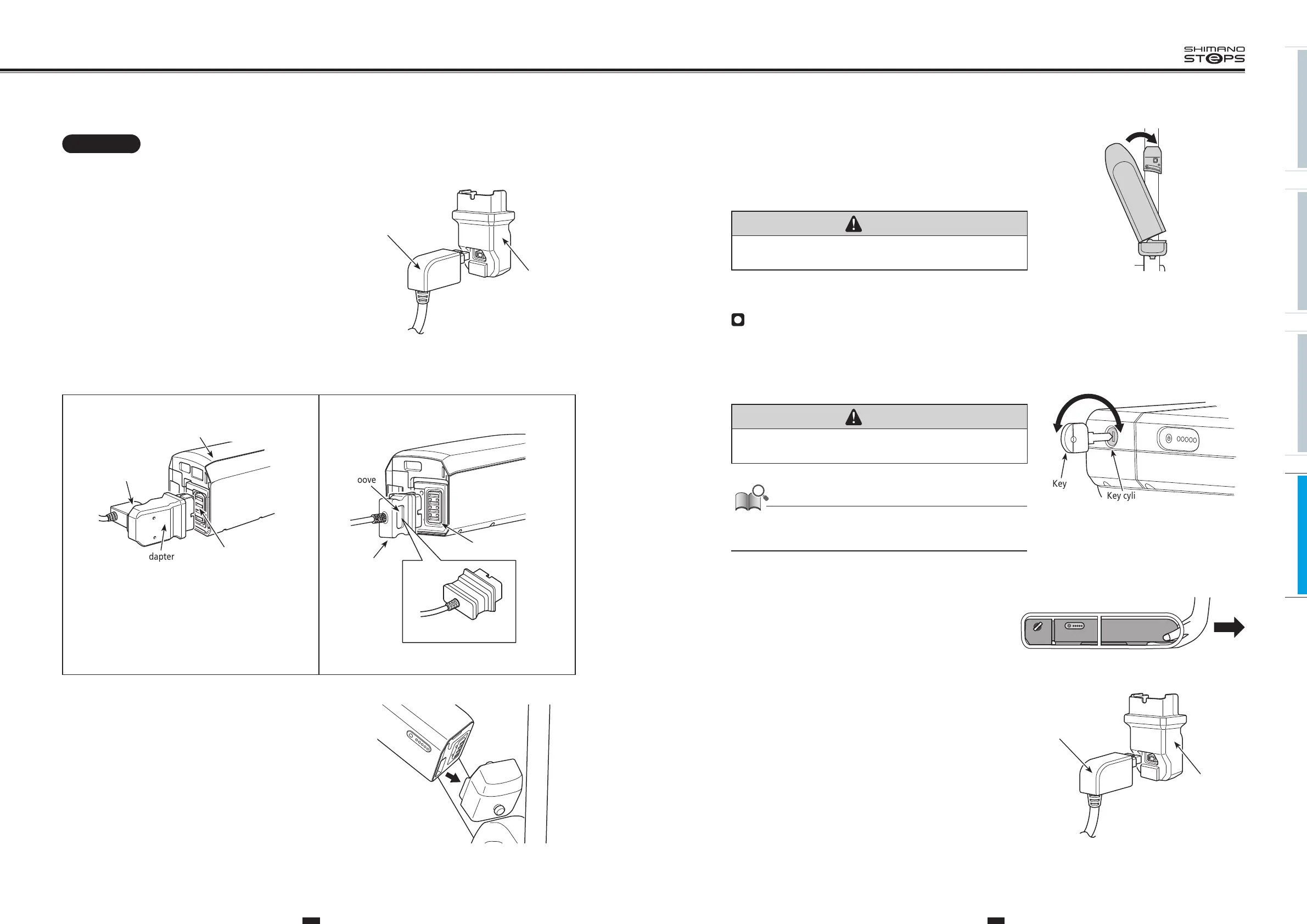
4. Attach the adapter to the charging plug (
<EC-E6000>
only).
5.
Plug the charger’s power plug into the outlet.
Adapter
Charging plug
<EC-E6000> only
6. Attach the adapter (
<EC-E6000>
) / charging plug (
<SM-BCE60>
) into the charging port.
Battery
Charger portAdapter
Charging plug
<EC-E6000>
• When inserting the adapter into the charger port, hold the charging
plug so it is facing down toward the adapter. Do not insert the
charging plug upward into the adapter.
Charging
plug
Groove
Charger port
Backside (no groove)
<SM-BCE60>
• You cannot insert it with the groove side facing down.
7. After battery charged, Align the indentation in the bottom of
the battery with the protrusion on the holder and insert the
battery.
8. Slide the battery to the right starting from the point where it
is inserted. Push in the battery until you hear it click.
9.
Return the key to the locking position, remove it, and store it
in a safe place.
CAUTION
Check to see that the battery is locked before riding the bicycle. The battery may
fall out while riding if not properly locked in place.
Battery for Rear Carrier <BT-E6001/E6000>
1. Turn off the power.
2.
Insert the key into the key cylinder in the battery holder, then
turn the key to the unlocking position.
CAUTION
To prevent the battery from dropping off, do not ride the bicycle with the key
inserted.
• The position of the key does not affect the insertion of the battery. You can
insert it regardless of the key position.
• You cannot remove the key when it is not in the inserting position.
unlock lock
Key
Key cylinder
3. Pull out the battery.
4. Attach the adapter to the charging plug
(
<EC-E6000>
only).
5.
Plug the charger’s power plug into the outlet.
<EC-E6000> only
Adapter
Charging plug






 To Next Page