https://shimano-steps.com/
126 127
https://shimano-steps.com/
E6000 MANUALE8000 CONCEPT E8000 MANUAL E6000 CONCEPT
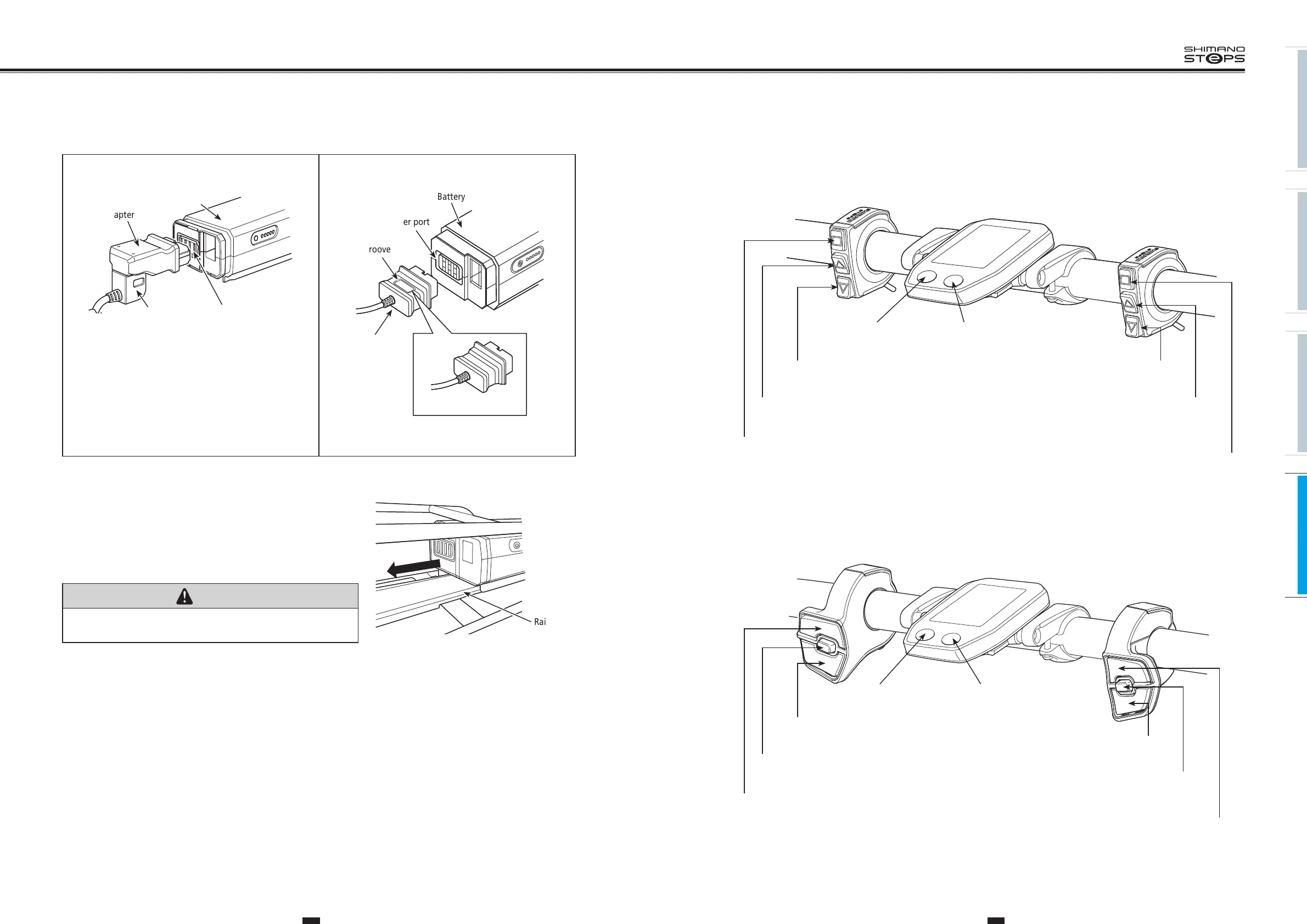
6. Attach the adapter (
<EC-E6000>
) / charging plug (
<SM-BCE60>
) into the charging port.
Adapter
Battery
Charger port
Charging plug
<EC-E6000>
• When inserting the adapter into the charger port, hold the charging
plug so it is facing down toward the adapter. Do not insert the
charging plug upward into the adapter.
Battery
Groove
Charger port
Backside (no groove)
<SM-BCE60>
Charging
plug
• You cannot insert it with the groove side facing down.
7. After battery charged, set the battery on the holder rail from
behind and slide it forward.
Push it in firmly.
8. Return the key to the locking position, remove it, and store it
in a safe place.
CAUTION
Check that the battery is locked before riding the bicycle. The battery may come
loose and fall out if not properly locked in place before riding.
Rail
BASIC OPERATIONS
Assist switch
<SC-E6010>
Cycle computer
Shift switch
Shift-Y buttonAssist-Y button
Shift-X buttonAssist-X button
Shift-A buttonAssist-A button
pedaling: lighterlevel of assistance: lower
pedaling: heavierlevel of assistance: stronger
switching automatic and
manual gear shifting
switch the display mode.
Power button Light button
<SW-E6000>
Assist switch
<SC-E6010>
Cycle computer
Shift switch
Shift-Y button
Assist-Y button
Shift-X button
Assist-A button
Shift-A button
Assist-X button
pedaling: lighter
level of assistance: lower
pedaling: heavier
switch the display mode.
switching automatic and
manual gear shifting
level of assistance: stronger
Power button Light button
<SW-E6010>






 To Next Page