https://shimano-steps.com/
128 129
https://shimano-steps.com/
E6000 MANUALE8000 CONCEPT E8000 MANUAL E6000 CONCEPT
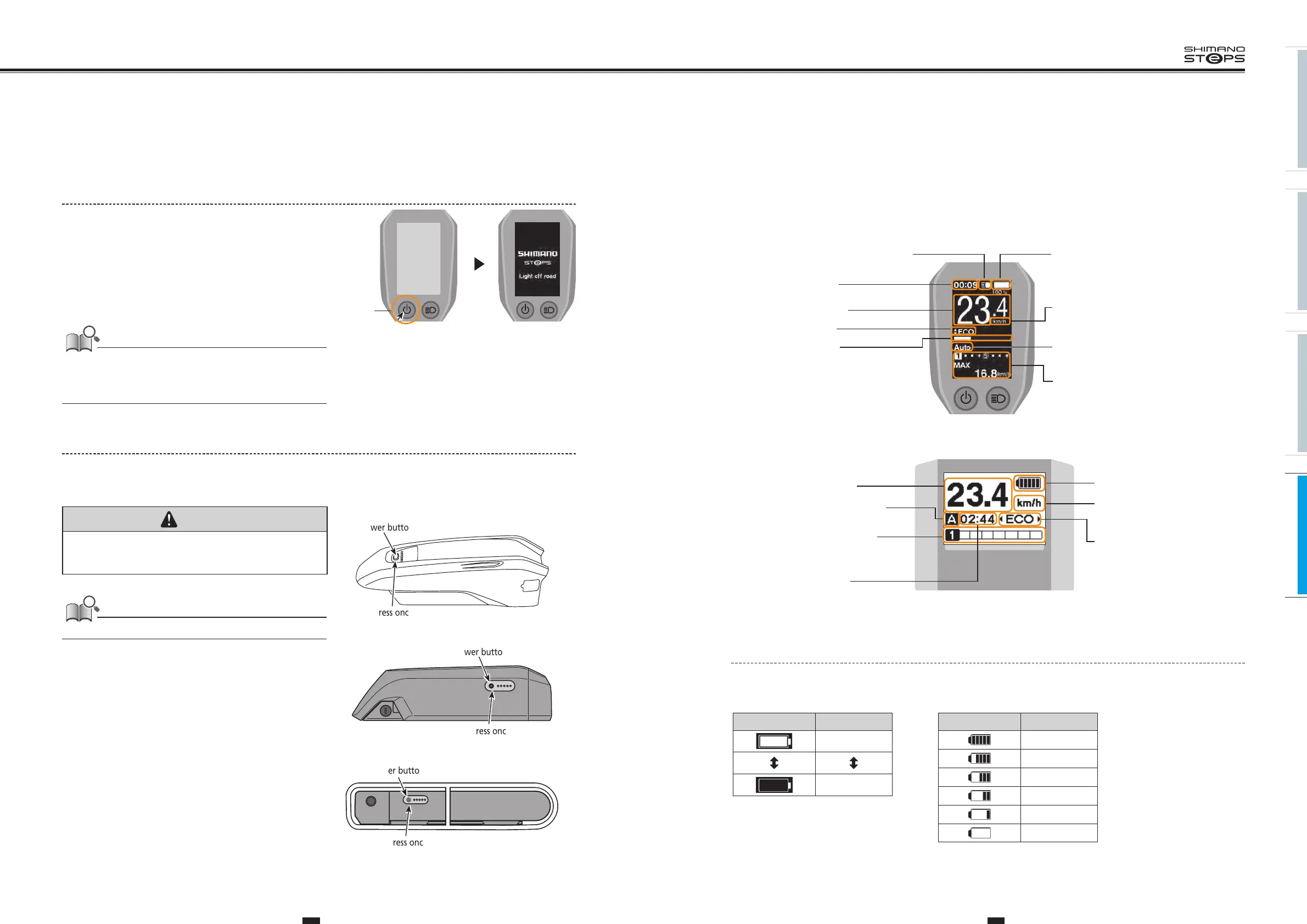
TURNING THE POWER ON/OFF
Turning the power ON and OFF via the Cycle computer
<SC-E6010>
1. To turn on the power, hold down the power button for
2 seconds.
Displays the SHIMANO STEPS logo screen during system start up.
2. To turn off the power, hold down the power button
for 2 seconds again.
Displays the SHIMANO STEPS logo screen during system shut down.
If built-in battery of cycle computer isn't charged sufficiently, the
power will not turn on.
The built-in battery of the cycle computer is charged only when the
cycle computer screen is on.
2 seconds
Example: SC-E6010 in the Light offroad setting.
Turning the power ON and OFF via the battery
1. To turn on the power, press the power button once.
All the indicators turn on when the power is on.
CAUTION
• When turning on the power, check that the battery is firmly attached to
the holder.
• Power cannot be turned on while charging.
When turning the power ON or OFF, do not place your foot on the pedal.
2. To turn off the power, press the power button once
again.
Automatic Power Off Function
If the bicycle has not moved for over 10 minutes, the power will
automatically turn off.
Power button
Press once
Battery for Rear Carrier <BT-E6001/E6000>
Power button
Press once
Battery for Down Tube Mounting <BT-E6010>
Power button
Battery for Down Tube Mounting <BT-E8010>
Press once
Refer to ”TURNING THE POWER ON / OFF” (page 36)
Battery for Down Tube Mounting <BT-E8020>
CYCLE COMPUTER
Displays the status of the power assisted bicycle, traveling data.
The number of gears and the shifting mode are only displayed when using electronic gear shifting.
<SC-E6010>
Icon to indicate when the
light is on
Gear position and traveling data
Assist mode
Current speed
Battery level
Speed unit
Gear shifting mode
Current time
Assist gauge
(km/h or mph)
Displays assistance level.
(Auto or Manual)
<SC-E6000>
Current speed
Battery level
Assist mode
Current time
Gear shifting mode
Gear position and
traveling data
(A: automatic or M: manual)
Speed unit
(km/h or mph)
Battery Level Indicator
You can check the battery level on the cycle computer while riding.
<SC-E6010>
<SC-E6000>
Display Battery level
100%
0%
Display Battery level
81 - 100%
61 - 80%
41 - 60%
21 - 40%
1 - 20%
0%






 To Next Page