https://shimano-steps.com/
140 141
https://shimano-steps.com/
E6000 MANUALE8000 CONCEPT E8000 MANUAL E6000 CONCEPT
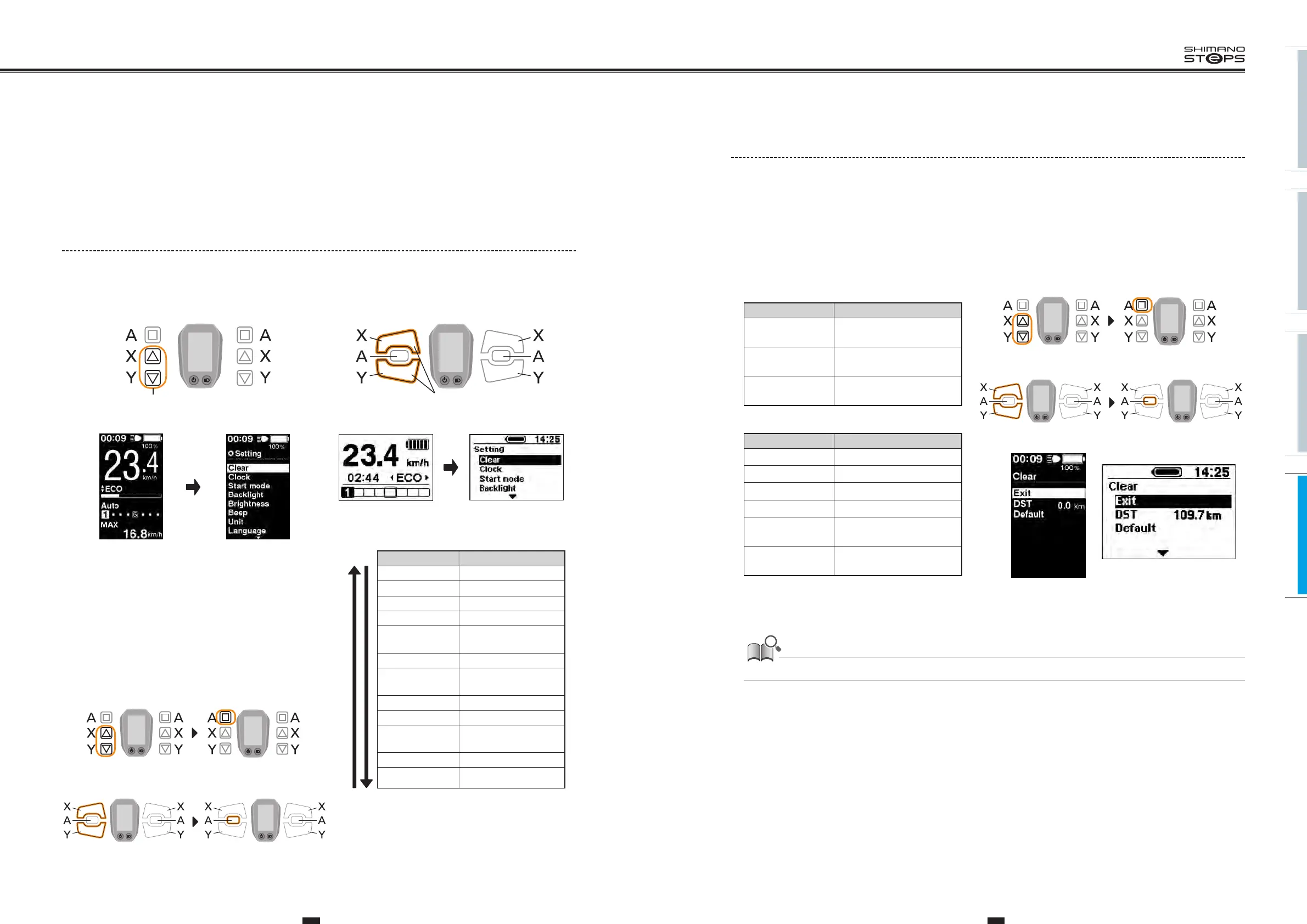
Clear Setting
Clear the traveling distance, or reset the display setting to default.
1. With the bicycle stopped, pressing both the Assist-X and Assist-Y at the same time for 2 seconds.
The “Setting menu" screen is displayed.
2. Press the Assist-X and Assist-Y to move the cursor to "Clear", then press the Assist-A.
“Clear" setting screen is displayed.
3. Press the Assist-X or Assist-Y to move the cursor to
the item you want to configure.
Configurable items Details
Exit
Return to the setting menu
screen
DST
Clearing the traveling
distance
Default
Reset the SC display setting to
default
Default value set in the SC display setting
Configurable items Default value
Backlight ON
Beep ON
Unit km
Language English
<SC-E6010>
Brightness
3
<SC-E6010>
Font color
White
4. Pressing the Assist-A button enables the setting item indicate by the cursor and takes you back to the
"Setting menu" screen.
When the traveling distance is cleared, TIME, AVG, and MAX are also cleared.
5. Press the Assist-X or Assist-Y to move the cursor to "Exit".
6.
Pressing the Assist-A exits the setting menu and takes you back to the basic screen.
Assist Shift Assist Shift
<SW-E6000>
Assist Shift Assist Shift
<SW-E6010>
<SC-E6000>
<SC-E6010>
SETTING MENU OF CYCLE
COMPUTER
General
1. With the bicycle stopped, pressing both the Assist-X and Assist-Y at the same time for 2 seconds.
The “Setting menu" screen is displayed.
Assist Shift
2 Sec.
2 Sec.
Assist Shift
<SW-E6000> <SW-E6010>
<SC-E6010> <SC-E6000>
2. Press the Assist-X or Assist-Y to move the cursor to
the item you want to configure.
3. Pressing the Assist-A displays the setting screen for
the item selected.
4. After the setting is finished, Press the Assist-X or
Assist-Y to move the cursor to "Exit".
5. Pressing the Assist-A exits the setting menu and takes
you back to the basic screen.
X Y
Configurable items
Details
Clear Clear settings
Clock Clock setting
Start mode
*2
Start mode setting
Backlight Backlight setting
Brightness
*1
Backlight brightness
settings
Beep Beep setting
Unit
Switching between km
and miles
Language Language setting
Font color
*1
Font color settings
Adjust
*2
Adjusting the power
gear shifting unit
Auto
*2
Shift timing adjustment
Exit
Return to the main screen
*1: This menu is only for the <SC-E6010>.
*2: This operation is only available when using electronic
gear shifting.
Assist Shift Assist Shift
<SW-E6000>
Assist Shift Assist Shift
<SW-E6010>






 To Next Page