https://shimano-steps.com/
144 145
https://shimano-steps.com/
E6000 MANUALE8000 CONCEPT E8000 MANUAL E6000 CONCEPT
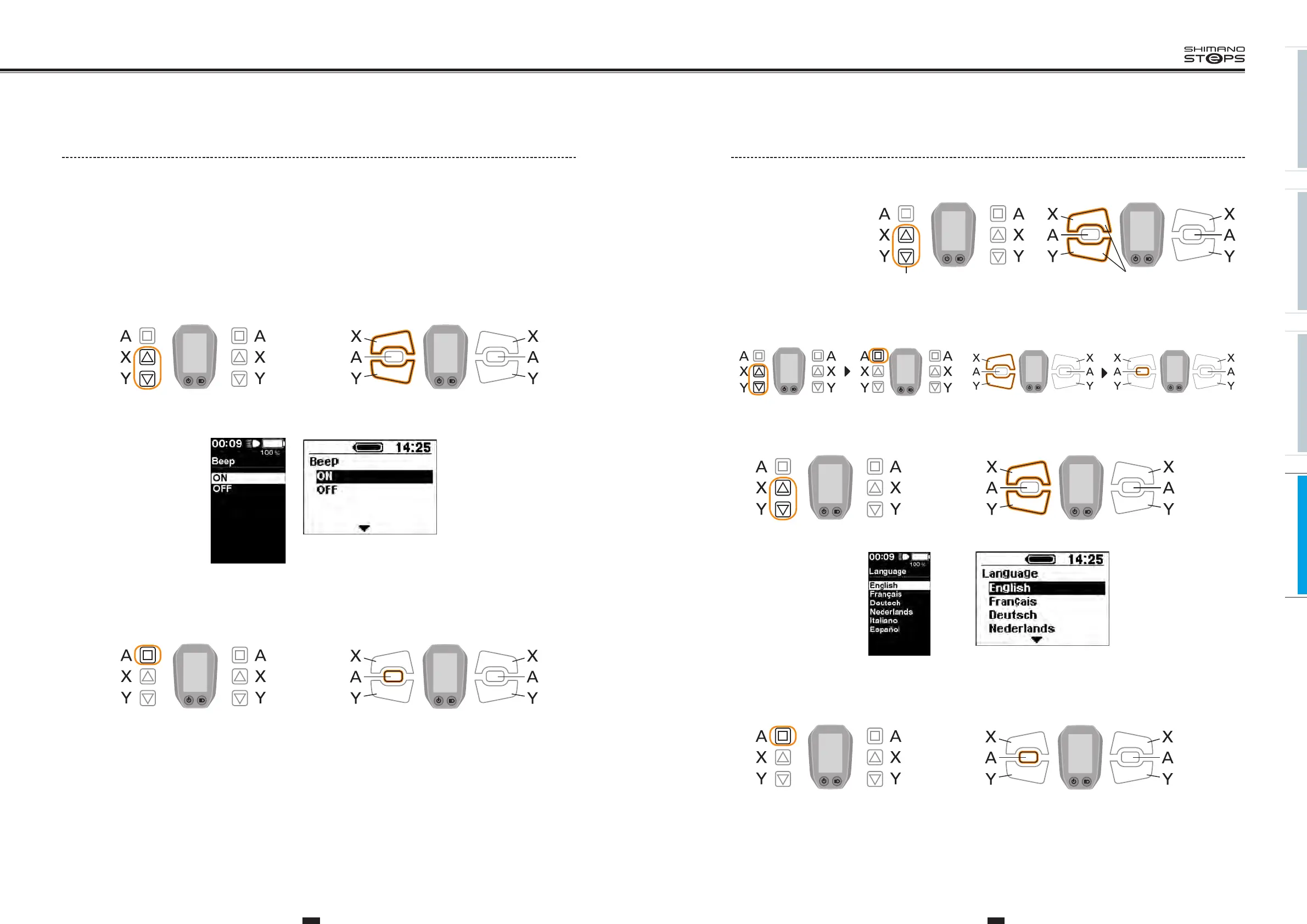
Language Setting
Configure the language setting.
1. With the bicycle stopped,
pressing both the Assist-X
and Assist-Y at the same
time for 2 seconds.
Displays the setting screen.
Assist Shift
2 Sec.
2 Sec.
Assist Shift
<SW-E6000> <SW-E6010>
2. Press the Assist-X or Assist-Y to move the cursor to the “Language”, then press the Assist-A.
Displays the “Language” setting screen.
3. Press the Assist-X or Assist-Y to move the cursor to the item you want to configure.
Assist Shift
Assist Shift
<SW-E6000> <SW-E6010>
<SC-E6000>
<SC-E6010>
4. Pressing the Assist-A button enables the setting item.
indicated by the cursor and takes you back to the "Setting menu" screen.
Assist Shift
Assist Shift
<SW-E6000> <SW-E6010>
5. Press the Assist-X or Assist-Y button to move the cursor to "Exit".
6.
Pressing the Assist-A exits the setting menu and takes you back to the basic screen.
Assist Shift Assist Shift
<SW-E6000>
Assist Shift Assist Shift
<SW-E6010>
Beep Setting
Configure the enable/disable beeps setting.
1. With the bicycle stopped, pressing both the Assist-X and Assist-Y at the same time for 2 seconds.
The “Setting menu" screen is displayed.
2. Press the Assist-X and Assist-Y to move the cursor to "Beep", then press the Assist-A.
“Beep" setting screen is displayed.
3. Press the Assist-X and Assist-Y to move the cursor to “ON" or “OFF".
<SC-E6010> <SC-E6000>
Assist Shift
Assist Shift
<SW-E6000> <SW-E6010>
4. Pressing the Assist-A button enables the set value at the cursor position.
The “Setting menu" screen is displayed.
Assist Shift
Assist Shift
<SW-E6000> <SW-E6010>
5. Press the Assist-X or Assist-Y to move the cursor to "Exit".
6.
Pressing the Assist-A exits the setting menu and takes you back to the basic screen.






 To Next Page