https://shimano-steps.com/
146 147
https://shimano-steps.com/
E6000 MANUALE8000 CONCEPT E8000 MANUAL E6000 CONCEPT
The condition has improved
Adjust the adjustment value by 1 speed
in the same direction and check the gear
shifting operation again.
Repeat these steps until any noise or
unusual feeling disappears.
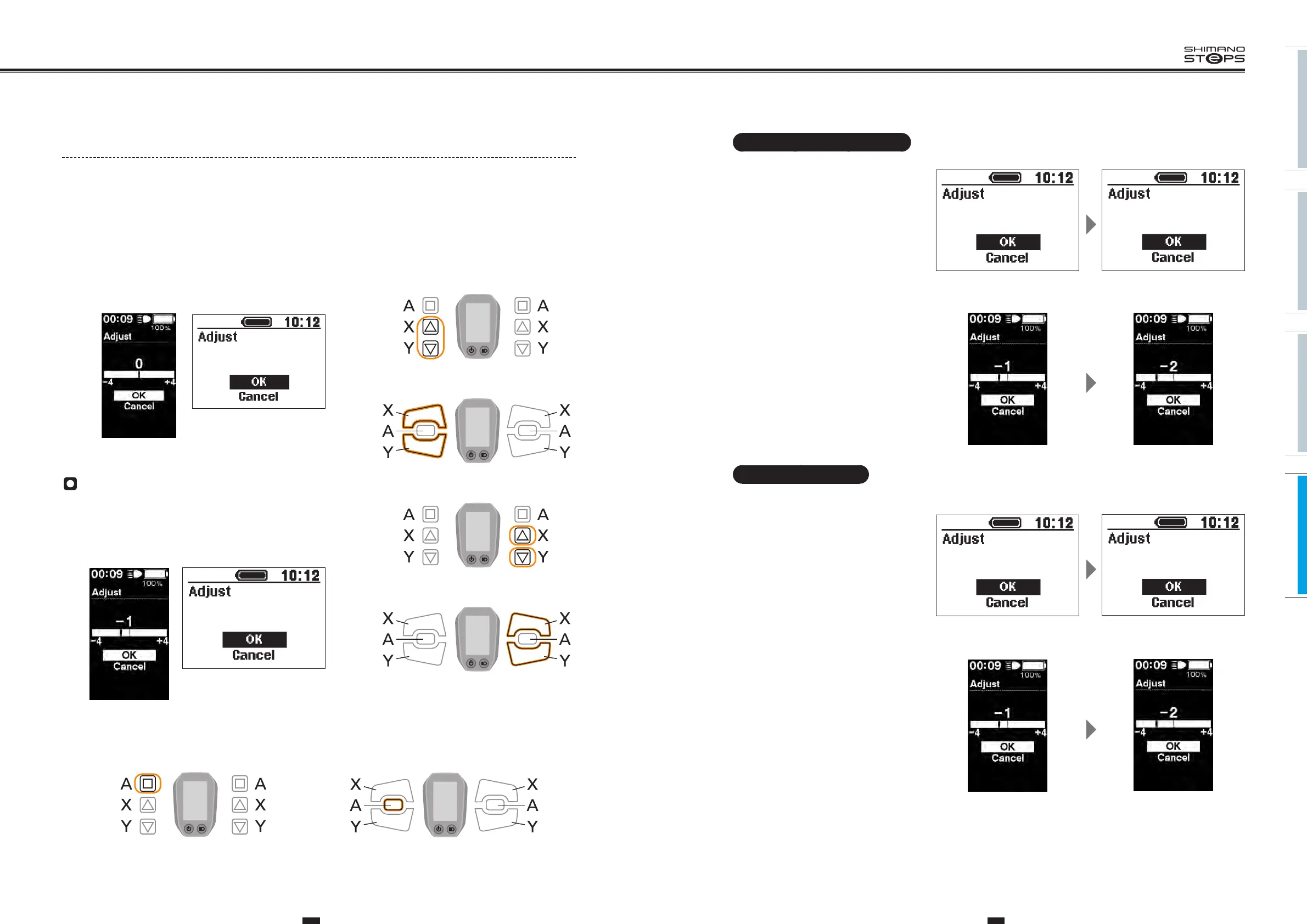
<SC-E6010>
− 1
− 2
<SC-E6000>
No apparent change
Adjust the adjustment value by 1 speed
in the same direction and check the gear
shifting operation again.
If the condition has improved, see "The
condition has improved" to continue.
If the condition has worsened, see "The
condition has worsened" to continue.
<SC-E6010>
<SC-E6000>
− 1
− 2
Adjust (Motor unit with DI2 internal geared hub)
Motor unit can be adjusted when it is assembled with DI2 internal geared hub.
1. With the bicycle stopped, pressing both the Assist-X and Assist-Y at the same time for 2 seconds.
The “Setting menu" screen is displayed.
2. Press the Assist-X and Assist-Y to move the cursor to "Adjust", then press the Assist-A.
“Adjust" setting screen is displayed.
3. Check whether the adjustment value is set to “0".
<SC-E6010> <SC-E6000>
0
If the adjustment value is [0]
1. Press Shift-X or Shift-Y to adjust the adjustment value
up or down by 1 speed.
− 1
<SC-E6010> <SC-E6000>
2. Press Assist-A.
Select "OK", then perform an actual gear shift to check whether the condition has improved.
Assist Shift
Assist Shift
<SW-E6000>
<SW-E6010>
Assist Shift
<SW-E6000>
<SW-E6010>
Assist Shift
Assist Shift
Assist Shift
<SW-E6000> <SW-E6010>






 To Next Page