https://shimano-steps.com/
150 151
https://shimano-steps.com/
E6000 MANUALE8000 CONCEPT E8000 MANUAL E6000 CONCEPT
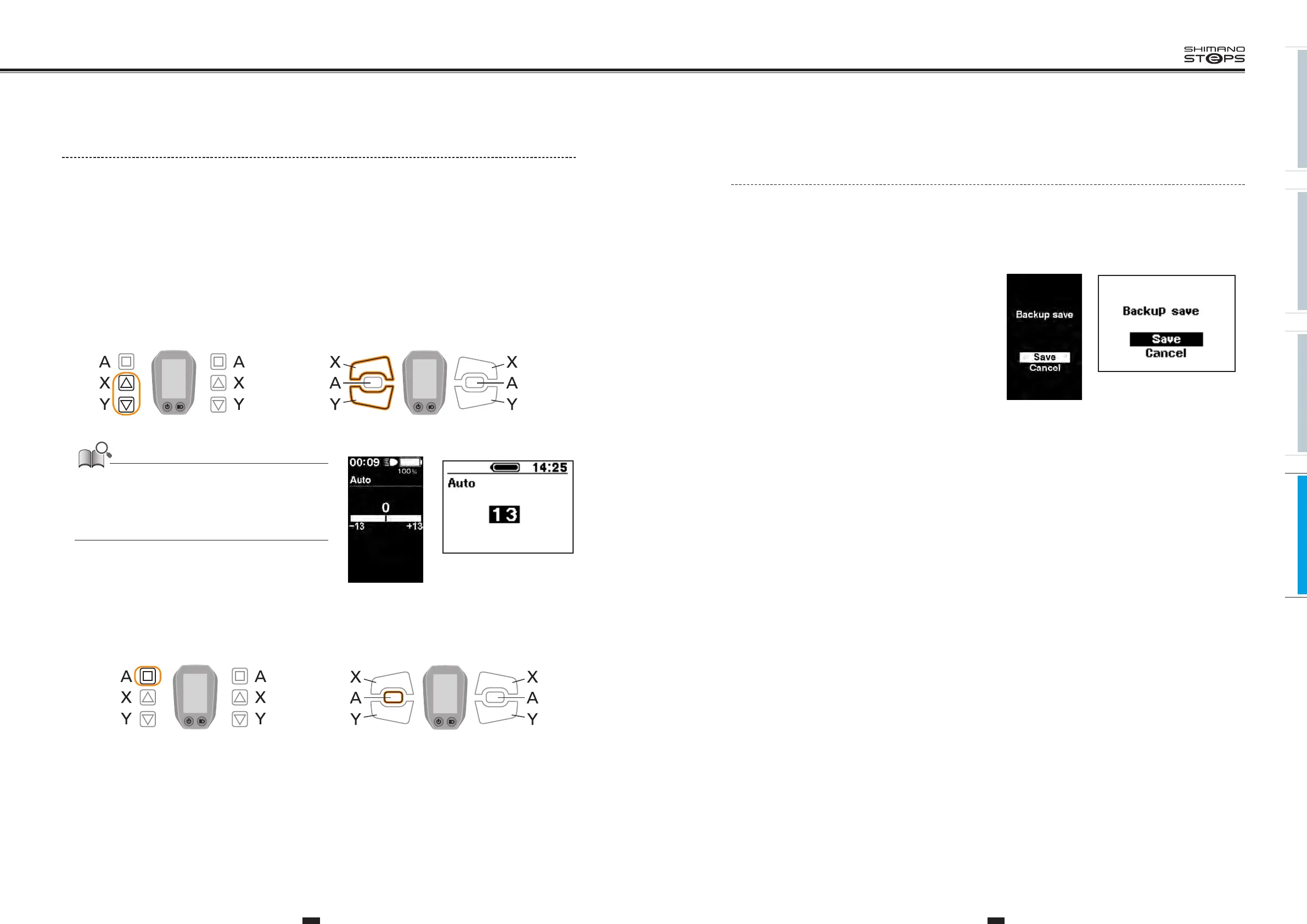
Update confirmation window for the drive
unit settings backup data
The cycle computer has a function to automatically back up drive unit settings.
In the following cases, when the cycle computer power is turned on, a window confi rming whether to update the backup data is displayed:
•
Reinstalling the cycle computer on a bicycle with different settings
•
If the drive unit settings have been changed via E-TUBE PROJECT
1. To update the drive unit settings select [Save],
to cancel update select [Cancel].
<SC-E6010> <SC-E6000>
If the settings cannot be accessed due to a drive unit malfunction, they can be accessed using E-TUBE PROJECT.
Auto Shift Timing Adjustment
Shift timing can be adjusted when in automatic shift mode.
1. With the bicycle stopped, pressing both the Assist-X and Assist-Y at the same time for 2 seconds.
The “Setting menu" screen is displayed.
2. Press the Assist-X and Assist-Y to move the cursor to "Auto", then press the Assist-A.
“Auto" setting screen is displayed.
3. Press Assist-X or Assist-Y to adjust the values.
• Pressing Assist-X and adjusting the value upward adjusts shift timing to make pedaling easier.
•
Pressing Assist-Y and adjusting the value downward adjusts shift timing to make pedaling harder.
Assist Shift
Assist Shift
<SW-E6000> <SW-E6010>
• The displayed set value indicates the offset from the default value
through the crank rotations reference value that is referred to
during automatic shifting.
• The set value is automatically refreshed by the learning function
according to manual operations made while in automatic shift
mode.
4. Pressing the Assist-A button enables the set value at the cursor position.
The “Setting menu" screen is displayed.
5. Press the Assist-X or Assist-Y to move the cursor to "Exit".
6.
Pressing the Assist-A exits the setting menu and takes you back to the basic screen.
<SC-E6010> <SC-E6000>
Assist Shift
Assist Shift
<SW-E6000> <SW-E6010>






 To Next Page