https://shimano-steps.com/
158 159
https://shimano-steps.com/
E6000 MANUALE8000 CONCEPT E8000 MANUAL E6000 CONCEPT
INSTALLING/REMOVING THE
SPEED SENSOR
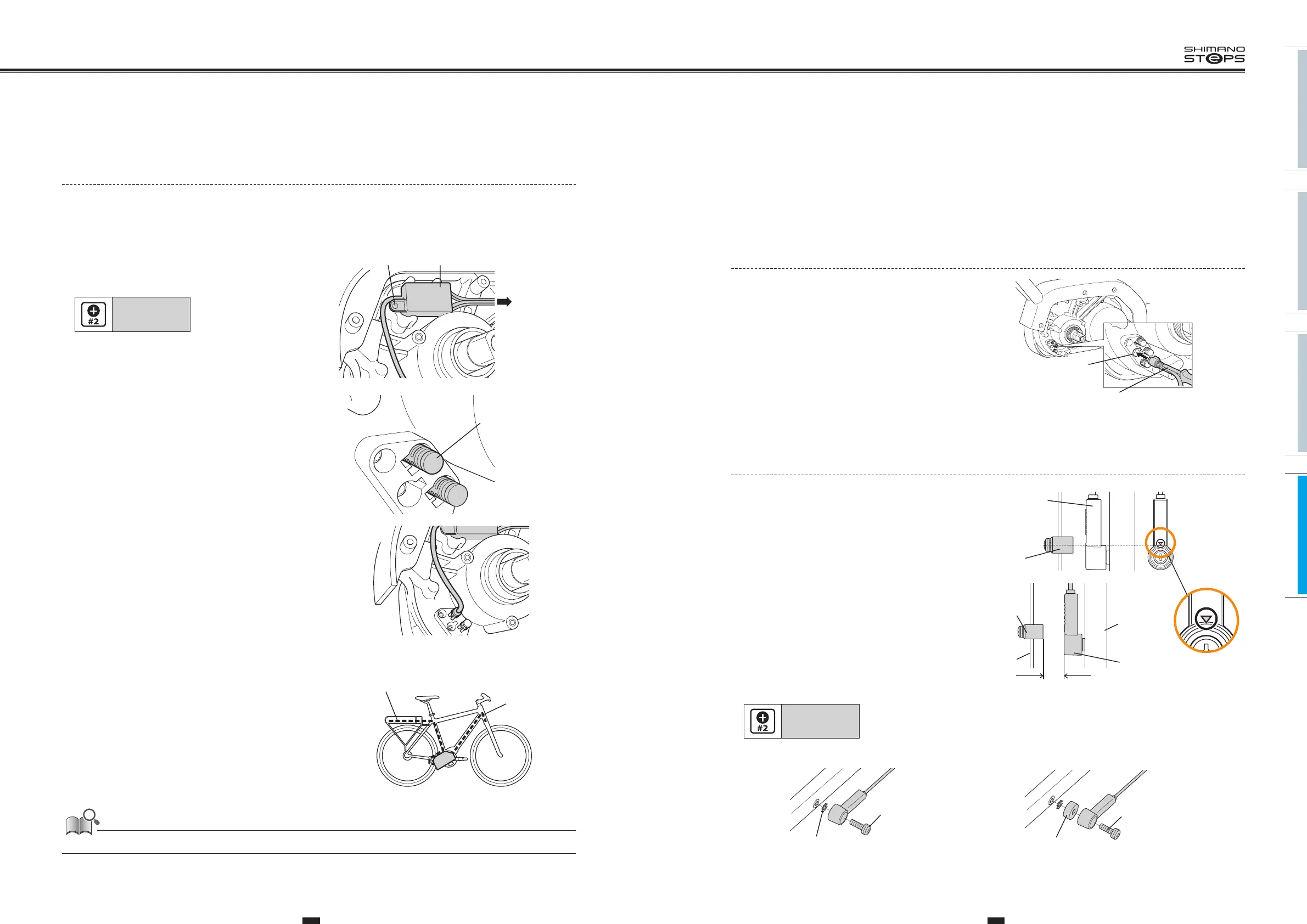
Connecting/disconnecting the Speed Sensor
to the Drive Unit
1. Connect the speed sensor unit electric wire to
the drive unit speed sensor connector.
Speed sensor
connector
Shimano original tool
<TL-EW02>
• Connecting: using the narrow side.
• Disconnecting: using the wide side.
Installing/Removing the Speed Sensor
1. Mounting the magnet.
Mount the magnet so that its center is aligned over the apex of
the triangle symbol.
Magnet unit
Speed sensor
Speed sensor
3-17 mm
Spoke
Chain stay
Magnet
unit
2. Before installing the speed sensor, check that
the clearance between the speed sensor and the
magnet unit will be within 3 to 17 mm.
3. Attach the speed sensor with the speed sensor fixing bolt.
Tightening torque:
1.5 to 2 N·m
•
If the clearance is within the designated range, place the
toothed washer between the speed sensor and the chain stay.
•
If the clearance exceeds
17mm
, use a spacer to adjust it.
Toothed washer
Speed sensor fixing
bolt (16 mm)
Spacer
Speed sensor fixing
bolt (22 mm)
Connecting the Light Adapter to the Drive Unit
(DU-E6001 / DU-E6010)
To connect the light by the light adapter, carry out wiring as follows.
1. Remove the drive cover.
Refer to “
ATTACHING/REMOVING THE DRIVE UNIT COVER
“ (page 155).
2. Attach the light adapter in the direction shown in the
illustration.
Secure it to the drive unit with the unit fixing screw.
Tightening torque:
0.6 N·m
Light adapterFixing screw
To front and
rear lights
3. Remove the dummy plug from the drive unit with
Shimano original tool
<TL-EW02>
.
Dummy plug
4. Attach the connector of the light adapter to the drive
unit.
5. Attach the drive cover.
Refer to “
ATTACHING/REMOVING THE DRIVE UNIT COVER
“ (page 155).
6. Fix the light cables to the electric wire around the
light adapter and route them along the frame.
Rear light cable
Front light
cable
For information on compatible lights, contact a manufacturer of completed bicycles.






 To Next Page