https://shimano-steps.com/
170 171
https://shimano-steps.com/
E6000 MANUALE8000 CONCEPT E8000 MANUAL E6000 CONCEPT
Preparation
Get the latest firmware* from Shimano
* Software controlling for each unit of SHIMANO STEPS
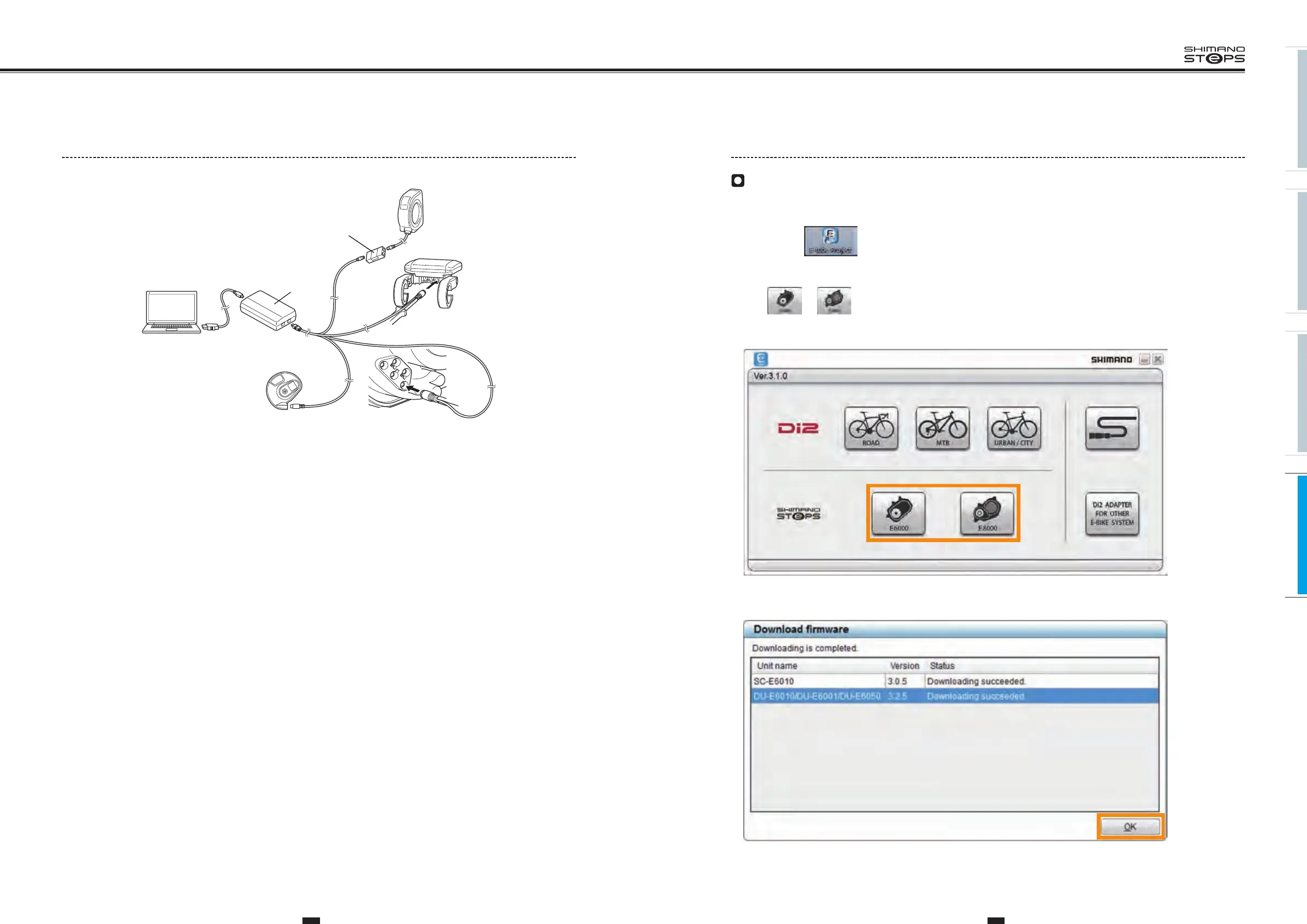
1. Start the "E-TUBE PROJECT" application on a PC that is connected to the Internet.
Double-click the icon on the desktop. After the start screen is displayed, a screen that shows the available connections will
be displayed.
2. Click or on the screen that shows the available connections.
A dialog box will be displayed to begin checking for the firmware update. If there is an update available for the firmware on the PC, the
latest update from Shimano will be downloaded.
3. Click [OK].
[Download Firmware] dialog box is closed.
Connecting to Individual Units
1. Connect
<SM-PCE1>
to the connector of each unit.
SM-JC40/JC41
Assist/Shift unit
Motor Unit Drive Unit
Cycle computer
PC
SM-PCE1






 To Next Page