32
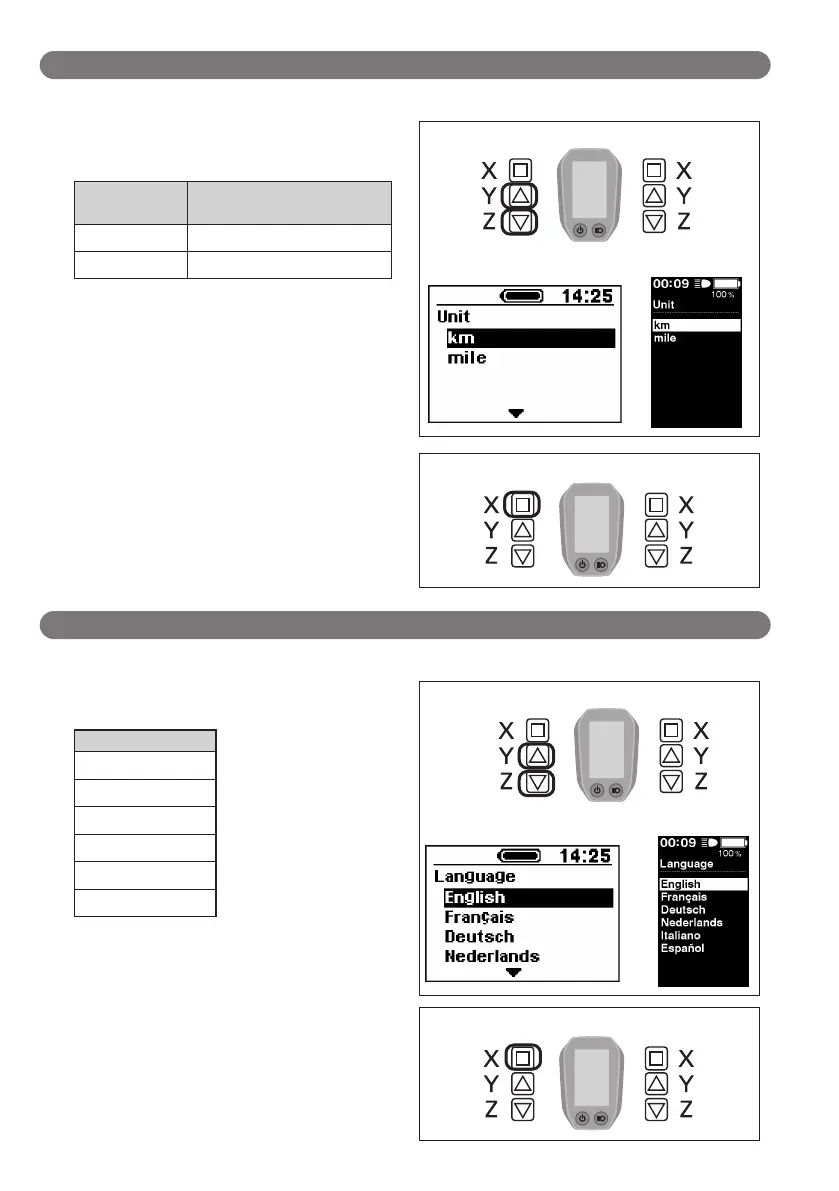
Unit (Switching between km and miles)
Configure the distance unit setting.
1.
Press the Assist-Y or Assist-Z to move the cursor to the
item you want to configure.
Configurable
items
Details
km Displayed in km
mile Displayed in miles
Assist Shift
< SC-E6000 >
< SC-E6010 >
2.
Pressing the Assist-X button enables the setting item
indicated by the cursor and takes you back to the
"Setting menu" screen.
Assist Shift
Language (Language setting)
Configure the language setting.
1.
Press the Assist-Y or Assist-Z to move the cursor to the
item you want to configure.
Configurable items
English
Français
Deutsch
Nederlands
Italiano
Español
Assist Shift
< SC-E6000 > < SC-E6010 >
2.
Pressing the Assist-X button enables the setting item
indicated by the cursor and takes you back to the
"Setting menu" screen.
Assist Shift




 To Next Page