34
Auto (Shift timing adjustment)
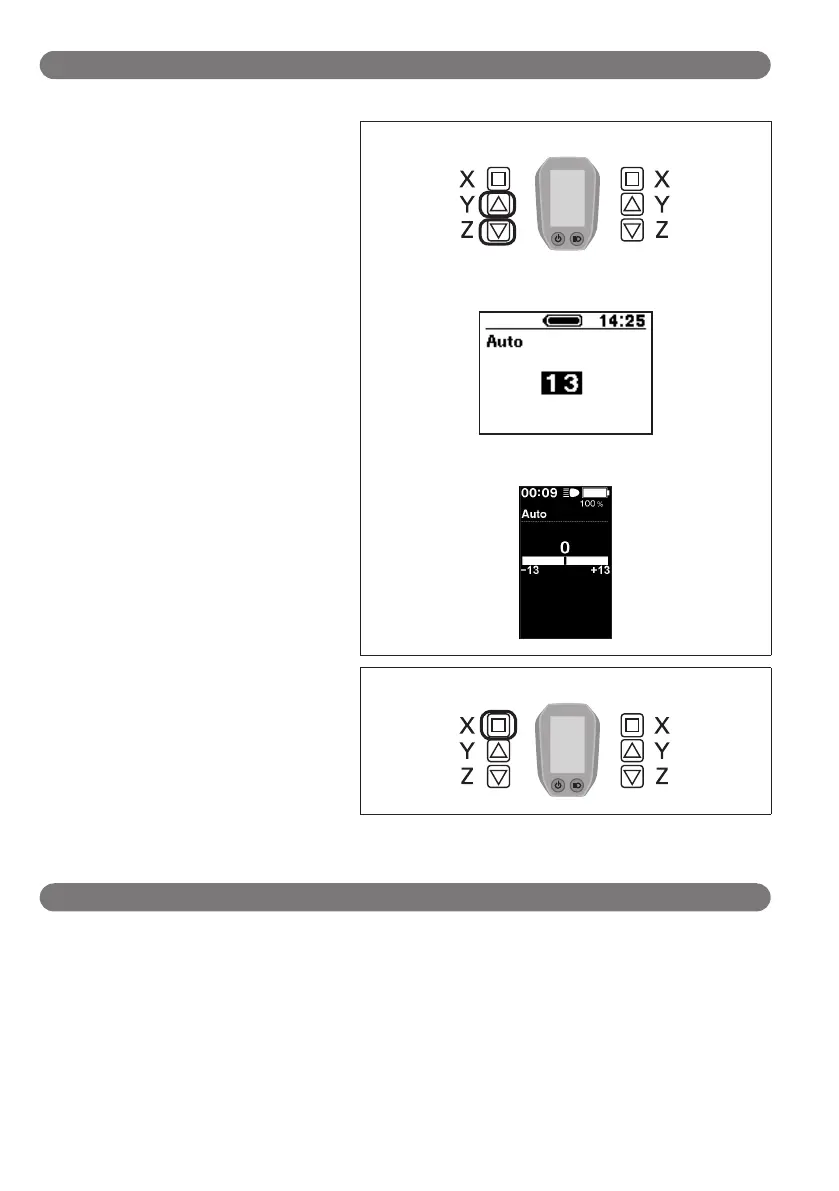
Shift timing can be adjusted when in automatic shift mode.
1.
Press Assist-Y or Assist-Z to adjust the
values.
•
Pressing Assist-Y and adjusting the value
upward adjusts shift timing to make
pedaling easier.
•
Pressing Assist-Z and adjusting the value
downward adjusts shift timing to make
pedaling harder.
Assist Shift
<SC-E6010>
<SC-E6000>
2.
Pressing Assist-X enables the adjusted
value and takes you back to the “Setting
menu”.
Assist Shift
Exit (Exit setting)
1.
Press the Assist-Y or Assist-Z to move the cursor to "Exit".
2.
Pressing the Assist-X exits the setting menu and takes you back to the basic screen.




 To Next Page