Desktop Quick-Start Guide • September 13, 2016
© Copyright 2016 ShopBot Tools, Inc. page 19
Switch Off Router or Spindle
First
If a router is used, ensure the switch is turned
off.
For BOTH ROUTERS and SPINDLES, make
sure the switch under the main power switch is
turned to OFF (counter-clockwise).
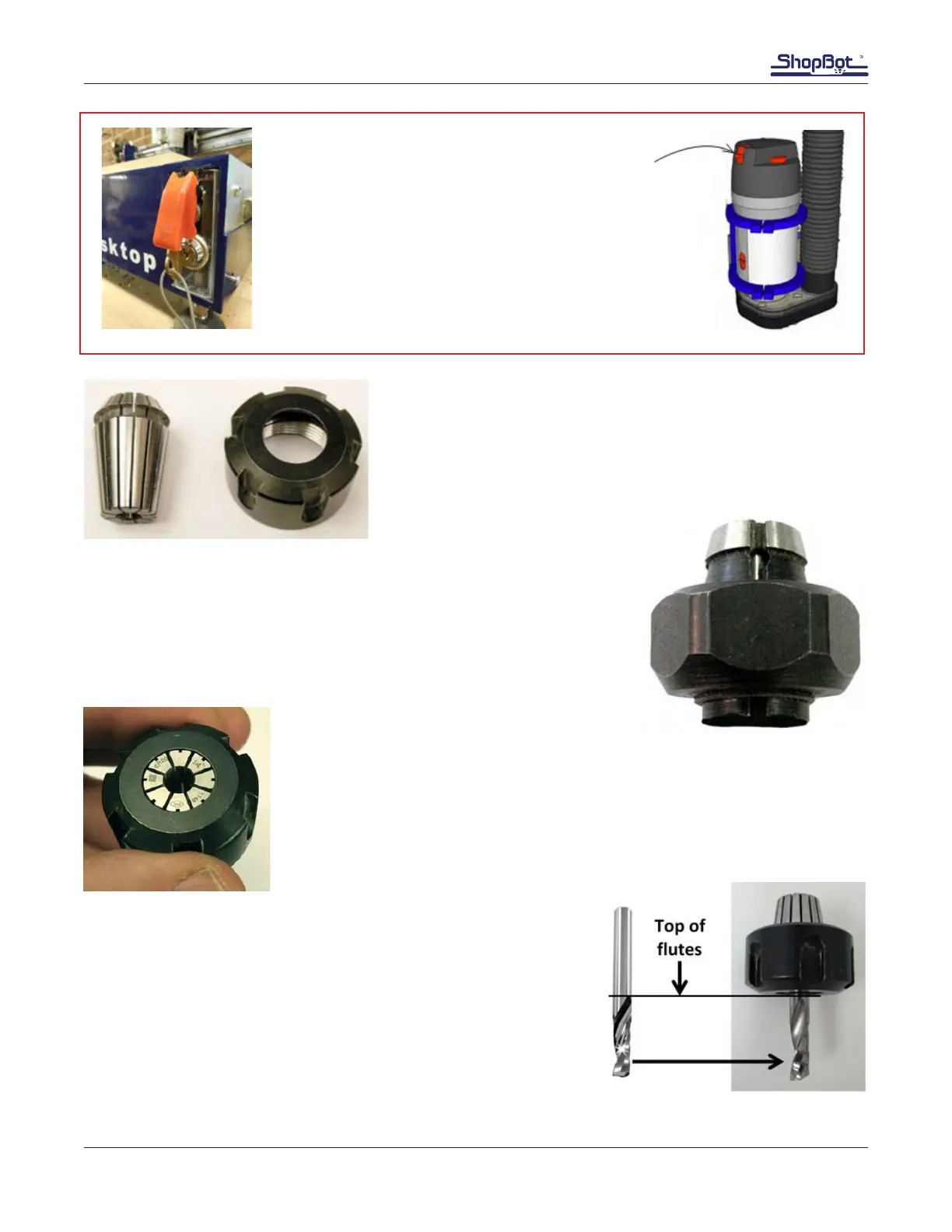
Note: The 1/4” collet and the spindle collet nut works for spin-
dles only.
The collet nut and collet come locked together as a single unit for rout-
ers only.
Press the spindle collet into the spindle nut and listen for the “click.” It may
be necessary to press it in at a slight angle. Hold the nut upside-down to
conrm that the collet is snapped in place (shown on left). It should hang
freely and not fall out.
Slide the 1/4” diameter upcut spiral bit into the collet. The shank of
the bit should ll up at least 75% of the collet to provide sufcient
gripping surface. Only allow the shank of the bit to extend above
the top of the collet a maximum of 3/8”. Keep the top edge of the
utes outside of the collet.



 To Next Page