Desktop Quick-Start Guide • September 13, 2016
© Copyright 2016 ShopBot Tools, Inc. page 27
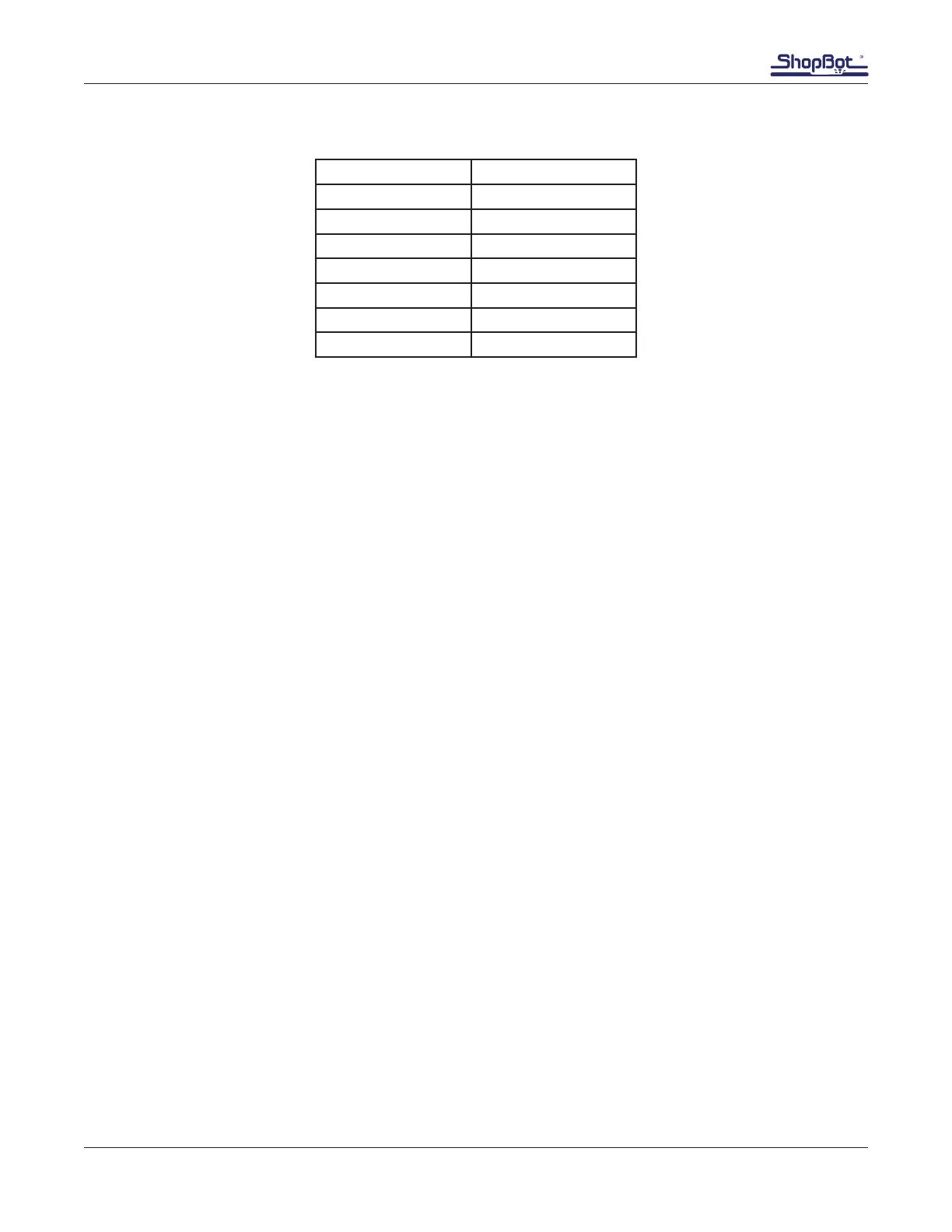
Frequency to RPMs for 50Hz (Europe and most other regions):
Display Spindle RPM
300 15,000
266 13,300
233 11,650
200 10,000
166 8,300
133 6,650
100 5,000
Preparing to Cut
Safety Reminder
To abruptly terminate tool action (to prevent damage to people, material, or the tool), push down the
red off/emergency stop switch. This will completely cut power to the Desktop and stop all movement.
For non-emergencies, simply hit the space bar on the computer keyboard. This will pause the tool
while maintaining XYZ coordinates, allowing the cut le to resume without starting over.
Restarting After an Emergency Shut-Off
If the Desktop’s main power switch was used to stop the machine during a cut, or if the tool loses
power unexpectedly (including a power outage, a tripped circuit breaker, or any other event), it is im-
portant to understand that there is nothing holding the motors in place and they may slightly move out
of position. Therefore, when turning on the machine back, do not expect the motors to be aligned with
where the cutting stopped. The location coordinates on the computer monitor will probably no longer
be accurate.
Turn the Desktop’s power switch back on.
If necessary, use the yellow Keypad function to move the bit to a safe Z height above the workpiece.
Zero the X-, Y-, and Z-axes. An error message may appear conrming lost communication. Click OK
to continue past the message. If any further errors appear, or there is trouble opening the Keypad; exit
and restart the software.
Pre-Cut Information
Prior to performing a cut, refer to the following documents, which are located in the binder that was
shipped with the tool, or can be accessed via www.shopbotdocs.com:
Feeds & Speeds
Material Hold Down



 To Next Page