Desktop Quick-Start Guide • September 13, 2016
© Copyright 2016 ShopBot Tools, Inc. page 23
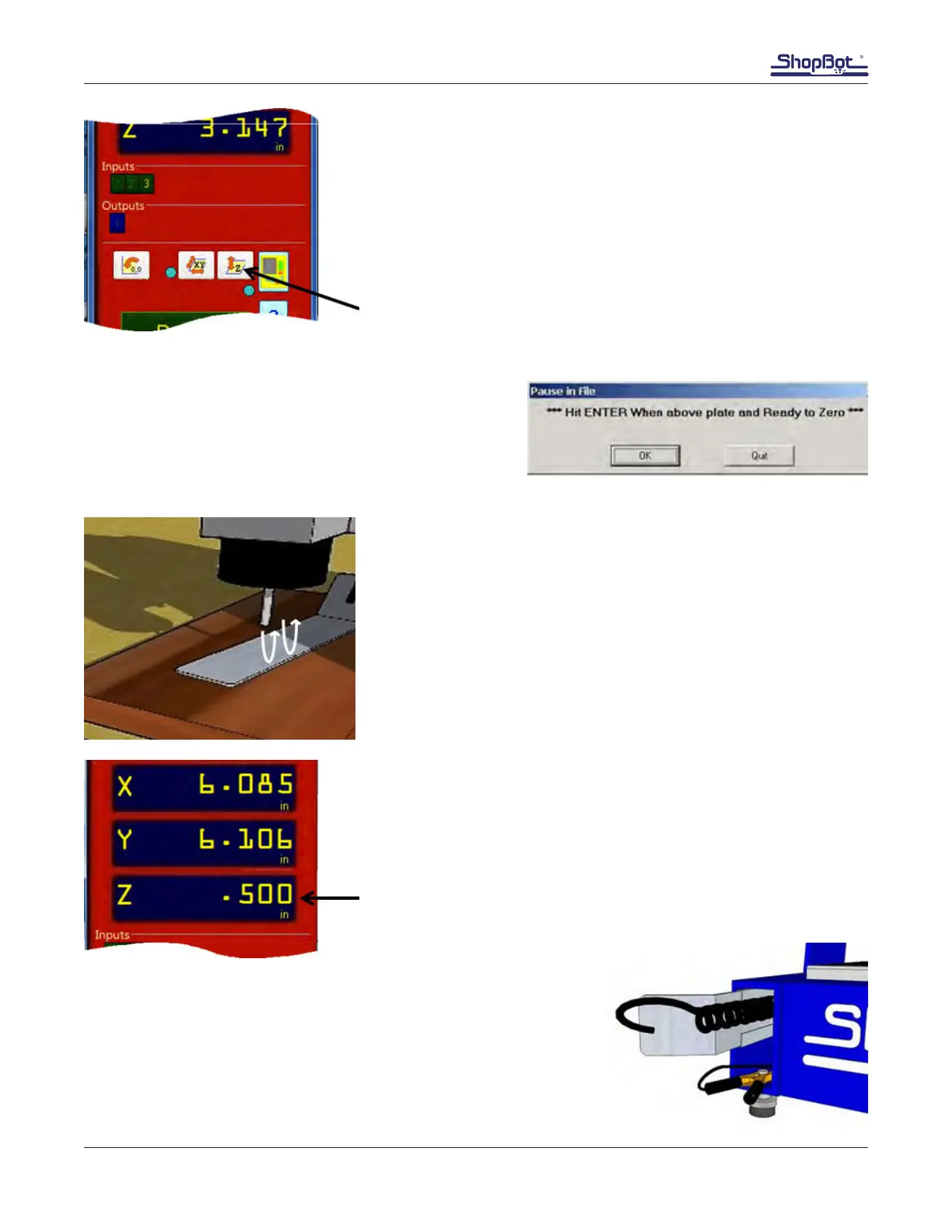
Click the white button marked “Z”.
The message at right will appear. Double check the
location of the Z zero plate and click OK. An alarm will
sound signifying that the Z-axis will start moving down
in couple of seconds. Hold the angled end of the Z zero
plate in place while the Z zero routine takes place.
The spindle/router bit will lower to contact the Z zero plate, then
immediately repeat the process.
Note: Wait until the router bit has contacted the Z zero plate
twice before removing the Z zero plate or the grounding clip.
The router bit will retract to a position of 1/2” above the deck.
The Z-axis is now zeroed to the top of the MDF deck.
Put away the clip and Z zero plate.
Press “OK” to exit the program.



 To Next Page