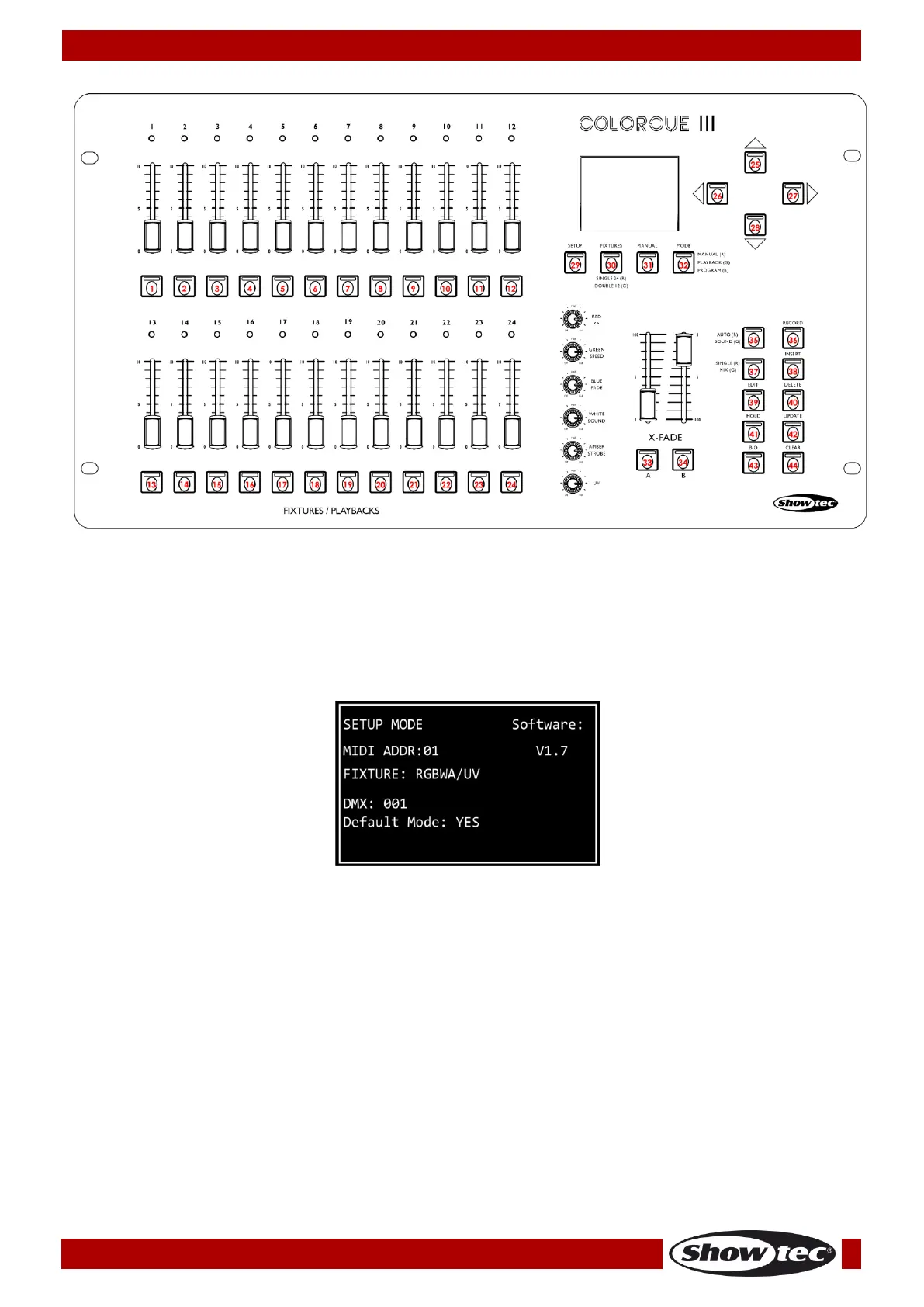
Setup Mode
In this mode you can select the type of the LEDs of the connected lighting fixture(s) and the MIDI address
of the device.
The setup mode screen provides information about the MIDI address of the device, the LEDs type of the
connected fixtures, the starting DMX address of the last connected fixture, whether the default settings of
the fixtures are active, and the firmware version.
01) Press and hold down the SETUP button (29) for 3 seconds to enter setup mode. The LED on the button
will start blinking.
Refer to LEDs Type Setup on page 8 and to MIDI Address Setup on page 9 for more information
about the available settings in this mode.
02) Press and hold down the SETUP button (29) for 3 seconds to exit setup mode. The LED on the button
will stop blinking.
LEDs Type Setup
01) In setup mode, press one or more FIXTURES buttons (01)–(24) to select the fixture(s) for which you
want to set up the LEDs type. You can select multiple fixtures at the same time. The LEDs on the
selected buttons will light up.
02) Press the LEFT/RIGHT buttons (26)/(27) to select the LEDs type of the fixture. The available options are:
● RGB
● RGBW
● RGBA
● RGBWA
● RGBAW
● RGBW/UV











 To Next Page