6
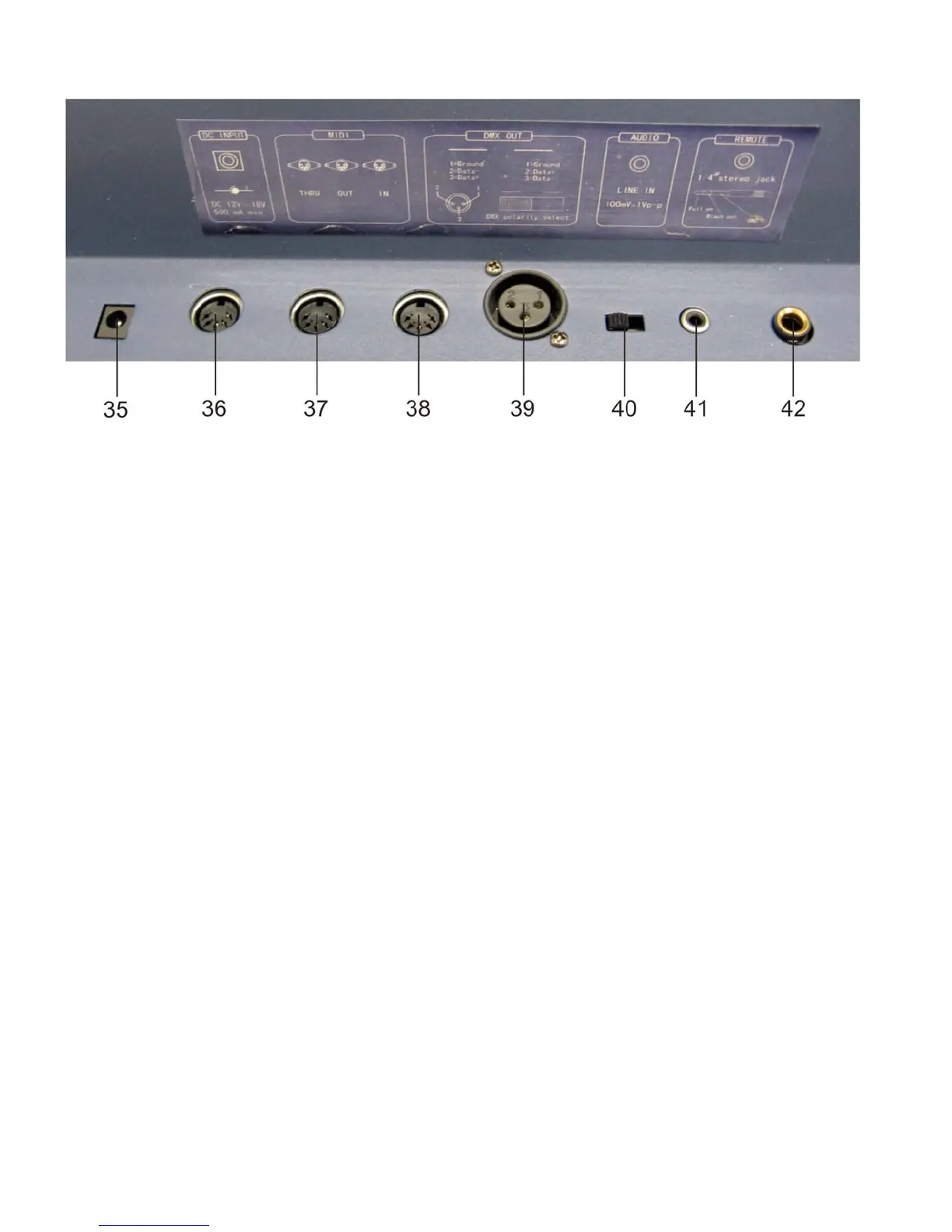
Controller Backside
Fig. 2
35) DC Input: DC 12-20V, 500 mAMin.
36) MIDI Thru: MIDI port for connection to a sequencer or MIDI device.
37) MIDI Out: MIDI port for connection to a sequencer or MIDI device.
38) MIDI In: MIDI port for connection to a sequencer or MIDI device.
39) DMX OUT: This connector sends your DMX value to the DMX fixture or DMX pack.
40) DMX polarity select: Used to select DMX polarity.
41) Audio Input: This jack accepts a line level audio input signal ranged from 100 mV to 1Vpp.
42) Remote Input: BLACK OUT und FULL ON may be controlled by a remote control using a standard
1/4" Stereo jack.
Installation
Remove all packing materials from the Showmaster 24. Check that all foam and plastic padding is removed.
Screw the equipment into a 19" rack. Connect all cables.
Always disconnect from electric mains power supply before cleaning or servicing.
Damages caused by non-observance are not subject to warranty.













 To Next Page