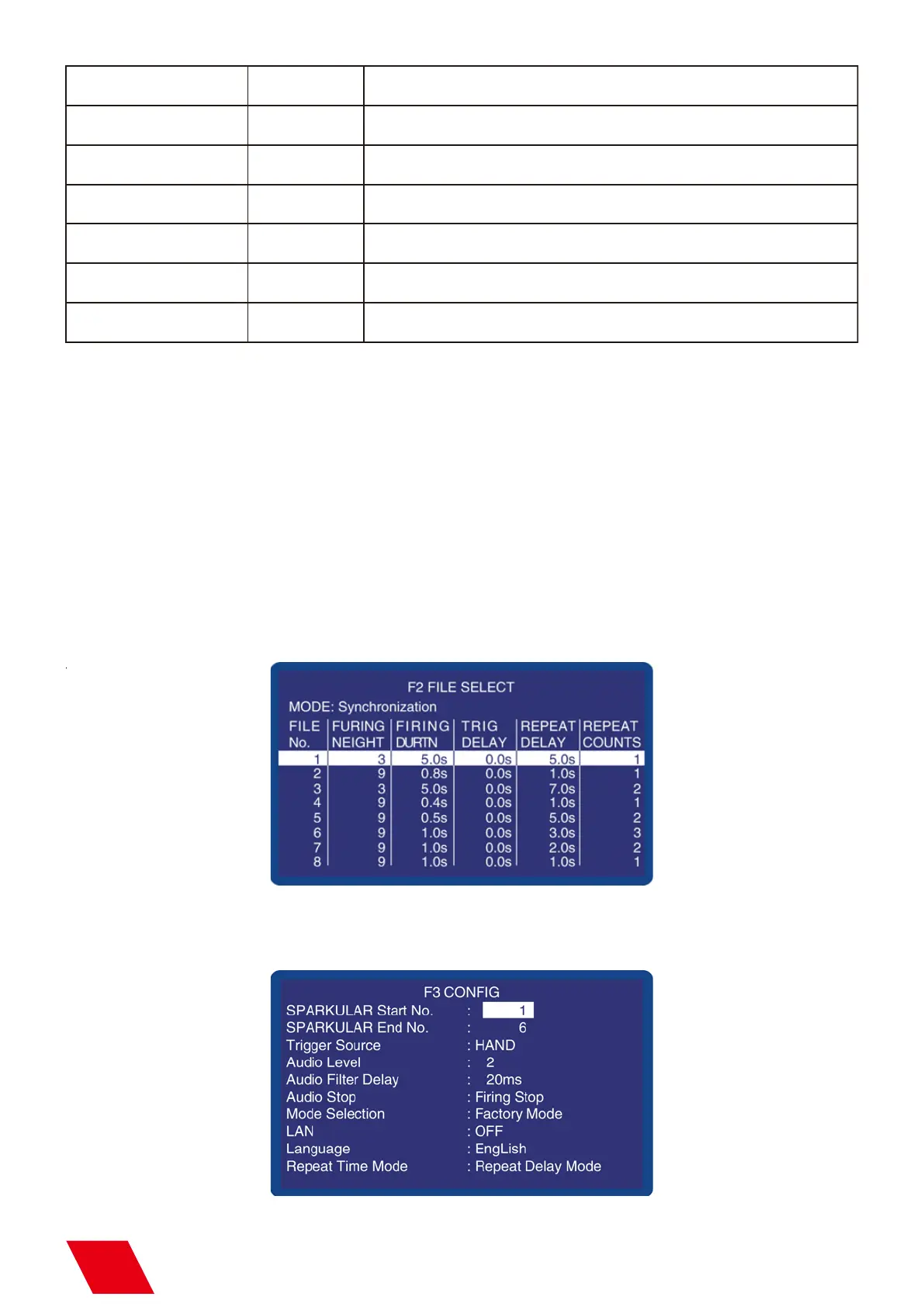
d) Configuration Menu:F3
Note: Only “Pause or Stop, Forward”, “Rewind” button are available when “Firing” button lighting.
Please note the setting for “repeat counts”to avoid mutli repeat of effects.
Monitor: The working status of SPARKULAR will show on the LCD screen of host controller. Normal
ly it shows the core temperature of SPARKULAR, when there are error information it will also show
in this area.
b) Error Information
Option
FILE NO.
FIRING HEIGHT
FIRING DURATION
TRIGER DELAY
Scope
REPEAT PERIOD
REPEAT COUNTS
1-8
1-10
0.1-30.0s
0.1-30.0s
0.1-50.0s
1-5
File number
Fountain Height gear. “.” button can change height10 directly.
Duration of the Fountain
Trigger delay between two machines
Time to start of next sequence/period
Repeated times
Illustration
Please refer to the error information of the machine.
c) File Select: F2
F2 displays the parameters list of 8 preset files.
11



 To Next Page