Shure Incorporated
7/21
ﺱﺃﺮﻟﺍ ﺕﺎﻋﺎﻤﺳ ﻭﺃ ﻥﺫﻷﺍ ﺔﻋﺎﻤﺳ ﻞﻴﺻﻮﺘﻟ ﻢﺟﺮﺘﻤﻟﺍ ﺓﺪﺣﻭ ﺐﻧﺍﻮﺟ ﻦﻣ ﺐﻧﺎﺟ ﻞﻛ ﻰﻠﻋ ﺪﺟﻮﻳ ﺮﻴﻐﺻ ﺲﺒﻘﻣ )ﻦﻣ ﺎﹱﻴﺋﺎﻘﻠﺗ ﺕﻮﺼﻟﺍ ﻞﺼﻓ ﻰﻟﺇ ﻥﺫﻷﺍ ﺔﻋﺎﻤﺳ ﻞﻴﺻﻮﺗ ﻱﺩﺆﻴﺳ
ﺔﻴﻨﺤﻨﻤﻟﺍ ﺱﺃﺮﻟﺍ ﻱﺫ ﻞﺼﺘﻤﻟﺍ ﻥﻮﻓﻭﺮﻜﻴﻤﻟﺍ.( ﺔﻴﺟﺭﺎﺨﻟﺍ ﺱﺃﺮﻟﺍ ﺔﻋﺎﻤﺳ ﺔﻬﺟﺍﻮﺑ ﻞﻴﺻﻮﺘﻠﻟ ،ﺓﺪﺣﻮﻟﺍ ﻦﻣ ﻲﻠﻔﺴﻟﺍ ءﺰﺠﻟﺍ ﻲﻓ ﻱﺩﺮﻓ ﺓﺮﻴﻐﺻ ﺲﺒﻘﻣ ﺎﹱﻀﻳﺃ ﺪﺟﻮﻳﻭ.
ﻞﺻﻮﻣ DCS-LAN
ﺎﺴﺒﻘﻣ RJ45 ﺓﺪﺣﻮﺑ ﻝﺎﺼﺗﻼﻟ ﻢﻜﺤﺘﻟﺍ ﺓﺪﺣﻭ ﻦﻣ ﻲﻠﻔﺴﻟﺍ ءﺰﺠﻟﺍ ﻲﻓ ﻥﺍﺩﻮﺟﻮﻣ DIS-CCU ﺔﻜﺒﺷ ﻲﻓ ﺓﺩﻮﺟﻮﻤﻟﺍ ﻯﺮﺧﻷﺍ ﺕﺍﺪﺣﻮﻟﺍﻭ DCS-LAN.
Interpreter Navigation and Menu Screens
Use the dedicated buttons to the left of the display to navigate the menus on the MXCIC. Where applicable, rotate the selector
knob to highlight the desired function and press to select the highlighted option.
Back/Cancel
Returns to the previous step or menu screen.
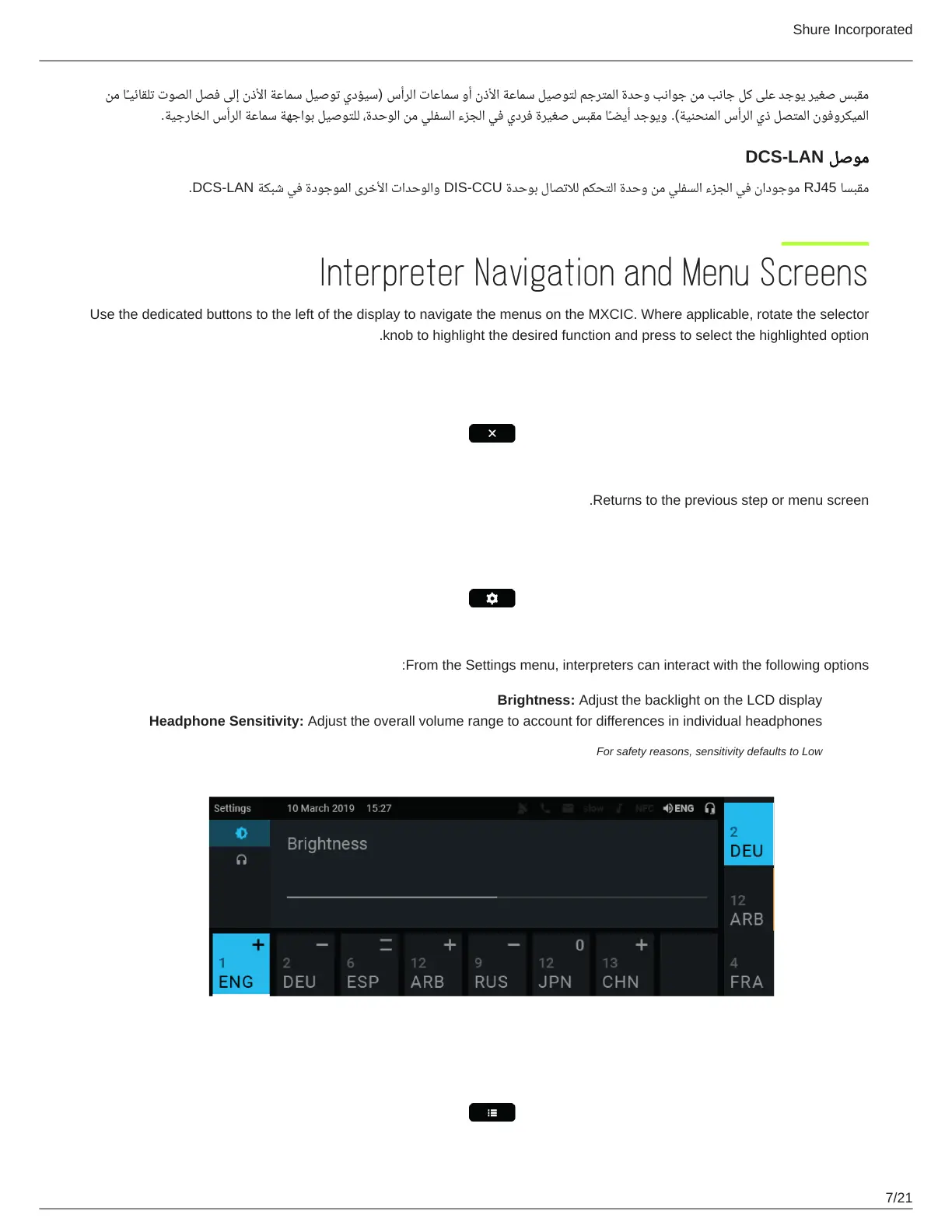
Settings
From the Settings menu, interpreters can interact with the following options:
Brightness: Adjust the backlight on the LCD display
Headphone Sensitivity: Adjust the overall volume range to account for differences in individual headphones
For safety reasons, sensitivity defaults to Low
Agenda














 To Next Page