I 13
Long Side Short Side
5.3 CEILING MOUNTING
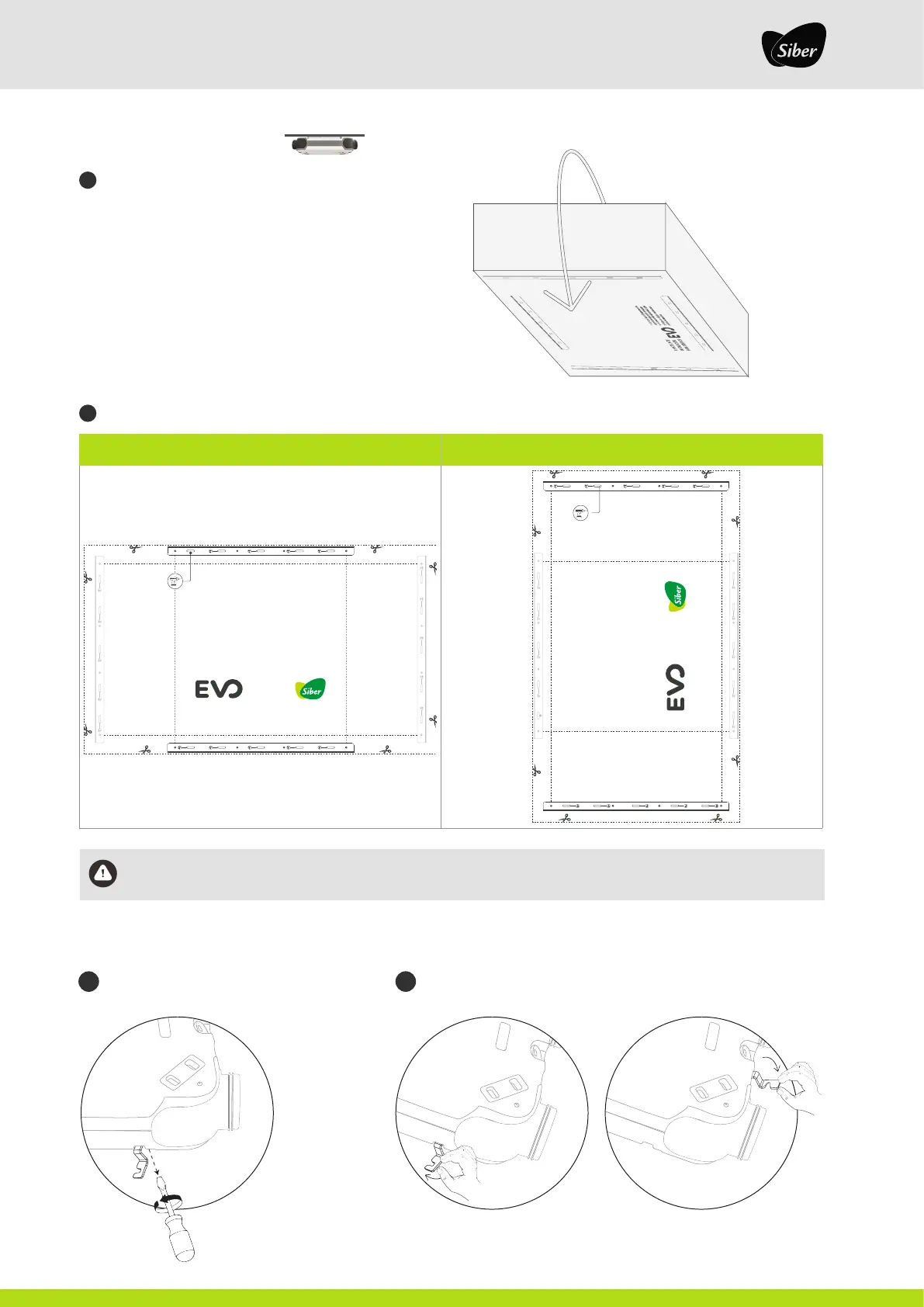
Use the installation template, located on the back of the box
Mark the area where the fixing brackets are to be installed with the help of the installation template.
By default, the unit comes with the Silentblock Hooks fitted on the long side.
To switch to the short side, follow the steps below:
INSTALLATION TEMPLATE
FOR SIBER DF
1. Place the template in the desired
location for the ventilation equipment
2. Choose the orientation of the guide
pair between horizontal or vertical.
3. Use the oval holes to drill the surface.
4. Screw the guides to the surface.
Use the oval holes to drill the
surface
603 mm
603 mm
INSTALLATION TEMPLATE
FOR SIBER DF
1. Place the template in the desired
location for the ventilation equipment
2. Choose the orientation of the guide
pair between horizontal or vertical.
3. Use the oval holes to drill the surface.
4. Screw the guides to the surface.
Use the oval holes to drill the
surface
1005 mm
1005 mm
1
2
2.1 2.2
Unscrew the Silentblock Hooks Replace the Silentblock Hooks to the short side, respecting the same
direction.
If the template is not used, the fixing brackets must be spaced 630 mm apart on the long sides (standard version) and
1,035 mm apart on the short sides.


 To Next Page