The SICE S 65 E and S 65 E C are off-the-car wheel balancers designed for professional use. This manual provides comprehensive instructions for their safe operation and maintenance, ensuring efficient and long-lasting service.
Function Description
The primary function of the SICE S 65 E and S 65 E C wheel balancers is to measure the extent and position of unbalances in car and motorcycle wheels. They offer various balancing modes, including dynamic balancing on both rim sides, seven different routines for alloy rims (ALU / ALU P), dynamic balancing for motorcycle rims (Motorcycle Dynamic and Motorcycle ALU), and static balancing on a single side.
The machines feature an automatic sensor for measuring diameter and distance. Optional features include a LaserX pointer, which uses a laser line within the automatic detection arm to indicate the balancing plane acquisition position, and an Automatic Width Device (AWD) with an ultrasonic sensor for automatic width measurement. For models without the ultrasonic sensor, manual width entry is enabled via the keypad.
The balancers incorporate several usage features to enhance efficiency and safety:
- Low balancing speed: Minimizes spin times, reduces risks associated with rotating parts, and saves energy.
- Automatic brake: Stops the wheel at the end of the spin.
- STOP button: Allows immediate stopping of the machine.
- Automatic start: Initiates the spin when the wheel guard is lowered.
- Automatic Position Search (RPA): Automatically positions the wheel at the correct angle for weight application.
- "Shift planes" programme (in ALU P): Facilitates the use of multiple five-gram weights, eliminating the need for partial cuts.
- "Hidden Weight" programme (in ALU P): Divides outer adhesive weights into two equal weights positioned behind the spokes for aesthetic reasons.
- "Split Weight" programme (motorcycle programmes): Divides the weight into two equivalent values to be placed on either side of the spoke.
- "OPT flash" programme: Optimizes wheel balance to reduce operating noise.
- "FSP" (Fast Selection Program): Automatically selects the appropriate balancing programme.
- User-friendly graphics: High-resolution LCD monitor with icon-based interface for easy learning and operation.
- Multi-language texts: Supports various languages for user convenience.
- Interactive help: On-screen help provides information related to the current screen or error messages.
- Independent working environments: Allows up to three operators to work in parallel without resetting data.
- LED light and LASER indicator: Assist in precise weight application.
Important Technical Specifications
- Power supply voltage: Single-phase 100/115 ±10% or 200/230 V ±10%, 50/60 Hz.
- Rated power: 122 W.
- Rated current: 1.2 A at 100-115V, 0.6 A at 200-230V.
- Balancing speed: 90/130 rpm.
- Maximum unbalance value calculated: 999 grams.
- Average spin time (with 5”x14” wheel): 7 seconds.
- Shaft diameter: 40 mm.
- Ambient work temperature: 5° to 40°C.
- Weight of electrical/electronic components: 4.5 kg.
- Machine weight with guard (without accessories and external measuring sensor): 198 kg.
- Machine weight with guard (without accessories and with external measuring sensor): 205 kg.
- Noise level in operation: < 70 dB(A).
Working Range:
- Settable rim width: 1.5" to 25".
- Rim diameter measurable with automatic sensor: 10" to 28".
- Settable rim diameter: 1" to 35".
- Maximum wheel/machine distance: 360 mm.
- Maximum wheel width (with guard): 600 mm.
- Maximum wheel diameter (with guard): 1117 mm.
- Maximum wheel weight: 75 kg.
Dimensions (approximate, with guard):
- Depth (closed): 1134 mm.
- Depth (open): 1044 mm.
- Width: 1352 mm.
- Height (closed): 1592 mm.
- Height (open): 1673 mm.
Usage Features
The SICE S 65 E and S 65 E C are designed for ease of use and precision.
Wheel Clamping System C (Automatic):
- Centring with front cone: Mount the wheel, insert the cone, slide the locking device, and press the control pedal for at least one second.
- Centring with rear cone: Insert the cone, mount the wheel, apply the protective cap, slide the locking device, and press the control pedal for at least one second.
- Wheel release: Press the control pedal for at least one second.
- Centring with flanges: Remove the C hub using the special C key, mount the flange, and lock it with two screws.
- Assembling the C hub: Hold down the keyboard key for 3 seconds to lock the shaft and open the pneumatic cylinder. Insert the split pin and tighten the C hub manually.
Wheel Data Entry:
- Without ultrasonic sensor: Automatically measures diameter and distance. Width is entered manually using the keypad and a calliper. The automatic arm is brought into contact with the inner rim side.
- With ultrasonic sensor (optional): Automatically measures distance, diameter, and width. The automatic arm is brought into contact with the inner rim side. The machine can differentiate between P TYRE (Passenger Tyre) and LT TYRE (Light Truck Tyre) for different wheel sizes.
Balancing Programmes:
- Dynamic balancing (standard): The most commonly used mode. The operator sets geometric data, performs a spin, waits for automatic stop, selects the side, turns the wheel to the indicated position, and applies the weight. A test spin is recommended to verify accuracy.
- ALU 1P and ALU 2P programmes: For high-precision balancing of light alloy rims, applying weights on the same side (inner) relative to the rim disk. ALU 1P places the weight 15mm back from the measuring head contact point, while ALU 2P uses the rim edge as reference for clip weights.
- Motorcycle Wheel Balancing: Includes dynamic and static modes for motorcycle rims. Dynamic mode is recommended for wider rims (over 3 inches). Motorcycle ALU mode allows dividing weights for rims with wide spokes.
- "Hidden Weights" programme: Divides the outer adhesive weight (Pe) into two parts (P1 and P2) positioned behind spokes, provided they are within a 120° angle of Pe.
- "Movable planes" programme: Adjusts weight application positions for commercially available 5-gram adhesive weights, improving precision.
- Static balancing: Applies a single counterweight to one side or the centre of the rim well.
Utility Programmes:
- Working environment programme: Allows up to three operators to save their settings independently.
- Optimisation Programme (OPT FLASH): Minimizes residual vibrations after balancing. The machine indicates when this procedure is necessary.
- Highest accuracy function: Displays balancing results with the best possible resolution (Gr x1 or Oz 1/10).
- Spin counter function: Displays total spins, partial spins (resettable), and spins since last calibration.
- Manual wheel data entry function: Allows manual input of diameter, distance, and width if automatic sensors fail.
Configuration Programmes:
- Automatic Position Search (RPA) Configuration: Enables/disables automatic wheel positioning for weight application.
- Selection of adhesive weights application position: Configures whether adhesive weights are applied at 12 o'clock, using the LASER line (6 o'clock), or with the CLIP device.
- Unbalance rounding-off configuration: Sets the display resolution for unbalance values (grams x1, grams x5, oz x 1/4, or oz x 1/10).
- Unbalance unit of measure (g/oz) configuration: Switches between grams and ounces.
- OPT warning configuration: Enables/disables the OPT programme warning at the end of a spin.
- Preferred programme configuration: Allows setting two frequently used icons on the main menu bar.
- Language configuration: Selects the display language for messages.
- Customisation Configuration: Allows saving personal data (name, city, phone, etc.) to be displayed on the initial screen.
- Lighting LED activation/deactivation: Controls the LED light, which can turn on during ALU P programmes, at the end of a spin with residual unbalances, or in centred position.
- LASER activation/deactivation: Controls the LASER line, which can turn on for manual adhesive weight application or in the Hidden Weight programme.
Maintenance Features
Regular maintenance is crucial for the machine's performance and longevity.
- Sensitivity Calibration: Performed when calibration is out of tolerance or when the machine displays an E 1 message. Involves mounting a medium-sized wheel, performing spins, and fixing a calibration weight.
- Calibration of the ultrasonic width sensor (if installed): Performed when the machine displays an E 4 message or if there's a discrepancy in width measurement. Involves fixing a calibration template to the shaft assembly bell and slowly lowering the wheel guard.
- Cleaning: Keep the working area clean. Never use compressed air or water jets to remove dirt. Clean the wheel balancer shaft, securing ring nut, cones, and flanges with a brush dipped in environmentally friendly solvents.
- Storage: Store cones and flanges in a dust-protected area after use.
- Display cleaning: Use ethyl alcohol to clean the display panel.
- Calibration frequency: Perform the calibration procedure at least once every six months.
- Electrical safety: Always unplug the machine before any adjustments or maintenance. Ensure all moving parts are locked.
- Original parts: Use only original spare parts and accessories to avoid voiding the warranty.
- Technical assistance: For any malfunctions not listed in the troubleshooting section, contact the technical support centre.

 Need help?
 General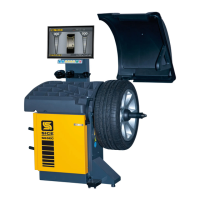

 To Next Page