Operating Instructions
LMS100 Product Family
Electrical installation
8012471/UT27/2012-02-14 © SICK AG · Germany · All rights reserved · Subject to change without notice 71
Chapter 5
Connection to an object protection system
You will find information on connecting the LMS12x/LMS13x and LMC12x/LMC13x to an
object protection system in the document ”Technical Information (installer instructions
VdS)”, part no.: 8013749, issue in English.
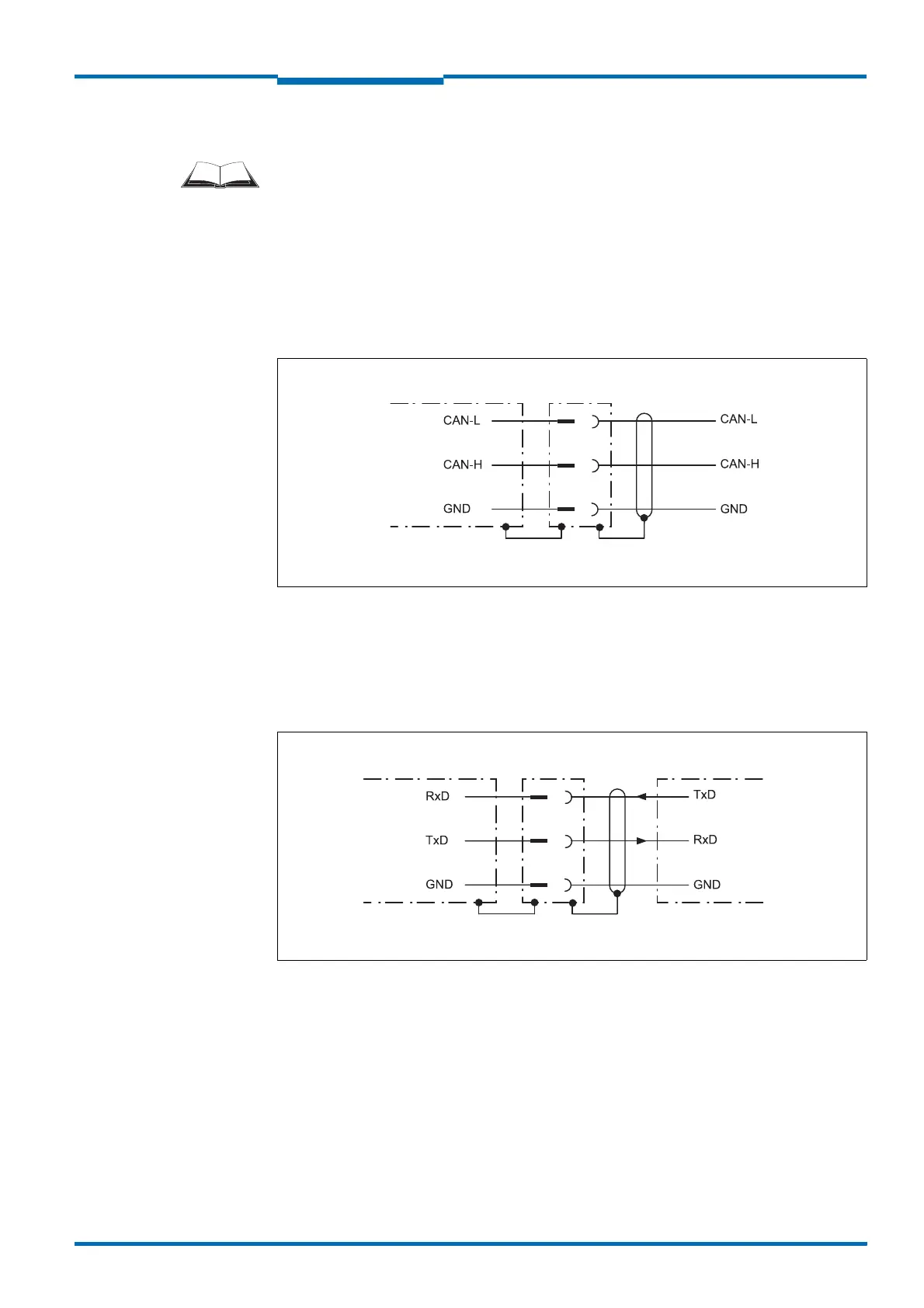
Wiring CAN- interface
To wire the CAN interface a screened “twisted-pair” cable is required. The terminator of
120 must be connected.
Pay attention to max. cable length as per section 5.3.3 “Boundary conditions for the
data interfaces” on page 64.
Fig. 55: Wiring CAN- interface
Wiring RS-232 interface
A screened cable is required for the wiring of the RS-232 interface.
Pay attention to max. cable length as per section 5.3.3 “Boundary conditions for the
data interfaces” on page 64.
Fig. 56: Wiring RS-232 interface



 To Next Page