EasyManua.ls Logo

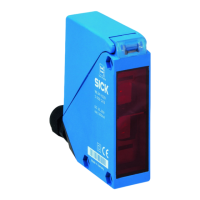
SICK WLG16 Bluetooth - User Manual

SICK WLG16 Bluetooth
30 pages
Print Icon
To Next Page IconTo Next Page
Loading...
O P E R A T I N G I N S T R U C T I O N S
WLG16 Bluetooth®

Questions and Answers

  • T
    thomasjordanAug 11, 2025
    Why is the yellow LED flashing on my SICK WLG16 Bluetooth Accessories?
    • S
      Stacy SextonAug 11, 2025
      The yellow LED might be flashing on your SICK Accessories because the distance between the sensor and reflector is too large, the light beam is not completely aligned, the reflector is unsuitable, or the front screen and/or reflector is contaminated. To resolve this, check the sensing range, ensure proper alignment, use a SICK reflector, and clean the optical surfaces of both the sensor and reflector.
  • L
    Lori GloverAug 16, 2025
    What to do if the sensor is not displayed in SOPASair for SICK WLG16 Bluetooth Accessories?
    • B
      bradley76Aug 17, 2025
      If the sensor isn't showing up in SOPASair, it could be due to several reasons. First, another hand-held device might already be connected, so disconnect or deactivate that existing connection. Second, the hand-held device could be out of the sensor's transmission range, so check the installation situation for any shielding, like metal. Third, Bluetooth LE might be deactivated in the sensor; activate it via SiLink2 master or IO-Link. Fourth, Bluetooth LE might be deactivated in the hand-held device; ensure it is activated. Finally, a MAC address filter might be activated, preventing the hand-held from being authorized; adjust or disable the MAC address filter.
  • A
    archeramyAug 22, 2025
    How to fix no connection to the SICK WLG16 Bluetooth sensor?
    • B
      Brendan ShawAug 22, 2025
      If you can't connect to the sensor, it might be because your Android or iOS version doesn't meet the requirements; check the operating system. Another reason could be that your SOPASair version lacks the necessary driver; uninstall SOPASair and install the latest version of the app.
  • S
    sandersjordanAug 29, 2025
    What to do if switching outputs don't behave in accordance with 3 on SICK WLG16 Bluetooth?
    • N
      Nicholas HinesAug 29, 2025
      If the switching outputs of your SICK Accessories aren't behaving as expected, it could be due to IO-Link communication issues, changes in configuration, or a short-circuit. You should adjust the configuration and check the electrical connections.
  • A
    Aaron KnightSep 4, 2025
    Why is the green LED flashing on my SICK WLG16 Bluetooth?
    • H
      hallthomasSep 4, 2025
      The green LED flashes when there is IO-Link communication.

SICK WLG16 Bluetooth Specifications

General IconGeneral
CategoryAccessories
ManufacturerSICK
Operating frequency2.4 GHz
Bluetooth standardBluetooth 4.0
Weight100 g
TypeBluetooth
Power Supply3.3 V DC

Related product manuals