INSTALLATION AND CONFIGURATION
2-27
Document No.: COM-00-05-16 June 2006, Revised June 2014
Version: C.1
8. To keep the transmit power default, press ENTER. If not, enter the transmit power from 0 to
23 and then press ENTER.
The user will be returned to the DHCP Binding Screen.
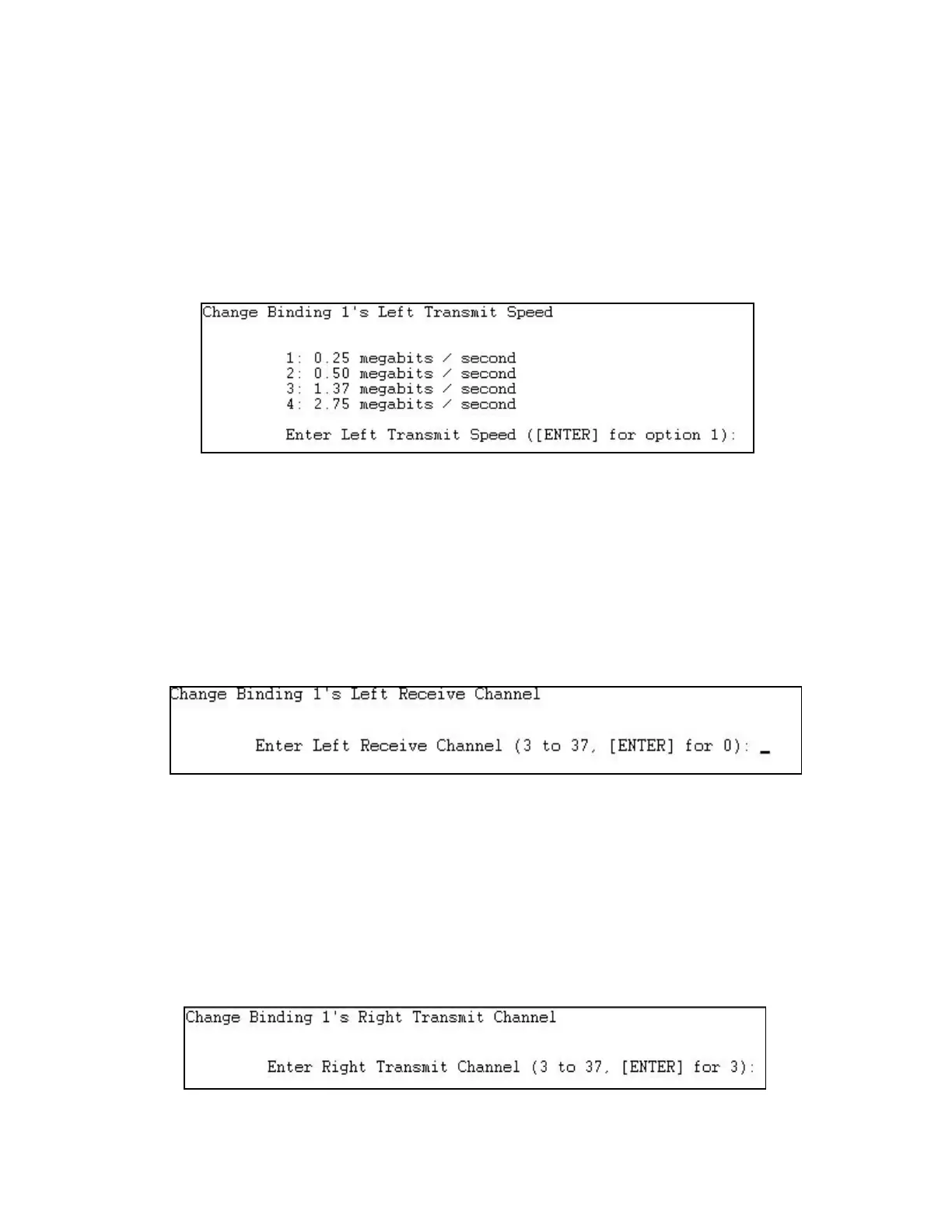
9. Select change binding “Left transmit speed”. The Change Binding Left Transmit Speed screen
appears.
Figure 2-33. Change Binding Left Transmit Speed Screen
10. To keep the transmit speed default, press ENTER. If not, select the option number for the
desired transmit speed and then press ENTER.
The user will be returned to the DHCP Binding Screen.
11. Select change binding “Left receive channel”. The Change Binding Left Receive Channel
screen appears.
Figure 2-34. Change Binding Left Receive Channel Screen
12. To keep the left receive channel default, press ENTER. If not, select the channel number from
3 to 37 and then press ENTER.
The user will be returned to the DHCP Binding Screen.
13. Select change binding “Right transmit channel”. The Change Binding Right Transmit Channel
screen appears.
Figure 2-35. Change Binding Right Transmit Channel Scree.




 To Next Page