Tips for Integrating with an OPC client
76
Building Technologies 048_DMS_MK8000_ICC_MP4.10_A6V10062407_a_en.doc
Fire Safety & Security Products 06.2007
Starting the MK8000 Server in Simulation mode
In the Advanced menu, you can start the MK8000 server in simulation mode. This
mode results in starting an additional application (Field Simulator), which allows
generating messages as though they were coming from the fire and intrusion con-
trol units in the field.
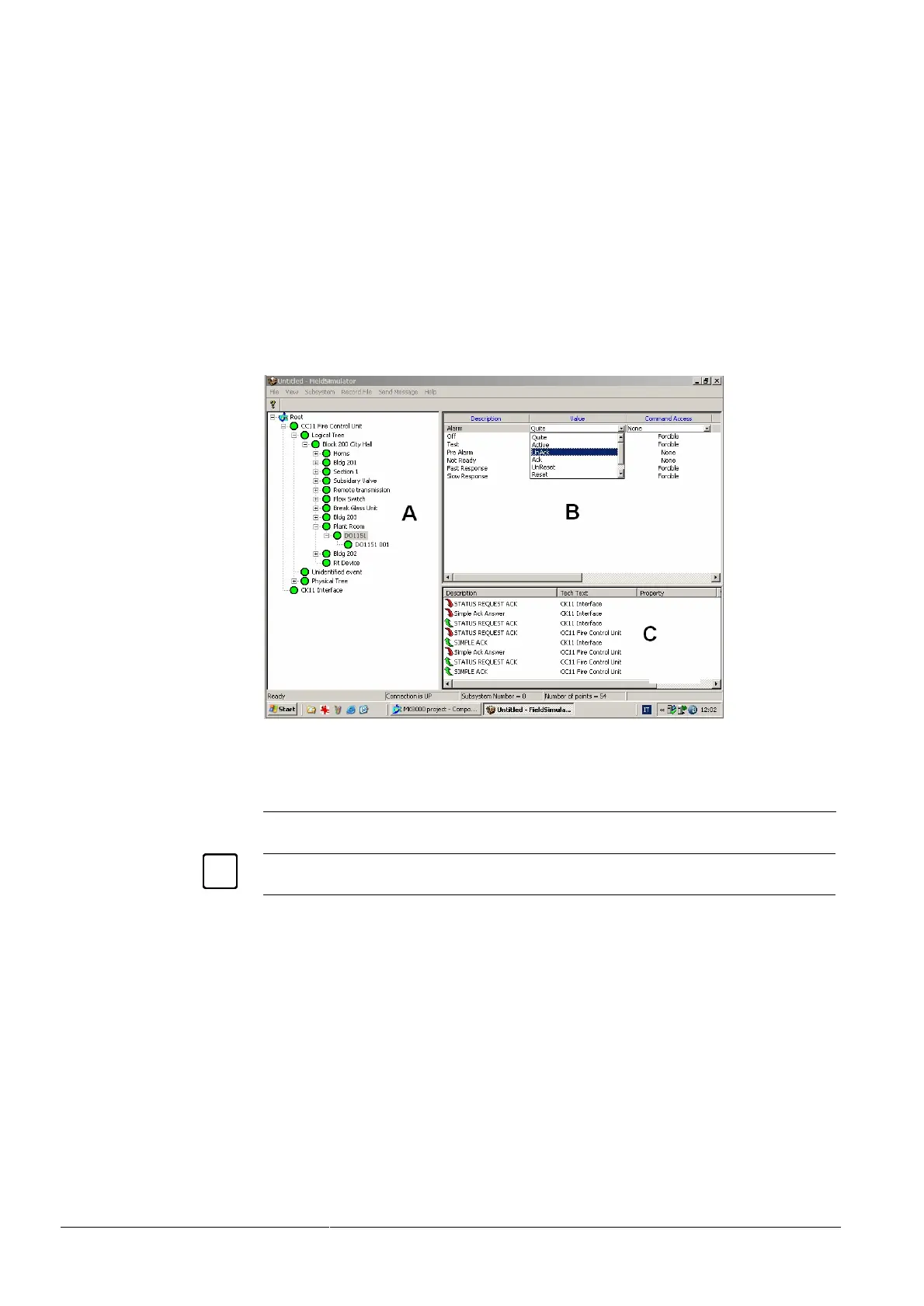
The Field Simulator (Fig 68) presents a user interface quite similar to the Testing
Client application (e.g. see Fig 48).
A tree structure on the left pane (Fig 68-A) allows for selecting the field objects.
When an object is selected, the corresponding properties are listed in the top right
pane (Fig 68-B). In this list, clicking the ‘Value’ field and picking up one the condi-
tions allows for modifying the property state, thus simulating a field message gen-
erated by the control unit.
The pane at the bottom right (Fig 68-C) presents the simulation logging, where all
messages are registered.
Fig 68 Field Simulator
A Object tree Hierarchical tree including control units and objects configured in MK8000
B Object property list List of properties of the currently selected object
C Simulation logging Logging of the simulated communication
The events from the SiPass Access Control system and from the CCTV Network can-
not be simulated with the standard Field Simulator.
Launching and using the System Supervisor Browser
The System Supervisor Browser can be launched either through the right click
menu of the System Monitor, or through the MK8000 program menu (StartPro-
grams MK8000System Supervisor Browser).
In the left pane (Fig 69-A), the MK8000 stations are listed. Selecting one of the sta-
tions results in the corresponding processes showing in the right pane (Fig 69-B).
For each process, a small coloured box shows the current process status. The
System Supervisor Browser uses the same Green-Yellow-Red colour scheme
used in the System Monitor:
– Green Everything is running properly.



 To Next Page