CP340/CP341/CP440/CP441 Communication and Programming
Entry-ID: 88867653, V1.0, 02/2014
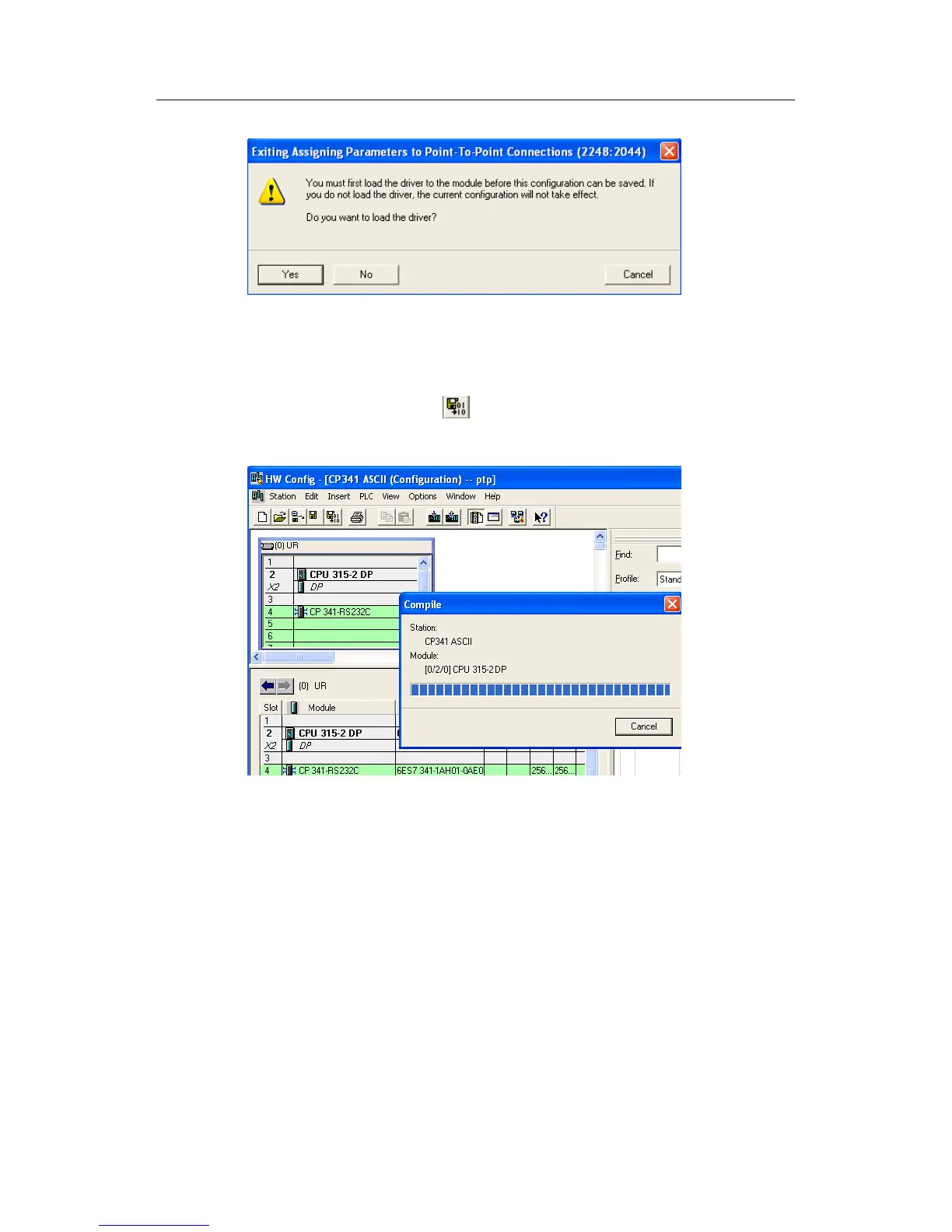
Fig. 68: Dialog box prompting loading driver
12. At this moment it must be connected to the actual PLC. Click Yes to load the
driver. The CPU must be in STOP mode when in loading. After the driver is loaded,
STEP7 will prompt "Driver already exists" if you load it another time. After
configuration completes, click button to save and compile the hardware
configuration and confirm that it has no error.
Fig. 69: Compile and save hardware configuration
5.1.3 Write communication program
1. Add FB7 and FB8 into the program Blocks in such method: double-click OB1 to
open OB1 programming screen, invoke send program block FB8 and receive
program block FB7 from Libraries->CP PtP->CP341, and then delete them from
OB1 because these two function blocks will be used in MODBUS Slave
communication.
2. Invoke MODBUS Slave function block FB80 at Libraries->Modbus->Modbus -
>FB80. Distribute instance data block DB80, and set the parameter LADDR as
start logic address 256 in the hardware configuration.


 To Next Page