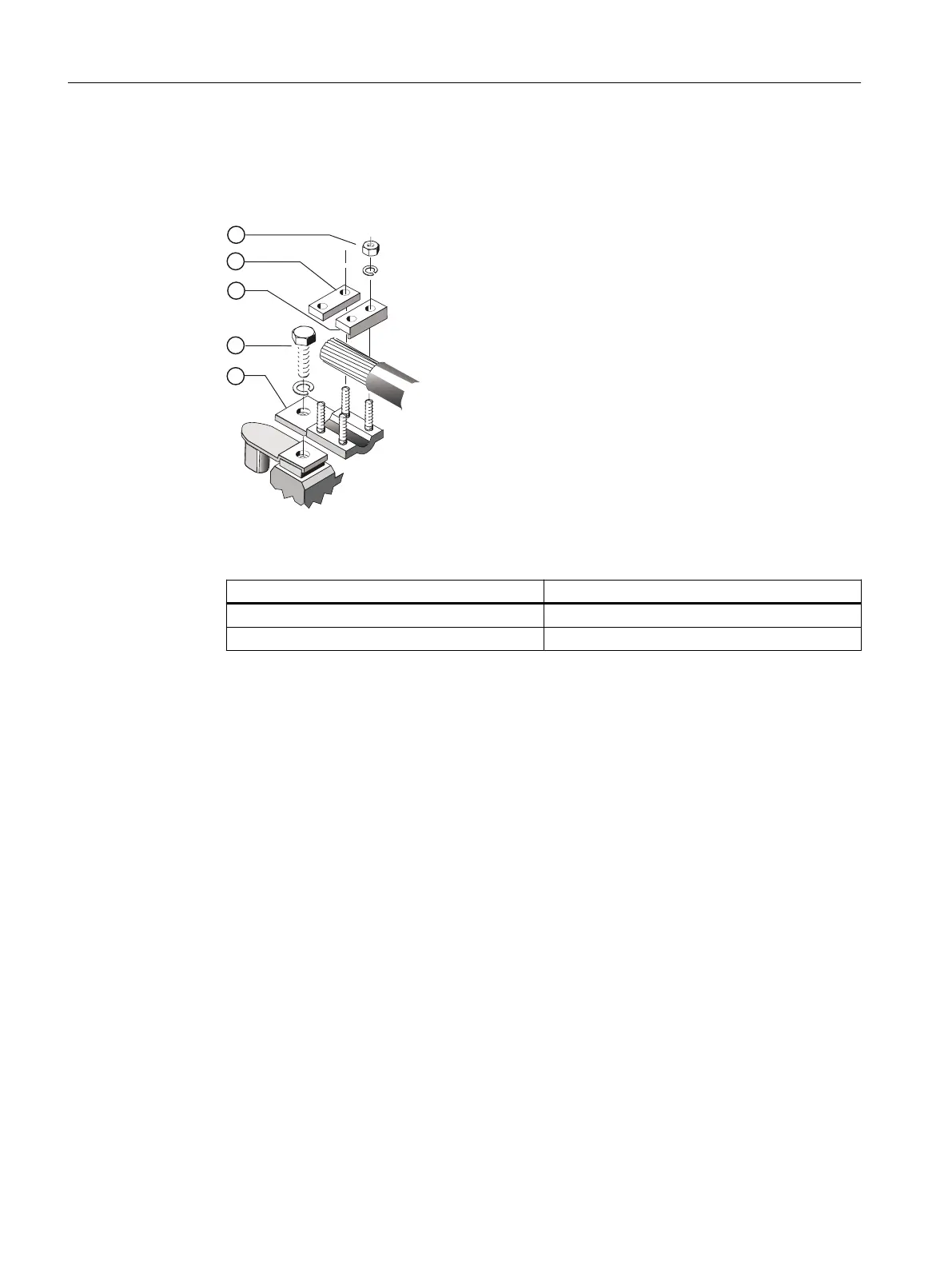
4. Make sure the terminal clamps ③, ④ are arranged correctly for the size of the conductor.
– Insert the cable into the terminal clamps.
– Tighten the clamping nuts ⑤ with 8 Nm.
Figure 6-6 Connection with terminal clamp (schematic diagram)
5. If you have loosened the terminal clamp screw ②, then retighten it with the following torque:
Terminal box Tightening torque
TB3R61 / 1XB1631 40 Nm
1XB7750 20 Nm
6.7.5 Using single-stranded cables
With high currents and where several single-stranded cables are used instead of multiple-
stranded cables, high temperatures can result in the cable entry area due to induced eddy
currents. A short-circuit and an explosion may occur. This can result in death, serious injury, or
material damage.
● After commissioning, ensure that the temperature limits of the connected power cables are
not exceeded during operation. This temperature effect can be reduced by altering the
conditions at the entry points or by using modified cable entry plates after consultation with
the manufacturing plant.
● Use a cable entry plate made of non-ferrous metal.
Electrical connection
6.7 Conductor connection
1MB5 SH 400/450
80 Operating Instructions, 05/2019, A5E45959221A




 To Next Page