OP1S Operator Control Panel
477 459 4070 76 J AA-74 Siemens AG
2 Operating Instructions SIMOVERT MASTERDRIVES
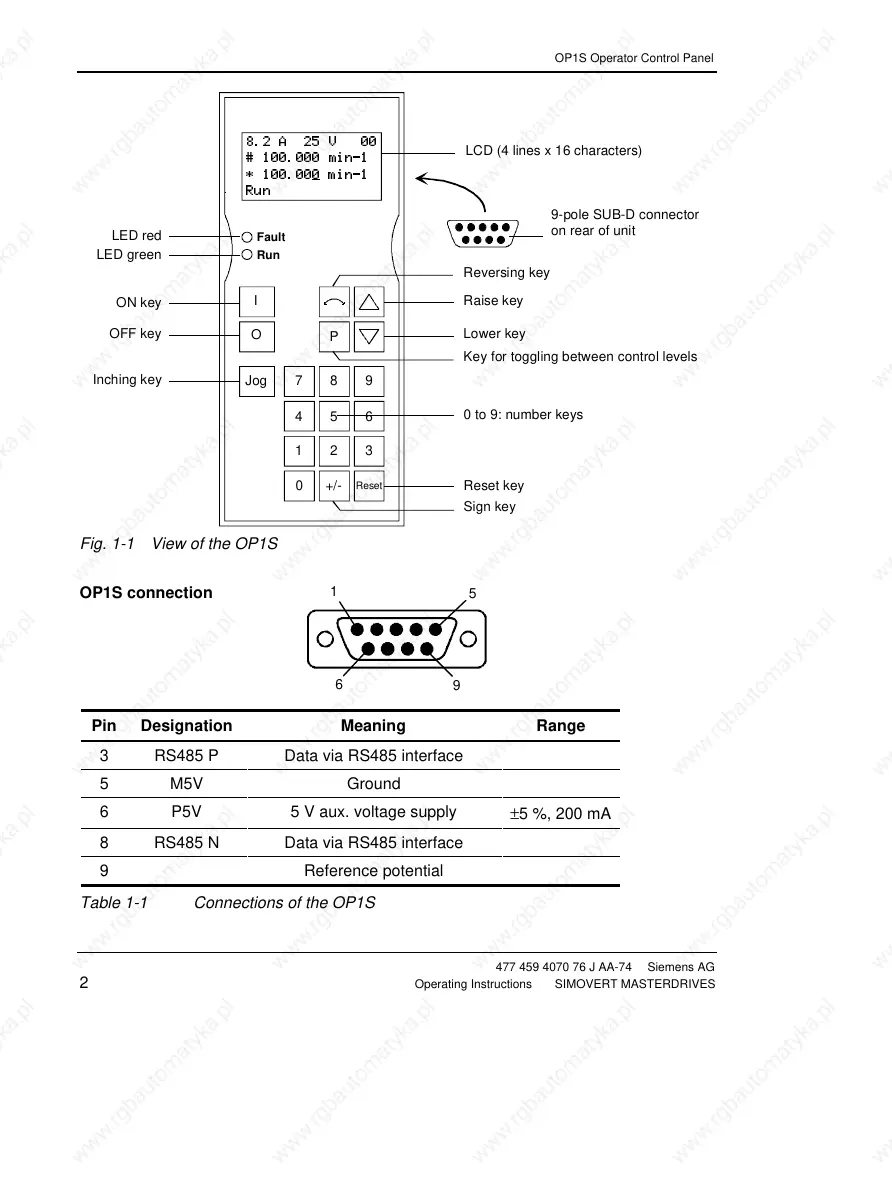
Inching key
OFF key
ON key
Key for toggling between control levels
Lower key
Raise key
Reversing key
8.2 A 25 V 00
# 100.000 min-1
* 100.000
min-1
Run
LCD (4 lines x 16 characters)
Sign key
Reset key
0 to 9: number keys
Jog789
P
Reset
+/-
0
456
123
O
I
Fault
Run
9-pole SUB-D connector
on rear of unit
LED green
LED red
Fig. 1-1 View of the OP1S
OP1S connection
Pin Designation Meaning Range
3 RS485 P Data via RS485 interface
5 M5V Ground
6 P5V 5 V aux. voltage supply
±5 %, 200 mA
8 RS485 N Data via RS485 interface
9 Reference potential
Table 1-1 Connections of the OP1S
1
5
6
9







 To Next Page