OP1S Operator Control Panel
Siemens AG 477 459 4070 76 J AA-74
SIMOVERT MASTERDRIVES Operating Instructions 3
2 Connecting, Run-up
2.1 Connecting
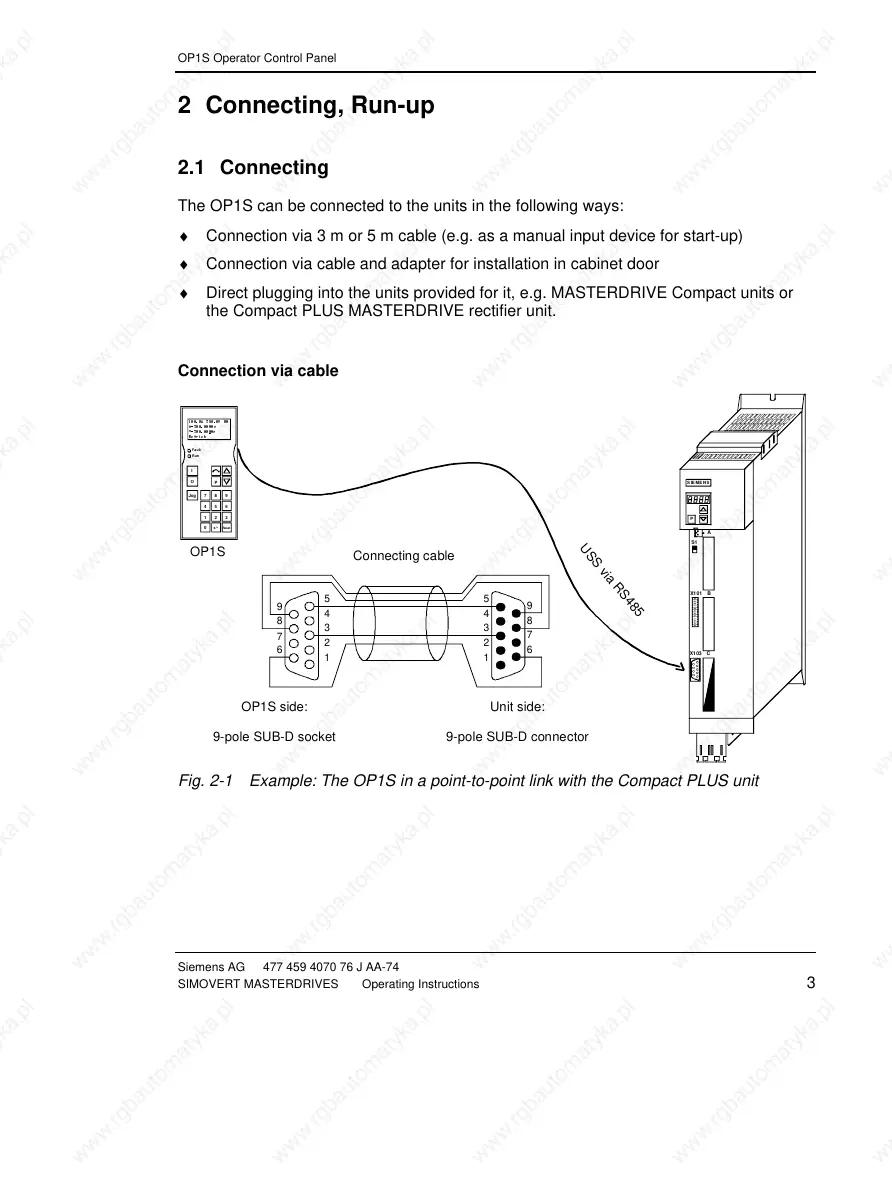
The OP1S can be connected to the units in the following ways:
♦ Connection via 3 m or 5 m cable (e.g. as a manual input device for start-up)
♦ Connection via cable and adapter for installation in cabinet door
♦ Direct plugging into the units provided for it, e.g. MASTERDRIVE Compact units or
the Compact PLUS MASTERDRIVE rectifier unit.
Connection via cable
SIEMENS
A
S1
BX101
CX103
P
USS-Bus
100.0A 380 .0V 00
#-300.000H z
*-300.000
Hz
Betrieb
Jog 7 8 9
P
Reset
+/-0
456
123
O
I
Fault
Run
OP1S
U
S
S
vi
a
R
S
4
8
5
5
4
3
2
1
9
8
7
6
5
4
3
2
1
9
8
7
6
OP1S side:
9-pole SUB-D socket
Unit side:
9-pole SUB-D connector
Connecting cable
Fig. 2-1 Example: The OP1S in a point-to-point link with the Compact PLUS unit







 To Next Page