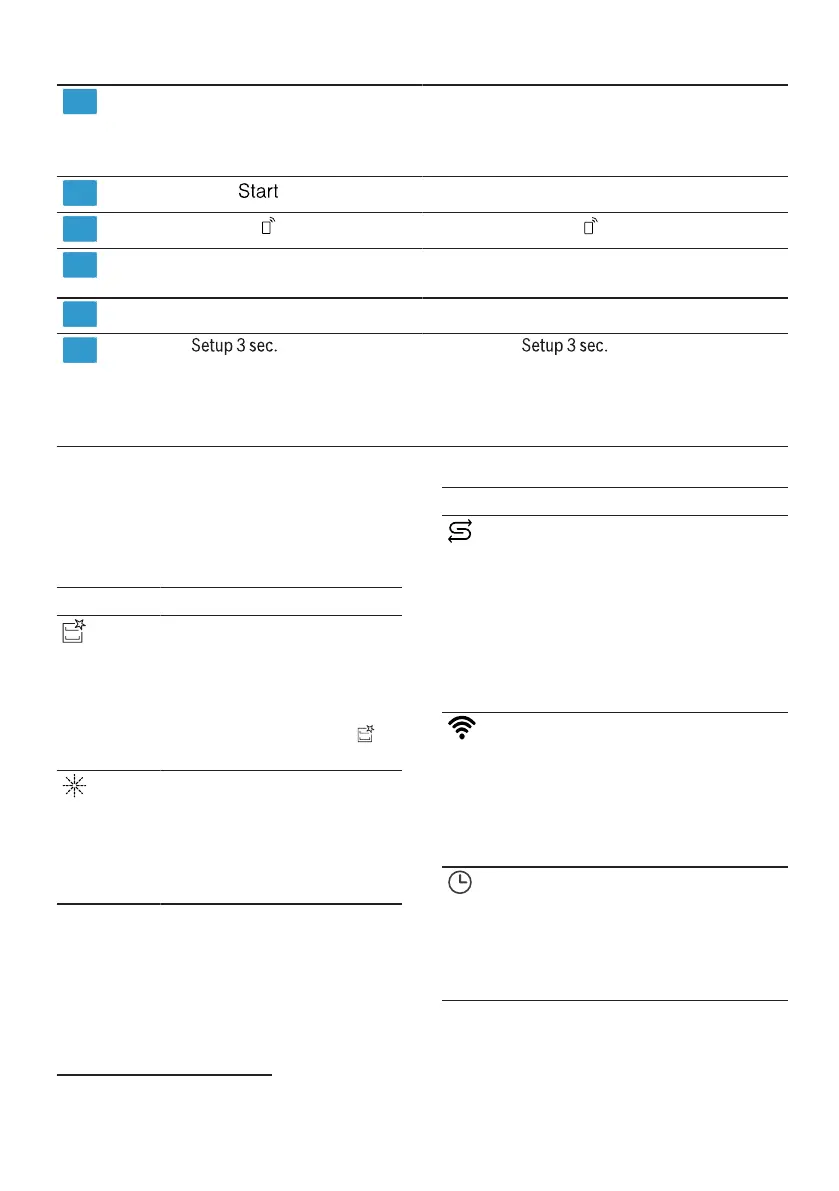
deGet to know
8th
Program buttons and additional
functions
programs
→
"Programs", page 20
Additional functions
→
"Additional functions", page 23
9
Start button
Remote start
Time delay and setting buttons
Start program →
Page 37
→
"Remote Start", page 45
10
11
Set time delay →
Page 37
Change
basic settings
12
Door handle1
button
Open the device door.
13
If you
Press to open the basic settings.
→
""Change basic settings", page
43
approx. 3 seconds
1Depending on the device equipment
Symbols in the display1
symbol Description
Depending on the device equipment, the
display shows the following symbols. You can
find the explanations for this.
If the special salt refill
indicator lights up in the
display, fill with special
salt immediately before
the program starts
into the storage container
for special salt.
→
"Fill in special salt",
page 28
Icon Description
If the symbol for
machine
maintenance lights up,
carry out machine
maintenance.
→
"Machine care", page
46
If the device is connected
to a wireless Wi-Fi
Home network connected
the symbol lights up
in the display.
→
"Home Connect",
page 44
If the rinse aid refill
indicator lights up in the
display, refill the rinse
aid.
→
"Filling with rinse aid",
page 30
If you have activated
the time delay,
the symbol lights up in the
display.
→
"Setting the time
delay", page 37
1Depending on the device equipment
18



 To Next Page