Get to knowde
5.2 Controls
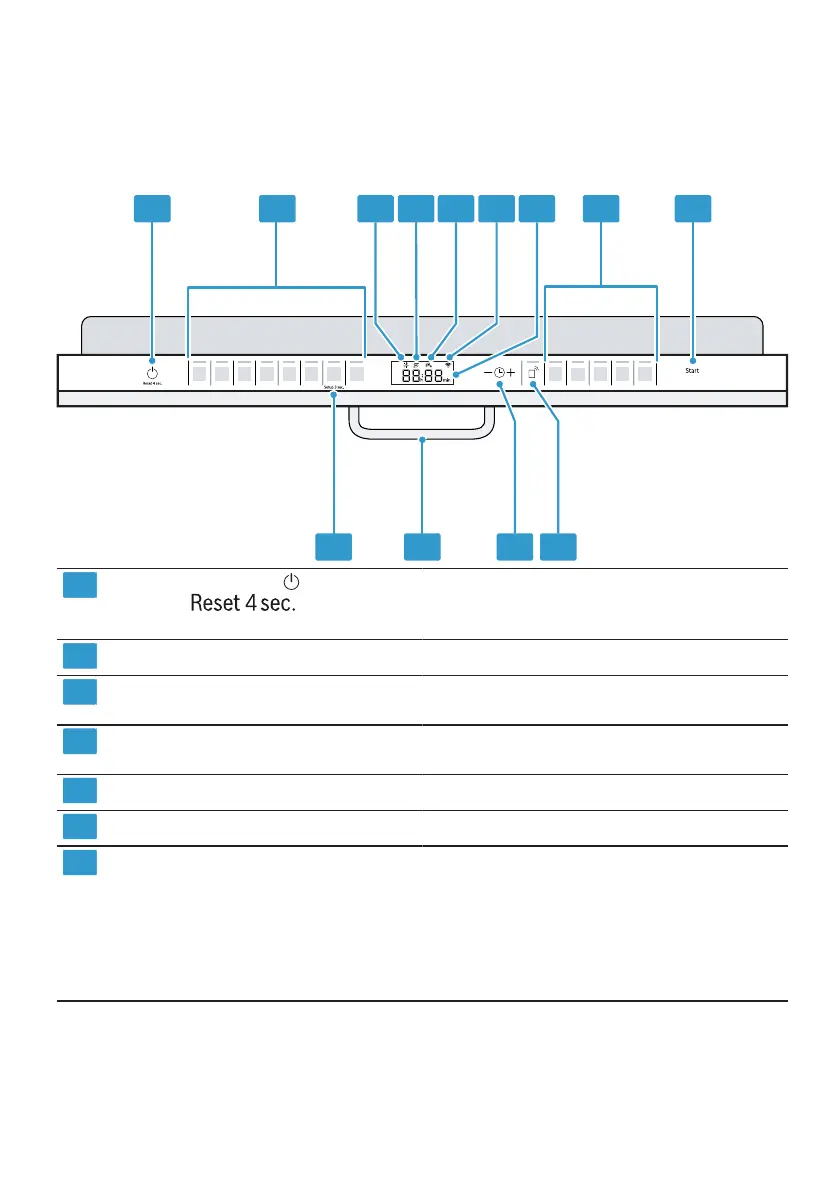
You can use the control panel to set all of your device's functions and receive
information about its operating status.
Some buttons allow you to perform various functions.
1 2 3 4 5 6 7 8th 9
13 12 11 10
1
ON/OFF button
button
and reset
Switch on device →
Page 36
Switch
off device →
Page 38
Cancel
program →
Page 38
2
Program buttons
Rinse aid refill indicator
Programs →
Page 20
3
Rinse aid system
→
"Filling with rinse aid", page 30
4
Special salt refill indicator Softening system
→
"Fill in special salt", page 28
5
Water inlet indicator
WiFi display
Display
Water inlet indicator
Home Connect →
Page 44
6
7
y The di ay shows information about the
remaining term or basic settings. You
can use the display and the setting
buttons to set the basic settings
→
"
Se
spl t you
positions
Basic setting
ite 43
change.
"change positions",
1Depending on the device equipment
17



 To Next Page