Using your USB Modem
Rev 1.0 Sep. 09 21
Using the microSD card (some
models only)
SomeSierraWirelessmodemscanaccommodateamicroSD
externalstoragecard.
TouseamicroSDcard:
1. Ifthereisanon‐functionalmicroSDcardinthelowerslot:
a. Pressitinandthenreleaseit.
b. Gentlyremovethenon‐functionalmicroSDcard.
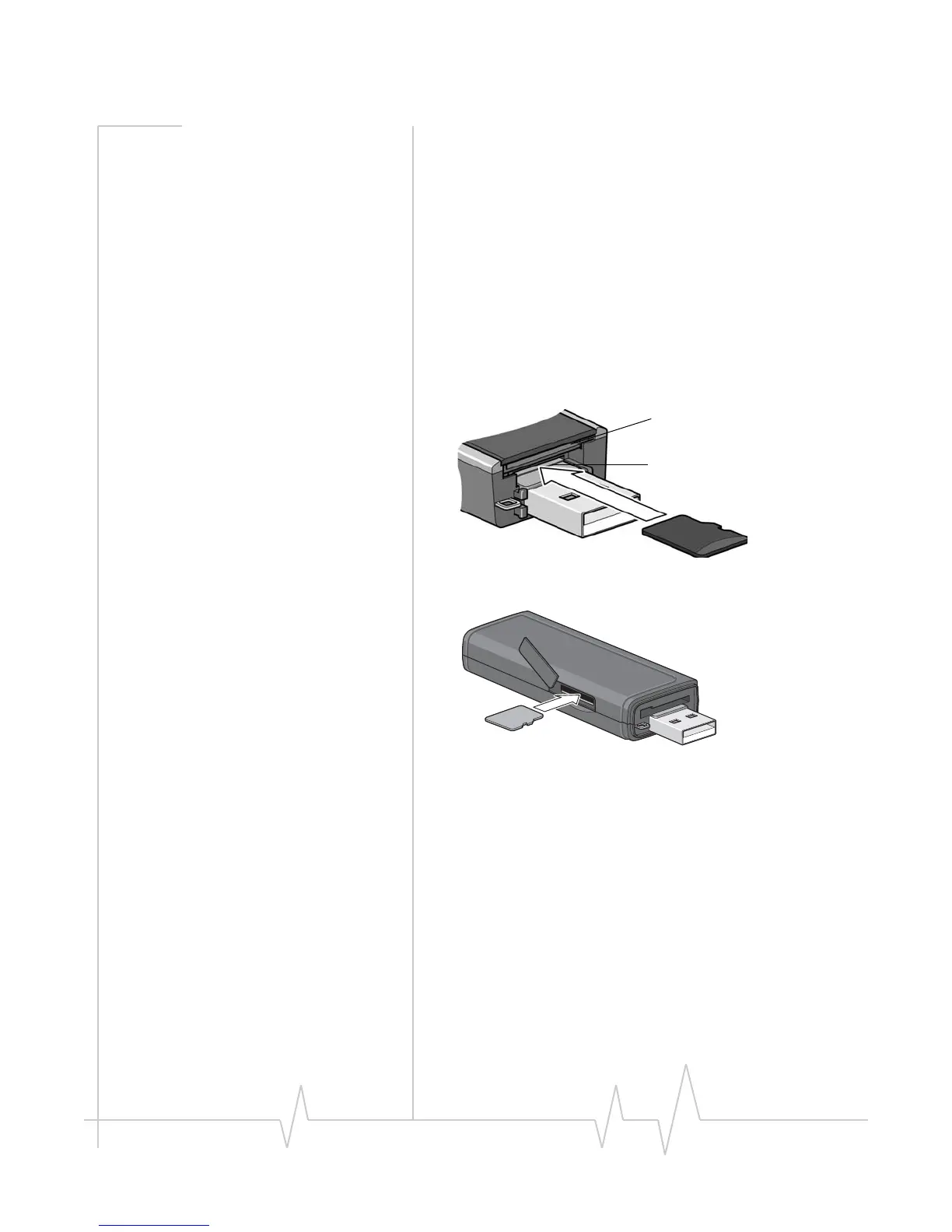
2. InsertthemicroSDcardintothelowerslotat
theendofthe
modem,asshownintheillustration.
OrifthemicroSDslotisonthesideofthemodem:
3. Insertthemodemintothecomputer.
IfthecomputerdoesnothaveWatcherinstalled,youmay
begiventheoptiontoinstallit.Ifyoudonotwanttoinstall
Watcher,canceltheinstallation.YoucanusethemicroSD
cardwithouthavingWatcherinstalled.
ThemicroSDcardappearsasaUSBmemorydrive.Youcan
copy,paste,anddragfilestoandfromitthesamewayasyou
canwithanyotherexternaldrive.
SIM card slot
microSD card slot










 To Next Page