Using your USB Modem
Rev 1.0 Sep. 09 23
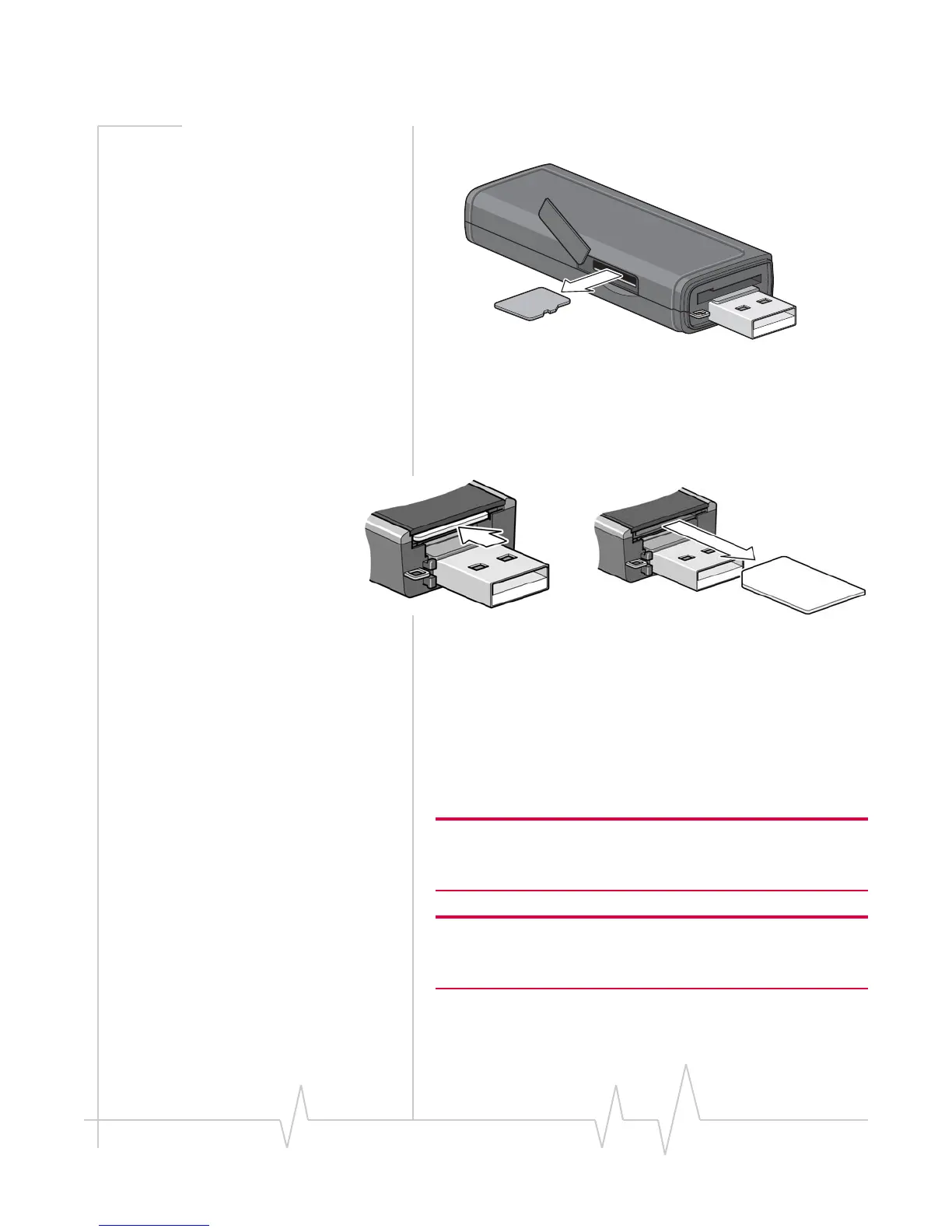
3. GentlypullthemicroSDcardout.
Removing the SIM card
ToremovetheSIMcardfromthemodem,pushtheSIMcard
inandthenreleaseit.SeeFigure 3‐1.
Figure 3-1: Removing the SIM card from a USB modem
Using the extension cable and
clip
SomeUSBmodemsmaycomewithanextensioncableand
clip.Theclipfitsonthetopofyournotebookcomputerand
holdsyourmodem.
Note: To meet FCC (regulatory) requirements, use only the supplied
extension cable and notebook computer clip; other cables and
notebook computer clips should not be used.
Note: Do not insert the modem or the USB extension cable into a
USB hub or, if your keyboard is separate from your notebook
computer, a USB slot on your keyboard.
Tousetheextensioncableandclip:
1. Placetheclipontopofthenotebookcomputer.










 To Next Page