TM
SIGMAC
LE15AB
12
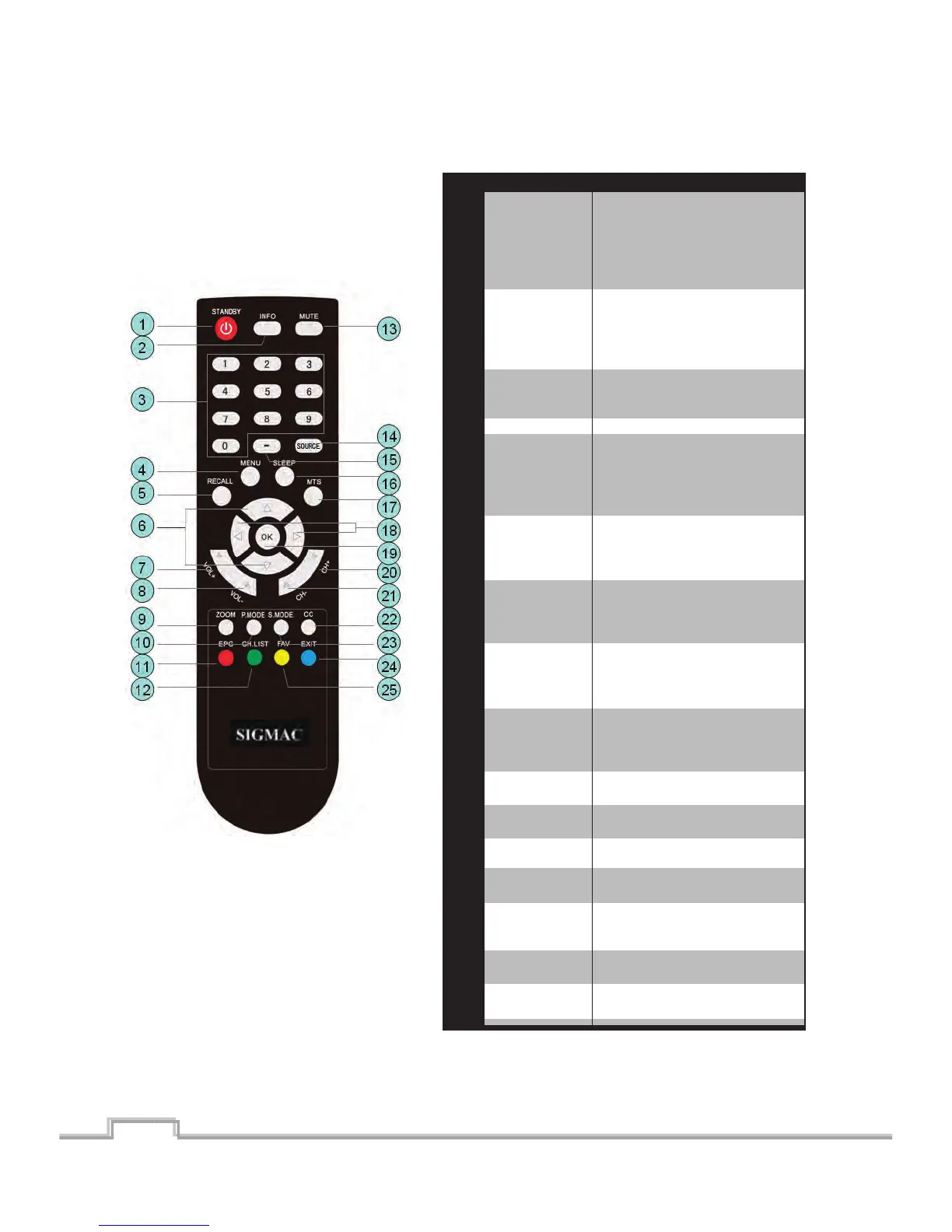
Picture
Mode
selecon
Press this key repeatedly to
switch between different picture
modes/presets
(Contrast/Brightness/Sharpness).
Standard -- Dynamic -- Movie
-- User
EPG
Channel List
Mute
Input Source
selecon
Dash (for
Mul Dlgit
Channel
Selecon)
Sleep mer
MTS
OK
Channel +
Channel -
CC (Closed
Capon)
Sound Mode
Selecon
Exit
Favorite
Channel List
Le and
Right
selecon
buons
Electronic Program Guide --
Press this buon to get detalled
info on the current Digital TV
Program.(**if available from the
provider)
Press this key to access a list of
Channels available on OSD
format.
Mute the current Audlo out
Press this key to switch between
different Input sources and the
TV mode. TV -- AV -- YPbPr
Component --
HDMI1 -- HDMI 2 -- HDMI 3 -- PC
Press this buon repeatedly to
set the sleep mer as sequence.
OFF - 5min - 10min - 15min - 30min - 45min
- 60min - 90 min -120min -180min - 240min
Analog TV: To select/detect
MONO/SAP/STEREO mode.
Digital TV: To switch between
sound modes
Press Le and Right buons to
select between Menu Items
To select/enter or confirm a
menu item.
Go up (Ascending) on the
Channel list
Go down (Descending) on the
Channel list
To Tum on/off “Closed capons”
(**If available)
To switch between the available
sound presets. Standard -- Music
-- Movie -- User
Exit from the Current
Menu/OSD.
Displays a list Favorite
Channels (set by user) on OSD
To access/change into sub
channels on a digital Channel.
Item
10
11
12
13
14
15
16
17
18
19
20
21
22
23
24
25
Funcon Descripon


 To Next Page