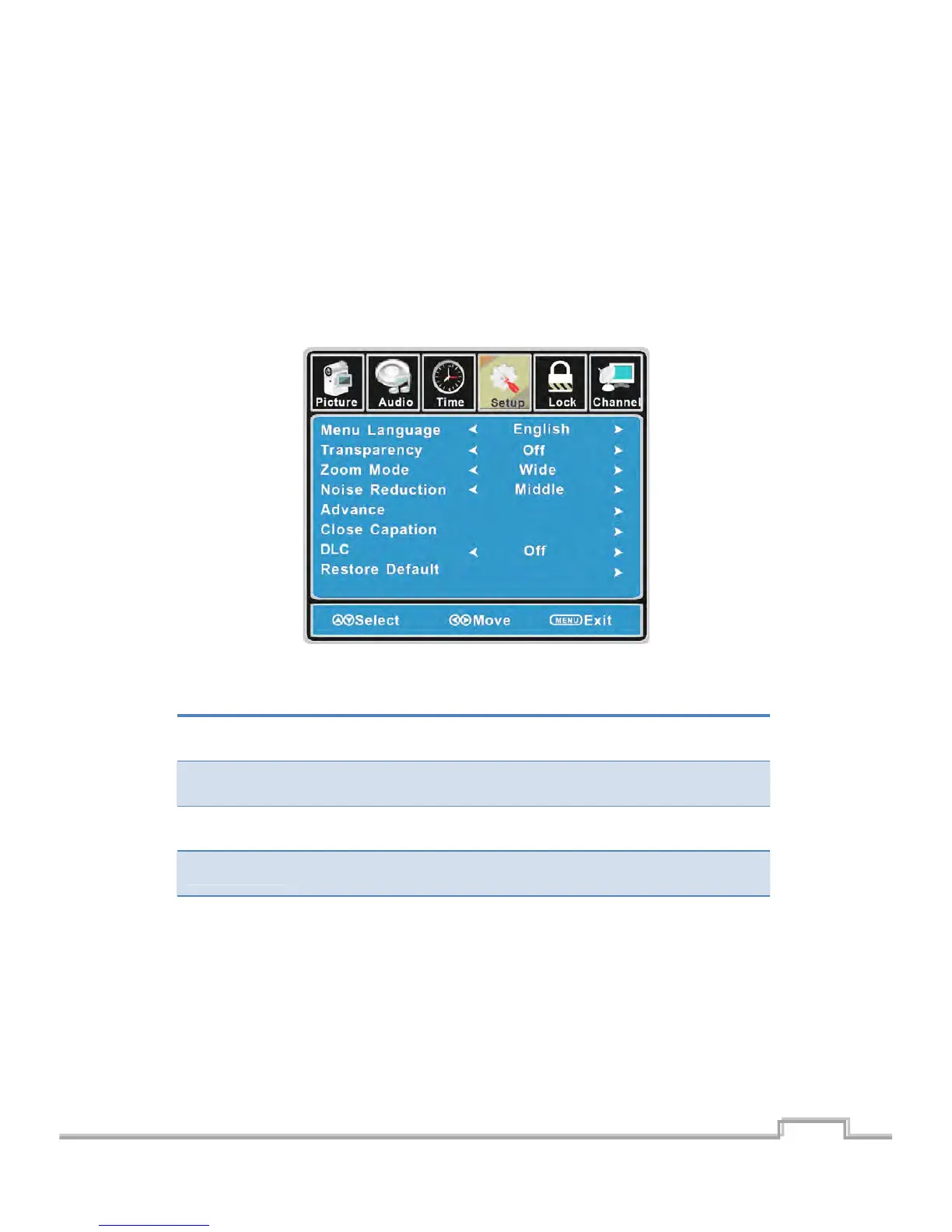
CustomizingtheSETUPSettings
SelectTVsourceforexample.(PressSOUCEbuttontoselectTVmode)
1. PressthePOWERbuttontoturntheLCDTVon.
2. PresstheMENUbuttonontheremotecontroltodisplaytheMainmenu,andusetheŻ/Ź
buttonstoselecttheSETUP.
3. Use the Ÿ/ź buttons to highlight an individual SETUP option, use the Ż/Ź buttons to
changethesetting,andpresstheMENUbuttontoexit.
TheTIMERmenuincludesthefollowingoptions:
MenuLanguage Allowyoutoselectmenulanguageamong:English,FrançaisandEspañol.
Transparency Allowyouto turnonoroffthetransparencyfunction.
ZoomMode
Allow you to select the zoom mode among: Normal, Cinema, Wide and
Zoom.
NoiseReduction
Allow you to select the noise reduction mode among: Strong, Off, Weak,
Middle.
Advance
InputPCsignalfirst,thenpressSOURCEbuttontoselectVGAmode,press Ź
buttontoconfirm.
18
SIGMAC
LE15AB
19


 To Next Page