CustomizingtheLOCKSettings
SelectTVsourceforexample.(PressSOURCEbuttontoselectTVmode)
1. PressthePOWERbuttontoturntheLCDTVon.
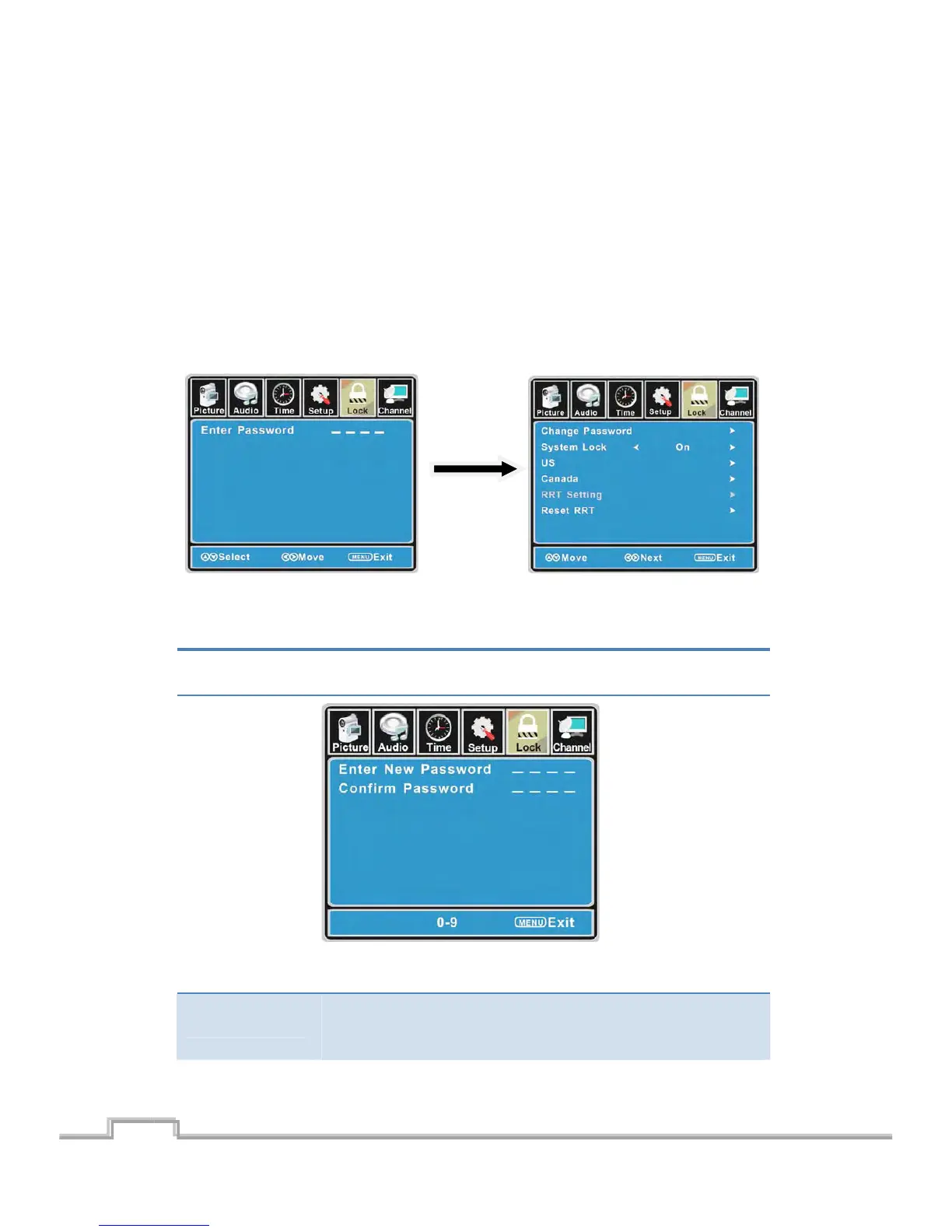
2. PresstheMENUbuttonontheremotecontroltodisplaytheMainmenu,andusetheŻ/Ź
buttonstoselecttheLOC K.
3. Usetheź button tohighlight“EnterPassword”item,usethenumerickeystoinput4Ͳdigital
password.Afteryouthat,thescreenwilldisplaythejuniormenu.Aftersettings,pressmenu
buttontoexit.
NOTE:Thefactorypasswordis0000.Thesupervisionpasswordis8899.
4Ͳdigitalpassword
Input
TheLOCKmenuincludesthefollowingoptions:
ChangePassword
Usetheź buttontoselectthe“ChangePassword”item,thenpressthe
Źbutto ntoenterint othefollowingmenu.
Inputthenew4Ͳdigitalpasswordandinputitagaintoconfirm.
SystemLock
Allowyoutoturnonoroffthesystemlock.
Ifyouturnof fthesystem lock,thenthefollowingitems(US,Canada,RRT
SettingandResetRRT)willunable touse.
21
SIGMAC
LE15AB
22
LCD/LED TV on.


 To Next Page