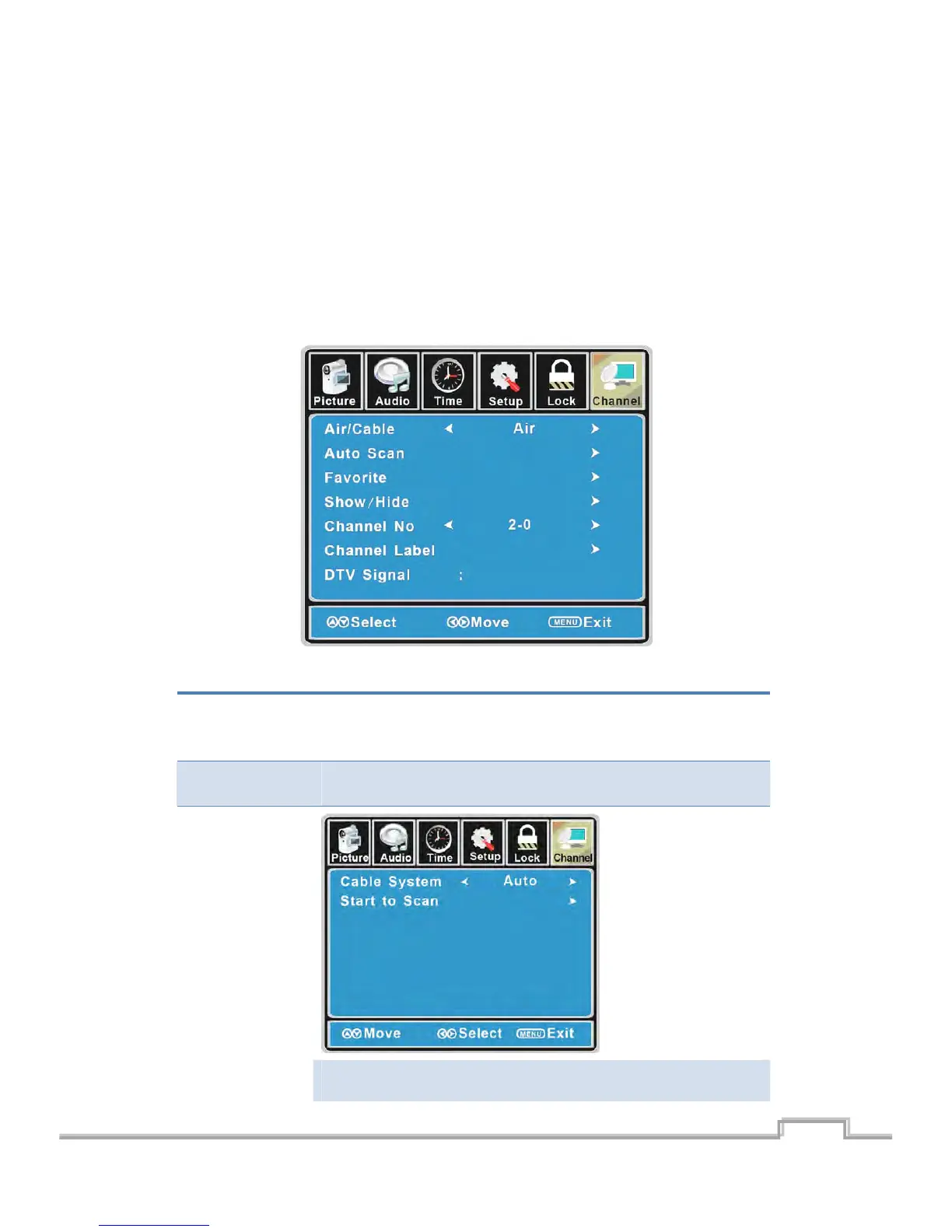
CustomizingtheCHANNELSettings
SelectTVsourceforexample.(PressSOUCEbuttontoselectTVmode)
1. PressthePOWERbuttontoturntheLCDTVon.
2. PresstheMENUbuttonontheremotecontroltodisplaytheMainmenu,andusetheŻ/Ź
buttonstoselecttheCHANNEL.
3. UsetheŸ/ź b uttonstohighlightanindividualCHANNELoption,usetheŻ/Źbuttonsto
changethesetting,andpresstheMENUbuttontoexit.
TheCHANNELmenuincludesthefollowingoptions:
Air/Cable
AllowsyoutoselectantennabetweenAirandCable.
If you select“Cable”, thefollowing items (Favorite, Show/Hide, Channel
NO.,ChannelLabelandDTVSignal)areunabletouse.
AutoScan
Usetheź buttontohighlightthe“Auto Scan”item,thenpressŹbutton
toenterintothefollowingmenu.
Ifyouselect“Air ”as inputsignalinAntenna item, youcan presstheŹ
buttontosearchthechannelsautomatically.
24
SIGMAC
LE15AB
25
LCD/LED TV on.
SOURCE buon to select TV mode)


 To Next Page