TM
Item
Power
1
2
Volume up
Increase the Volume
TV Channel
recall buon
Recalls the last TV Channel
Switches between the Normal
Working mode and the Stand-by
(minimum power consumpon)
mode on the TV. (LED indlcator
on the TV will turn Red when in
stand-by mode)
info
Press this key to show the
current program informaon
(Channel number, CC,
Language, Resoluon, Aspect
Rao.)
Up and
Down
selecon
buons
Press Up and Down buons to
select between Menu Items
One Digit
selecon
Use 0~9 Buons to select the
desired Channel.
Menu
call/ selecon
Access On screen Display Menu
for TV Sengs and Opons.
Volume
down
Decrease the Volume
3
4
5
6
7
8
9
Funcon Descripon
Zoom
Press this key repeatedly to
zoom into the picture in a
sequence as follows - Cinema-
zoom - Normal - wide
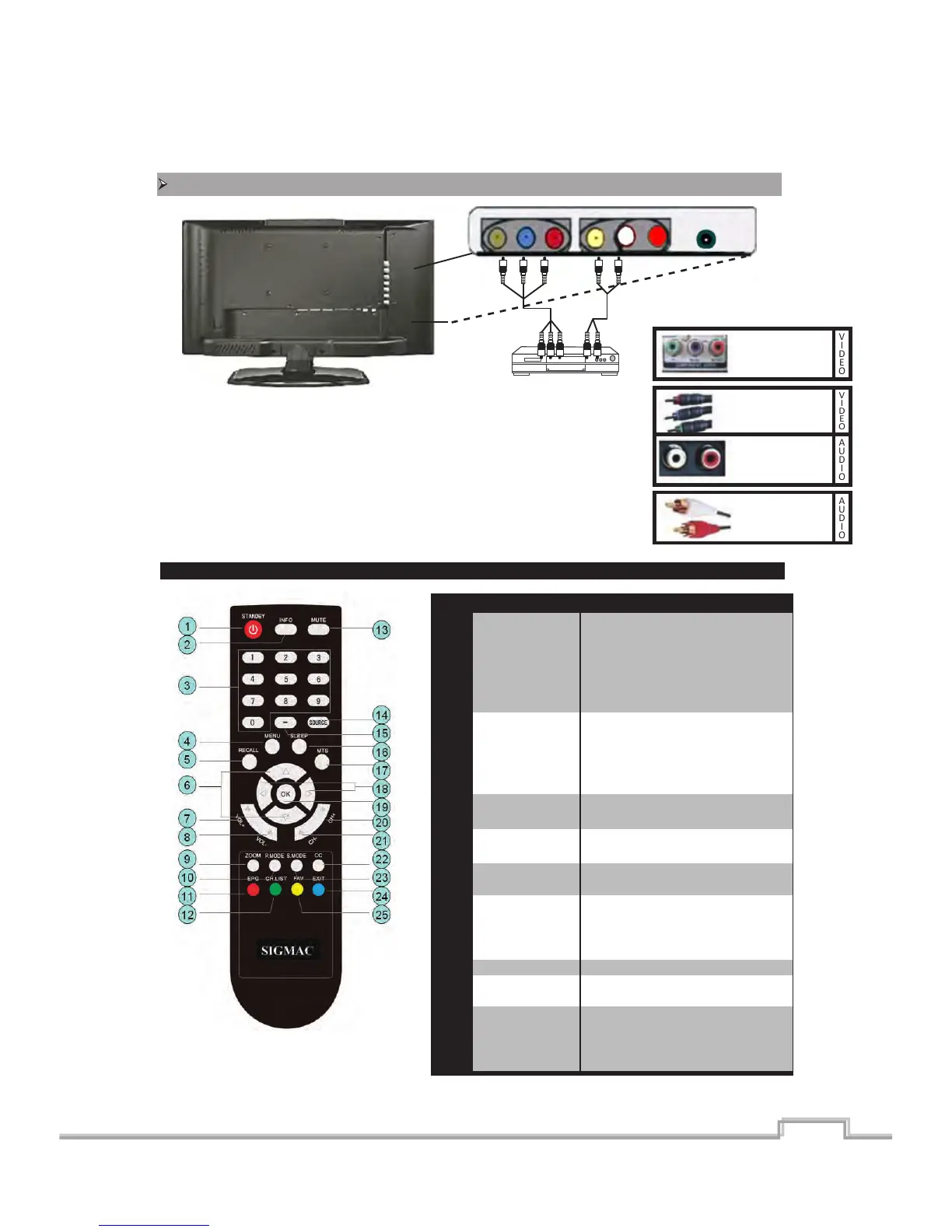
Component Video Connecon (Y Pb Pr Input channels).
YPbPr Ports
on TV
V I D E O
Component
Video Coble
V I D E O
L/R Audio in
Port on TV
A U D I O
L/R Audio
Cable
A U D I O
Remote Funcons
6.
Component video provides beer picture quality than the composite video and
supports hi-def Picture signals. DVD Players, DTV or Cable Set-top boxes and
Game consoles are few of the examples for products which carry a componen
video out put. Video and Audio carried over 5 separate cables. ( 3 for video
signals, 2 for L/R audio).
3 Video cables ( RGB, YPbPr ) coming out from the player can be connected to
one of the Component inputs, and the 2 L/R audio cables should be conneted
to the same Channel as the video has been connected ( Component 1 or 3).
SIGMAC
LE15AB
11



 To Next Page