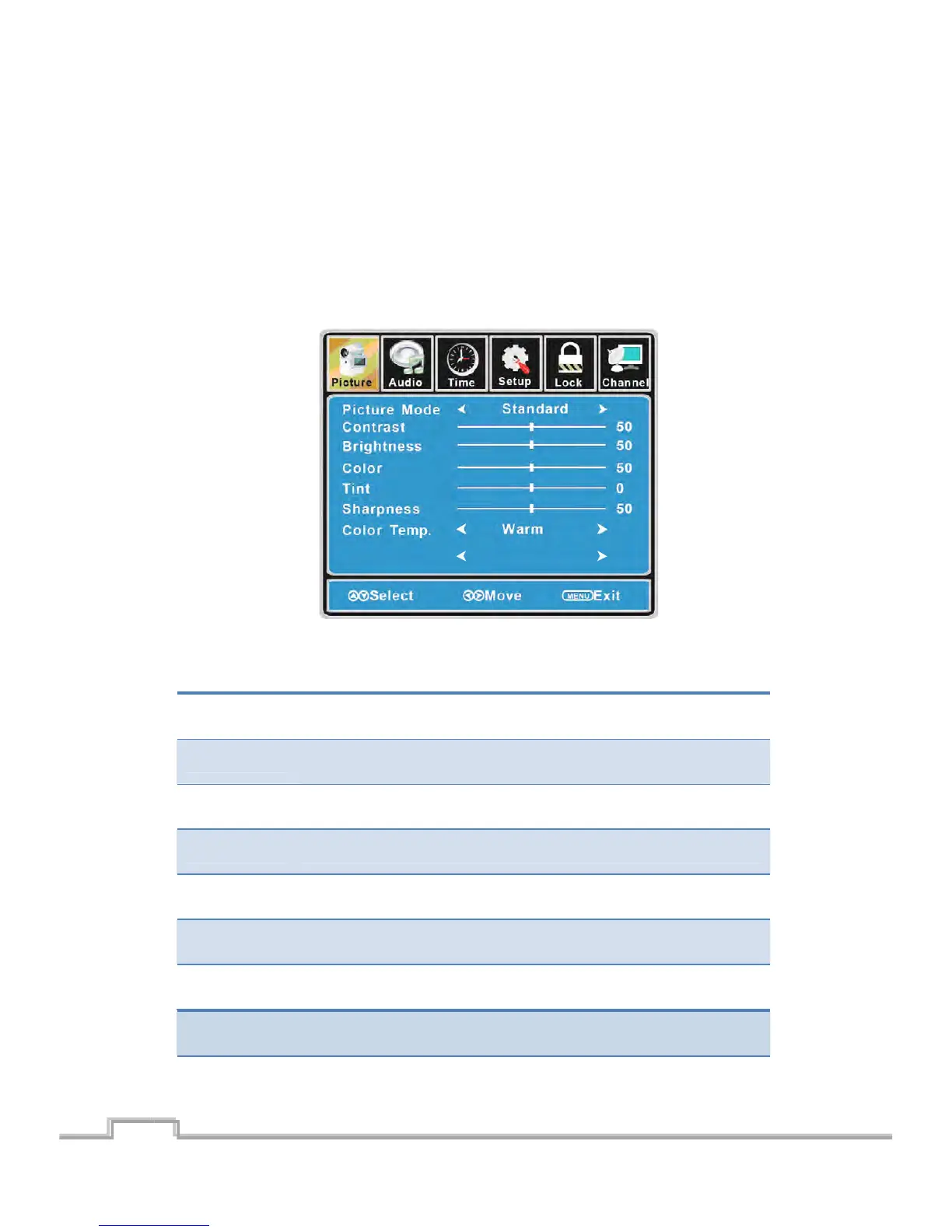
CustomizingthePICTURESettings
SelectTVsourceforexample.(PressSOURCEbuttontoselectTVmode)
1. PressthePOWERbuttontoturntheLCDTVon.
2. PresstheMENUbuttonontheremotecontroltodisplaytheMainmenu,andusetheŻ/Ź
buttonstoselectthePICTURE.
3. Use the Ÿ/ź buttons tohighlight an individual PICTUREoption, usethe Ż/Ź buttons to
changethesetting,andpresstheMENUbuttontoexitthemenu.
ThePICTUREmenuincludesthefollowingoptions:
PictureMode Cycleamongpicturedisplaymodes:Standard,Dynamic,Mild,User.
Contrast
Control the difference between the brightness and darkest regions of the
picture.
Brightness Controltheoverallbrightnessofthepicture.
Color Controlthecolor.
Tint Controlsthetint.
Sharpness
Increase this setting to see crisp edges in the picture; decrease it for so ft
edges.
ColorTemp. Cyclesamongcolormodes:Normal,Cool,Warm.
15
Blue Screen Off
Blue Screen
Allow you to select between off and on.
SIGMAC
LE15AB
16
LCD/LED TV on.


 To Next Page