UM_FULL_56SL_REV_A 4
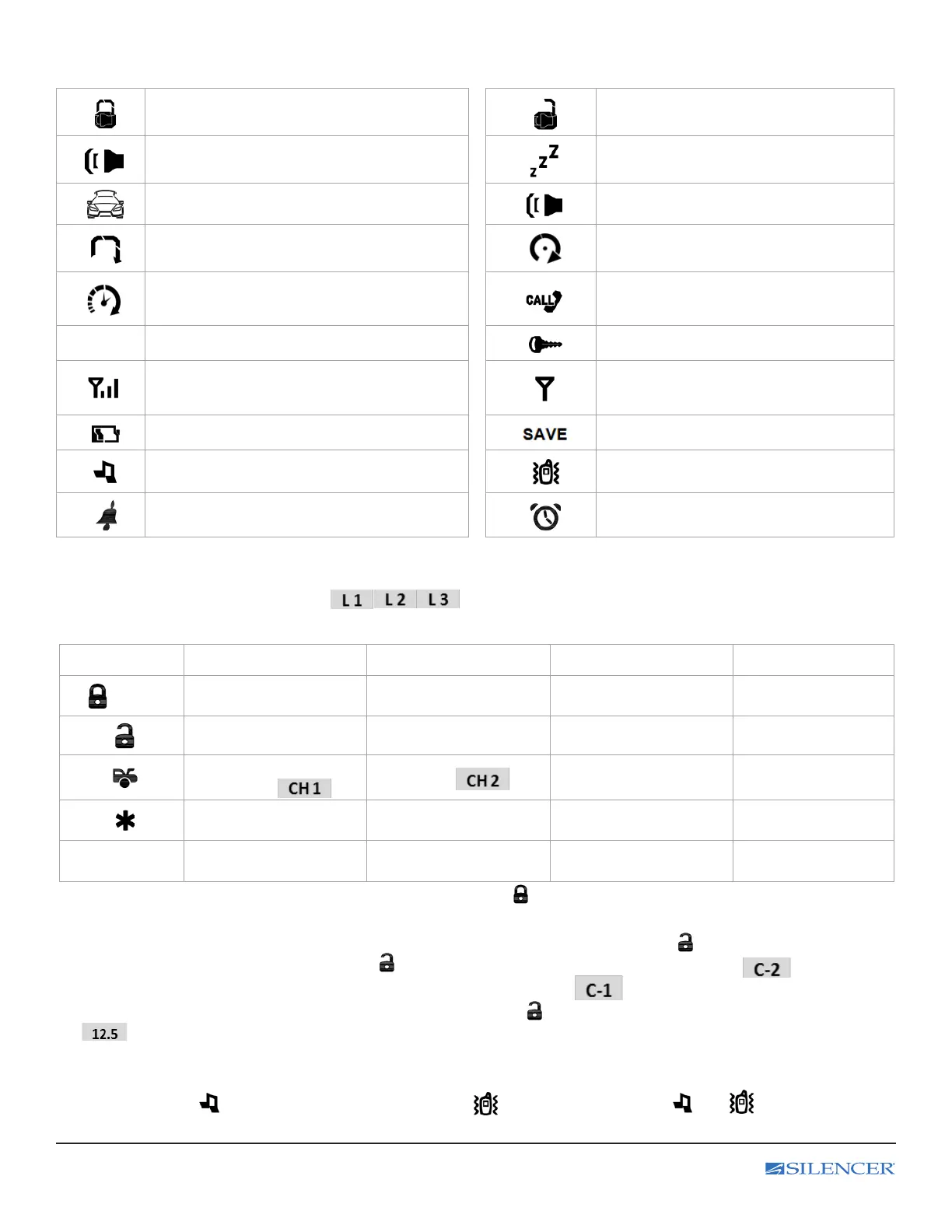
B. STANDARD LCD ICON CONFIGURATIONS:
The lock icon will be displayed when
the door are locked.
The unlock icon will be displayed when the
door are unlocked.
System trigger
Valet Mode
All the function shall be temporally on hold.
Trunk Release
Panic mode
Engine Cranking
Your vehicle engine cranking by remote control.
Engine Running
Your vehicle’s engine is running
Timer Control Start
Engine starts automatically every
2 or 3 hours
Driver paging
2
2
nd
Car Operation
Button Lock (Icon on)
Remote Transmission
You are transmitting the signal to control unit.
In – Range Indicator
You are within the range of the remote
control.
Low Battery
Power Save
Melody Mode
Vibration Mode
Alarm Clock
Parking Meter
Reminder when time is up for parking
C. LCD TRANSCEIVER REMOTE CONTROL:
1. Press the F buttons the number of times corresponding to the Level you wish to select;
the LCD will display LEVEL number ( )
2. Press the button while LEVEL number text is still on to perform the command.
Button Direct Access
F x 1 Level 1 F x 2 Level 2 F x 3 Level 3
1.0 sec.
Silent Arming
Vehicle’s
Status Check
Disarm & Unlock or
Silent Disarming
Remote Valet ON / OFF Car 1 / Car 2 operation Voltage Check
Trunk Release
(Aux 1)
Aux 2
Remote Start or Running
Time Extender
Timer Start ON / OFF
Daily Timer Start
ON / OFF
F 1 sec
Melody /
Vibration Mode
Power Save Mode
ON / OFF
Button Lock
ON / OFF
Vehicle’s Status Check: Press F button rst then press and hold buttons for 1 second and release.
The LCD remote transceiver will display the current status of the vehicle.
Second Vehicle Security Operation: Press F button 2 times rst then press and release button to enter Second
Vehicle Security Mode, Under this mode press button to select CAR 2 operation, The 2 icon and display
on the LCD screen or CAR 1 operation and the 2 icon will disappear and display on the LCD screen.
Voltage Check: Press F button 3 times rst then press and release button. The LCD remote transceiver will display
the voltage condition of the vehicle.
Melody / Vibration Mode: Press F button rst then press and hold F buttons for 1 seconds until the beep conrms,
then release the button to enter Melody / Vibrating Mode, Under this mode press and hold F button for 1 seconds to
select Melody Mode icon will display) or Vibration Mode icon will display) or both and icon will display).



 To Next Page