42 GB/IE
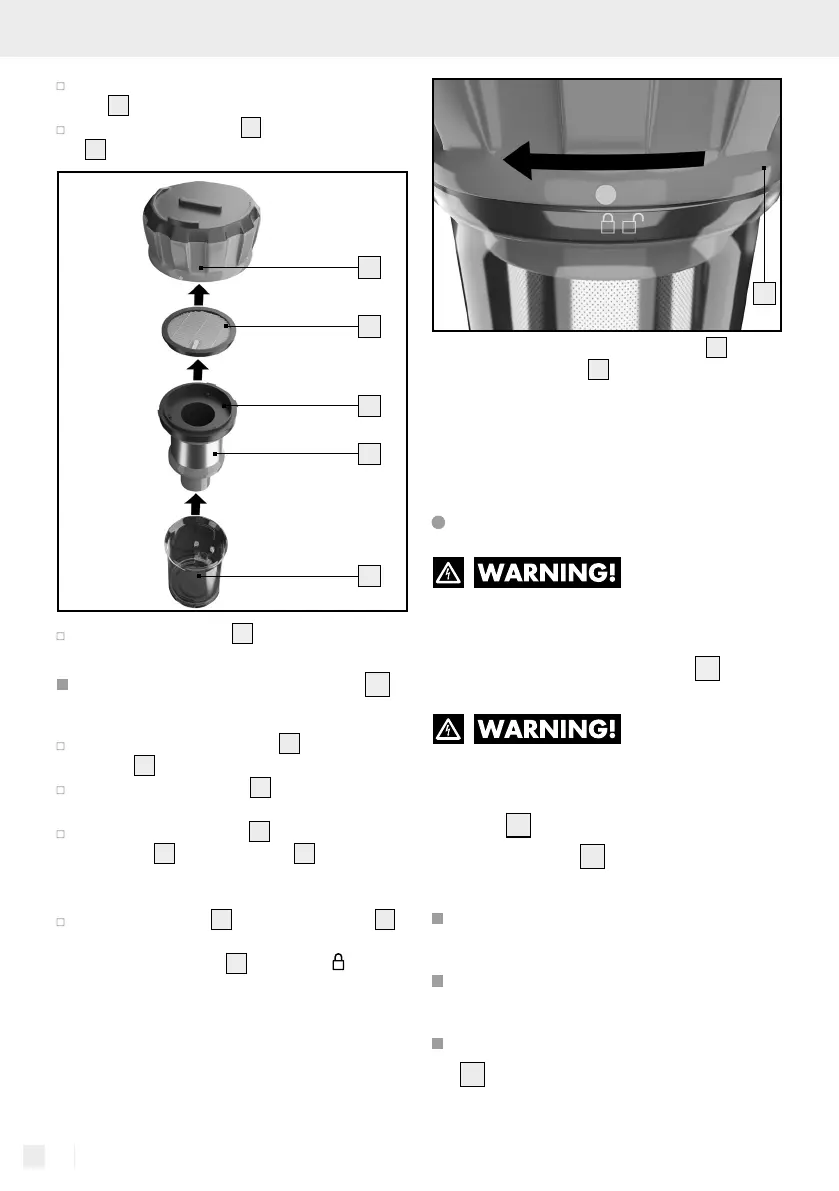
Take the entire filter unit out of the dust collec-
tor
20
.
Remove the HEPA filter
25
from the filter carrier
26
by pulling it out upwards on the flap.
24
25
26
27
20
Clean the HEPA filter
25
by tapping it out.
Only clean with a paintbrush or soft brush.
Do not clean the HEPA filter
25
with water!
Rinse the stainless steel filter
27
with the filter
carrier
26
under clear water.
Clean the dust collector
20
thoroughly using a
damp cloth.
Leave the dust collector
20
and the stainless
steel filter
27
with filter carrier
26
to dry thor-
oughly before you put all the parts back in the
reverse order.
Replace the cover
24
of the dust collector
20
and secure it by turning it to the left until the
marking on the cover
24
is above the - symbol.
24
Note: Check the filters (HEPA filter
25
and
stainless steel filter
27
) regularly when cleaning
for damage or deformations. Filters, which indi-
cate damage or deformations or which can no
longer be cleaned must be replaced. Please con-
tact customer service if this happens.
Cleaning the accessory parts
DANGER OF
ELECTRIC SHOCK! Always switch
off the product before cleaning and
remove the mains adapter
8
from
the mains socket.
DANGER OF
ELECTRIC SHOCK! Do not im-
merse the product, the rechargeable
battery
2
, the mains cable or the
mains adapter
8
in water or other
liquids to clean it.
Do not clean the product when it
is charging.
Let the product cool before you
clean it.
Remove the rechargeable battery
2
before cleaning.


 To Next Page
 Loading...