43 GB/IE
Do not use solvents, petrol, etc.
These would damage the
product.
Empty the dust collector
20
before cleaning
(see chapter “Emptying the dust collector”) and
thoroughly tap it out.
Cleaning the surface of the product:
When cleaning the surfaces, e.g. of the main
unit
4
, rechargeable battery
2
or electric
floor brush
13
, use a feather duster or soft,
slightly moistened cloth for persistent dirt.
Cleaning the accessories:
Regularly remove any hair and dirt from the
accessory parts.
Clean the crevice nozzle
12
and the dust brush
11
under running water. Allow all accessory
parts to dry thoroughly before using or storing
them again.
Cleaning the rotating brush roller:
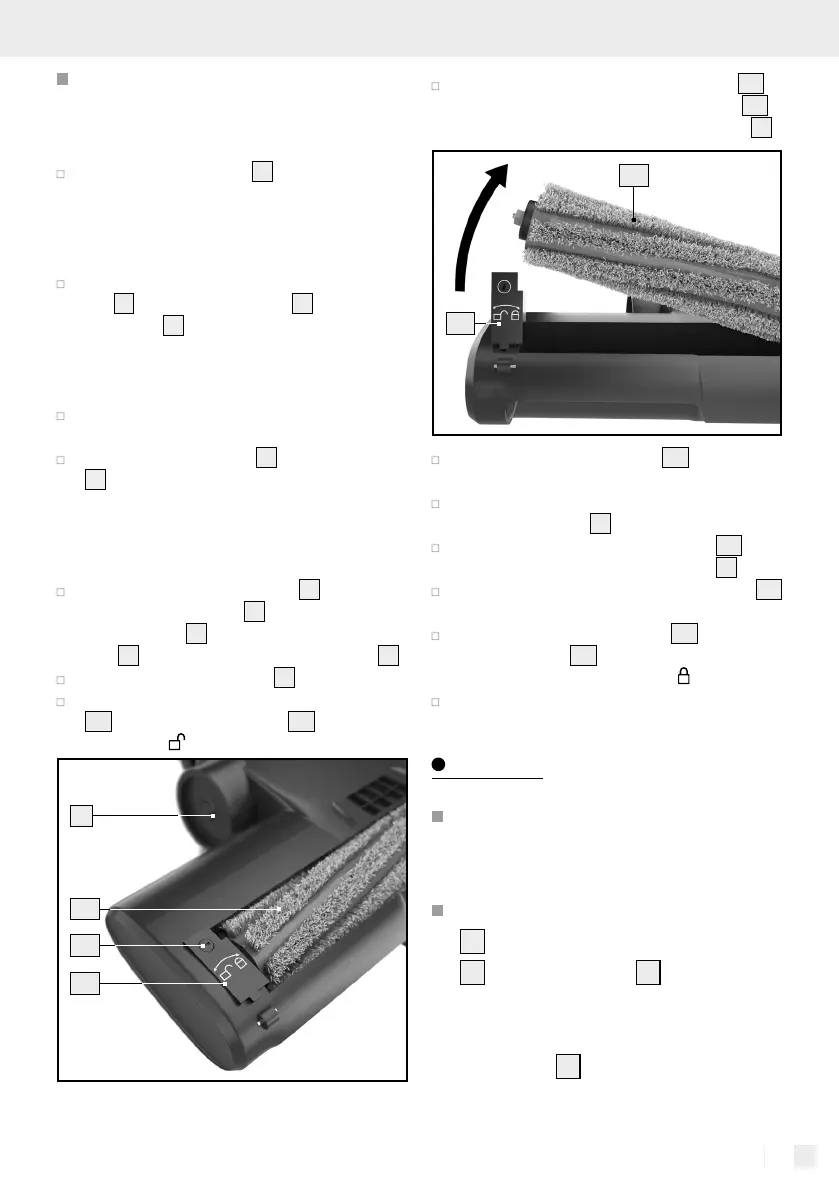
Remove the electric floor brush
13
from the
aluminium suction tube
15
. To do so, press the
release button
14
on the aluminium suction
tube
15
and remove the electric floor brush
13
.
Turn the electric floor brush
13
around.
Use a flat-tip screwdriver to turn the fixing screw
13 c
of the locking mechanism
13 b
anticlockwise
towards the
- symbol.
13 c
13 b
13
13 a
Carefully fold up the locking mechanism
13 b
and then remove the rotating brush roller
13 a
from the housing of the electric floor brush
13
.
13 a
13 b
Clean the rotating brush roller
13 a
by removing
any hair or dirt.
Also remove any dirt from the housing of the
electric floor brush
13
.
Then replace the rotating brush roller
13 a
in
the housing of the electric floor brush
13
.
Then carefully press the locking mechanism
13 b
down again.
Attach the rotating brush roller
13 a
by turning
the fixing screw
13 c
using a flat-tip screwdriver
clockwise in the direction of the
- symbol.
Check that it is positioned correctly.
Storage
Disconnect the power supply if
the product will not be used for
an extended period.
Remove the rechargeable battery
2
from the holder in the handle
1
of the main unit
4
(see chapte
r
“Charging the rechargeable bat-
tery”) and store it outside of the
main unit
4
.


 To Next Page
 Loading...