19GB/IE/NI
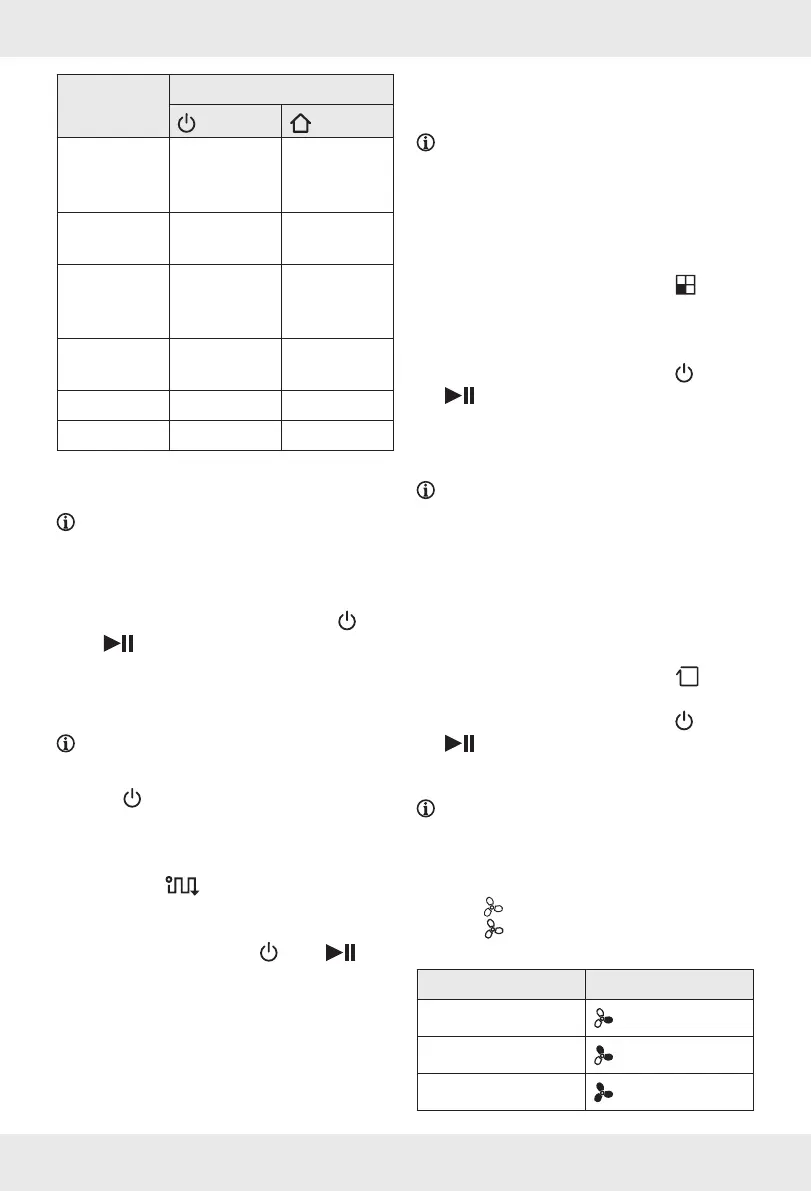
Action Indicator light
[2]
[3]
Return to
charging
dock
[5]
Lights up
white
Flashes white
Charging Breathing
effect, white
Breathing
effect, white
Charging
completed/
Sleep mode
Off Off
Standby
mode
Flashes white Off
Product error Lights up red Off
Low battery Flashes white Flashes white
Cleaning modes
NOTE: The product features 3different
cleaning modes for better results.
o Ensure the product is in standby mode (see
“Indicator lights on the product”).
o If the product is in sleep mode, press [2]
or [] to enter standby mode.
Automatic mode
(Fig.E)
NOTE: In this mode, the product cleans
surfaces and corners in alternating fashion.
1. Press
[2] or MODE [] to start
vacuuming. The product begins to vacuum in
automatic mode.
If you activate the product via the remote
control
[], [] lights up.
2. After cleaning: The product automatically
returns to the charging dock
[5].
3. To stop vacuuming, press
[2] or [].
Spot mode
(Fig.F)
NOTES:
o This mode is suitable for very dirty or very
dusty areas. In spot mode, the product
focuses on one area to clean.
o This mode ends automatically and the
product enters standby mode.
1. Press MODE
[] repeatedly until []
lights up. The product starts vacuuming.
2. After cleaning: The product switches to the
last selected operating mode.
3. To end this mode manually, press
[2] or
[].
Corner mode
(Fig.G)
NOTES:
o This mode is suitable for cleaning the corners
of a room. In this mode, the product follows
a barrier (for example a wall).
o The product operates continuously in this
mode until the battery level is low. The
product then automatically returns to the
charging dock
[5].
1. Press MODE
[] repeatedly until []
lights up. The product begins to vacuum.
2. To end this mode manually, press
[2] or
[].
Setting the suction power
NOTE: You can set the suction power in any
cleaning mode.
1. Select a cleaning mode (see “Cleaning
modes”).
2. Press
[] repeatedly to set the desired
level.
[] lights up. The 3different levels
are indicated as follows:
Level Display
1
2
3










 To Next Page