21GB/IE/NI
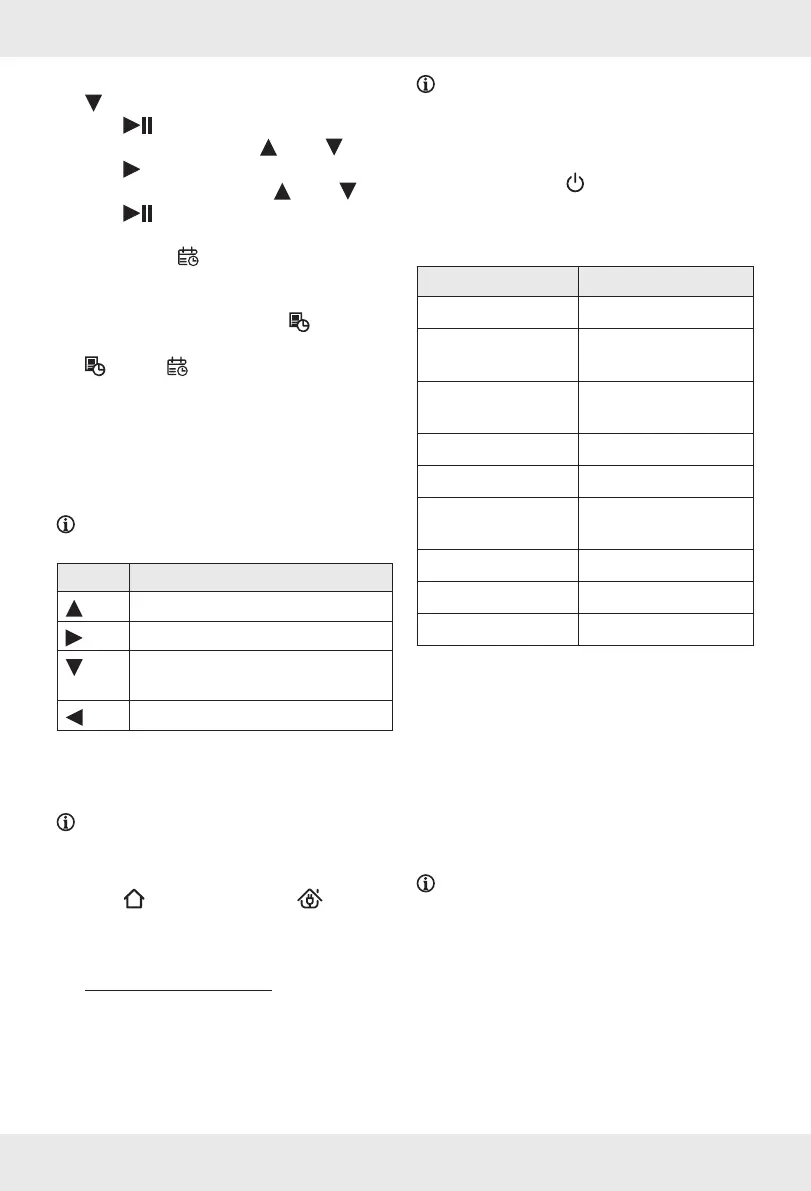
5. To delete any selected weekday, press
[].
6. Press
[] to confirm the setting.
7. Set the hours by pressing
[] or [].
8. Press
[] to confirm the setting.
9. Set the minutes by pressing
[] or [].
10. Press
[] to store the setting.
11. The product emits an acoustic signal for
confirmation.
[] lights up.
In order to display the programmed
weekdays and the time and make
adjustments as needed, press
[].
12. To delete a set schedule, press and hold
[] until [] and the programmed
time disappear from the display
[].
The product emits an acoustic signal for
confirmation.
Steering the product
manually
NOTE: You can steer the product manually
when it is in standby mode or working mode.
Button
Direction
[] Forwards
[] Right
[]
Turning back (product does a 180°
turn)
[] Left
Sending the product to the
charging dock
NOTE: You can send the product to the
charging dock
[5] when the product is in
standby mode or working mode.
o Press [3] on the product or [] on
the remote control
[]. The product returns to
the charging dock
[5].
Cleaning and care
m
ATTENTION! Risk of product
damage!
Do not rinse the product directly with water.
Do not wipe the product with a cloth soaked
in water.
NOTE: Unplug the mains adapter[] from
the socket-outlet, if the product will not be
used for an extended period.
o Before cleaning the product:
– Press and hold
[2] until the button’s
indicator light goes off.
– Unplug the mains adapter
[] from the
socket-outlet.
Part Cleaning intervals
Dust collector
[] After each use
Primary filter
[9]
Weekly (2× per week
if very dirty)
HEPA filter
[]
Every 4weeks
(2weeks if very dirty)
Side brushes
[] [] Every 4weeks
Anti-drop sensors
[] Every 2weeks
Charging
contacts
[7] Every 4weeks
Roller brush
[] Every 4weeks
Water tank
[] After each use
Floor cloth
[] After each use
Emptying the dust collector/Cleaning
the filters/Replacing the HEPAfilter
(Fig.I)
m
ATTENTION! Risk of damage to the
HEPAfilter!
Do not clean the HEPAfilter
[] with the
cleaning brush
[].
Do not rinse the HEPAfilter
[] with water.
NOTE: Replace the HEPAfilter[] after
max.6months.
1. Press the release button
[] on the dust
collector
[]. Pull the dust collector out of the
product.
2. Open the top cover
[].
3. Empty the dust collector
[].
4. Pull the lug
[8] and fold the primary filter[9]
upwards.
5. Remove the HEPAfilter
[].










 To Next Page