SilverCrest STVS 50 A1
English - 25
4.4 Display (9, Fig. C)
22
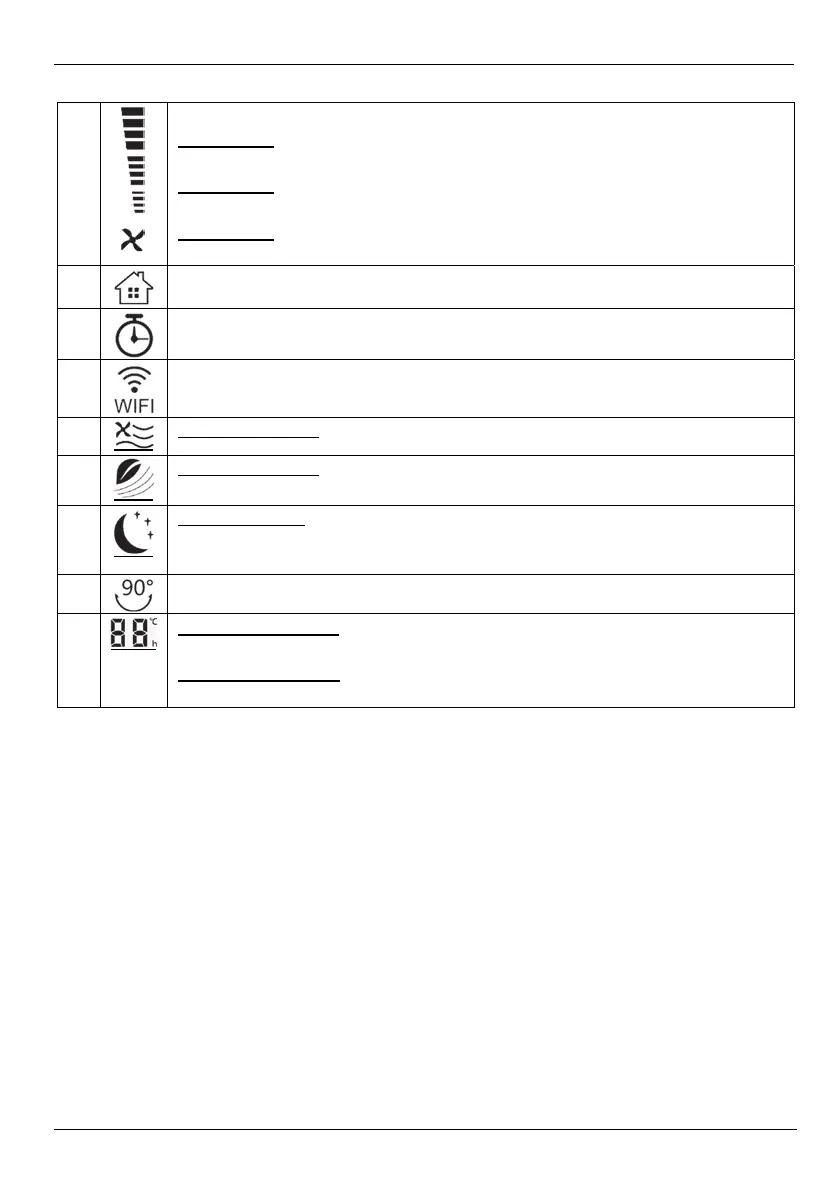
Display of fan speed in 3 levels:
Fan level 1:
the bottom 4 bars flash.
Fan level 2:
the bottom 4 bars flash, followed by the middle 4 bars.
Fan level 3:
the bottom 4 bars flash, followed by the middle 4 bars and finally the top 4 bars.
23
Lights when the room temperature is displayed.
24
Lights when the TIMER function is active.
25
Flashes when WiFi connection is being established.
Lights up when WiFi connection is established and active.
26
“Normal” fan mode: The air flow remains constant.
27
“Natural” fan mode: The air flow simulates a natural wind by rising and falling.
28
“Sleep” fan mode: The air flow reduces over time. If the fan speed selected is not the
lowest, the fan speed is reduced by one setting after approx. 30 minutes. After about 15
seconds, the display (9) goes ou
29
Oscillation active
30
When switched on:
mode, room temperature, remaining TIMER time and selected function are displayed.
When switched off:
the current room temperature is displayed directly after switching off.


 To Next Page
 Loading...