SilverCrest STVS 50 A1
32 - English
8.3 Remote control (19) - inserting the battery
You can operate the fan (8) from the control panel (4) on the fan or using the remote control (19).
The battery has already been fitted into the remote control (19). Remove the plastic strip
sticking out of the battery compartment in order to activate the battery.
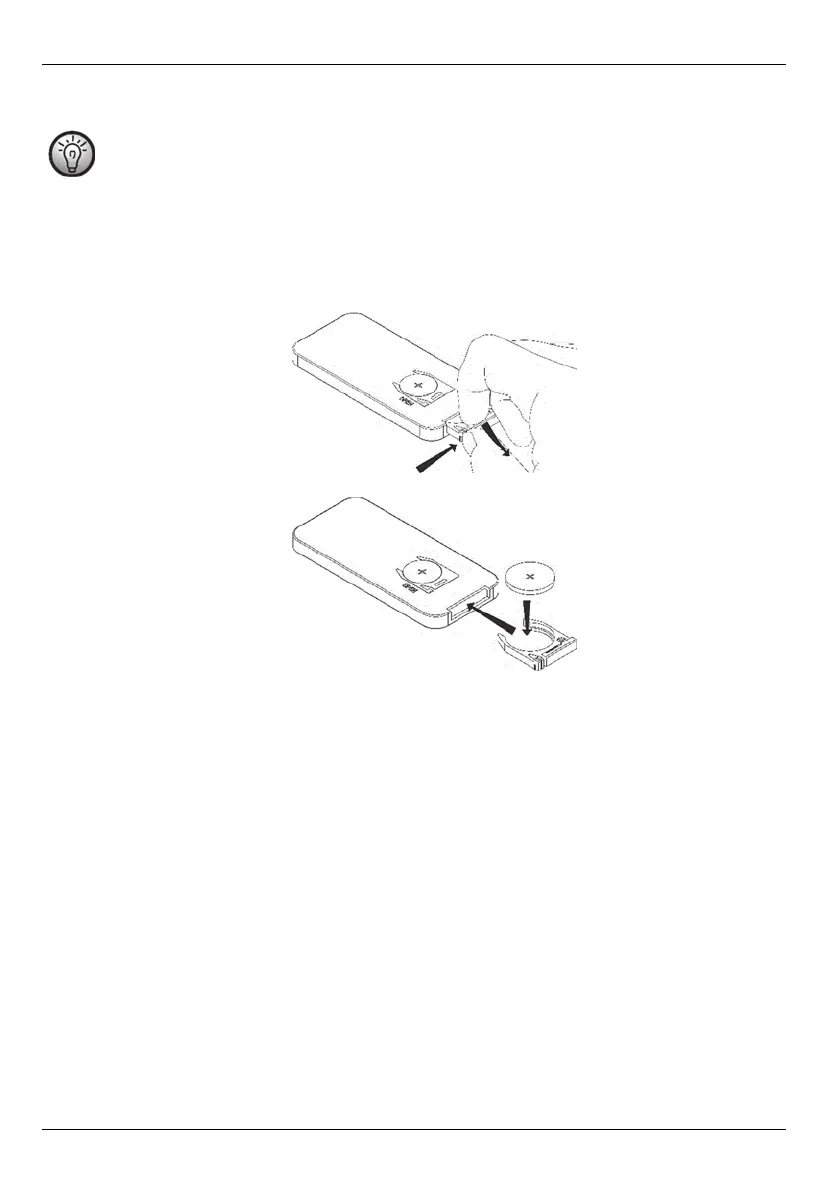
If the battery in the remote control (19) is empty, replace it with a new 3 Volt CR2025-type battery. The
procedure is as follows:
• Press the closure flap on the battery compartment towards the middle of the remote control (19). Pull
the battery holder out.
• Remove the empty battery and insert a new battery. Make sure the polarity is correct (+/-).
• Push the battery holder back into the remote control (19) until the closure flap clicks into place.


 To Next Page
 Loading...