34
IQ POWER CONTROL STATION
WITH SENSOR TECHNOLOGY
5201263 Rev D
7. TROUBLESHOOTING
NOTE – Only qualified service personnel are to perform troubleshooting
tasks.
CAUTION – Electrical Shock Hazard
Do not troubleshoot high voltage components with power supply energized.
Disconnect input power before troubleshooting. Troubleshooting must be
performed by a qualified service person.
ATTENTION – Risque De Choc Électrique
Ne pas faire de dépannage des composantes de haute tension avec
alimentation sous tension. Couper l’alimentation électrique avant le
dépannage. Le dépannage doit être effectué par une personne qualifiée.
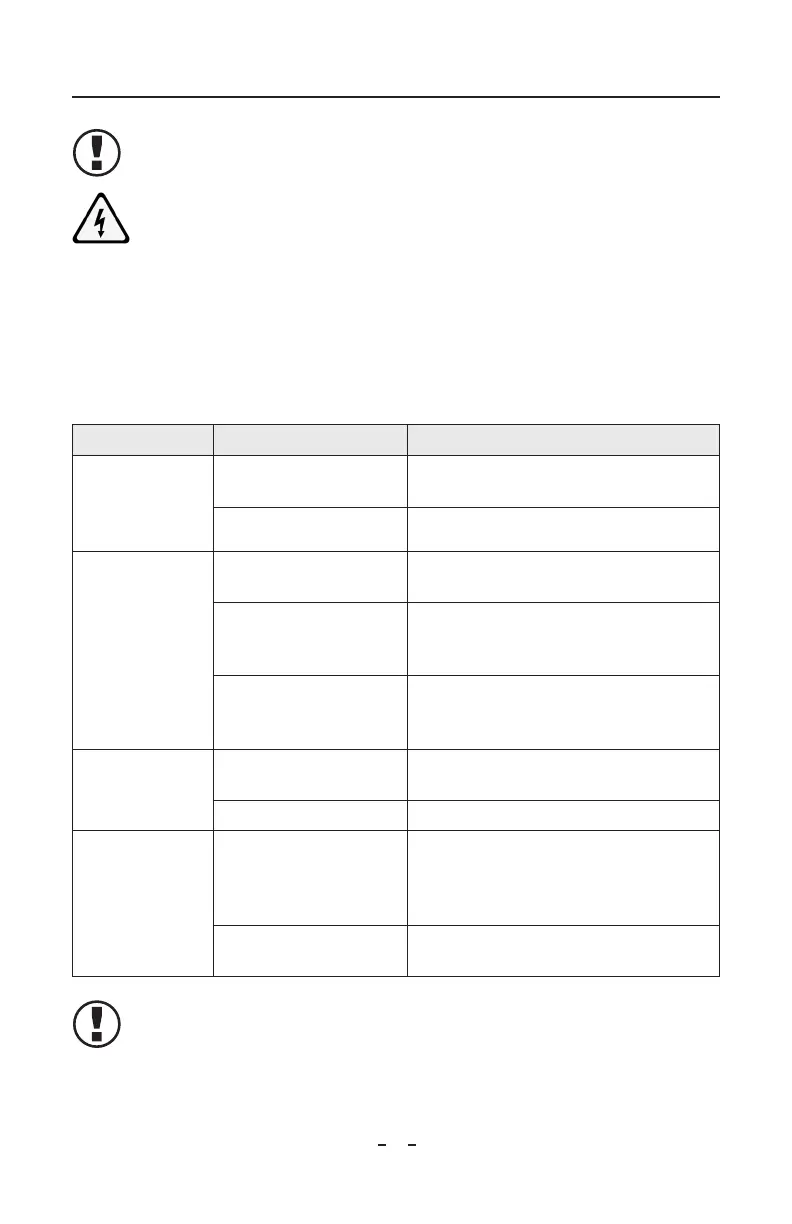
PROBLEM CAUSE SOLUTION
Control Station not
working; touch
screen dark, not
illuminated
Power not on at Control
Station
Turn on power switch at power entry module
Line voltage not supplied Check line voltage and connections.
Control Station not
working; touch
screen lit, display
“frozen”
Software needs reset Turn Control Station off, wait 10 seconds, turn
Control Station on
Touchscreen contaminated Examine touchscreen for build-up of debris that
would simulate an input, carefully clean debris
off touchscreen
Touchscreen damage Examine touchscreen for damage that would
simulate an input (cuts, gouges, deformities in
display area), replace touchscreen
Control Station not
delivering power to
device
Poor electrical connections Check connections of device cables at device and
Control Station. Check condition of cables
Internal fuse blown Replace fuse, see below
Communications
failure
Incorrectly wired modular
cable (check against cable
illustrations in Installation
section)
Replace or repair modular cable
Device cable routed near
HV cable
Move and secure device cable away from HV
cable
NOTE – Device power and communication ports are protected by internal
fuses identified as F1-F10 on the RJ-45 backplane circuit board and F1-F6
on the M12 backplane circuit board. The fuses are replaceable only by
qualified service personnel. Use radial-type fuses rated 230 VAC, 2.5 A only
(such as Bel Fuse MRT-2.5 or equivalent).



 To Next Page