5
IQ POWER CONTROL STATION
WITH SENSOR TECHNOLOGY
5201263 Rev D
4. INSTALLATION
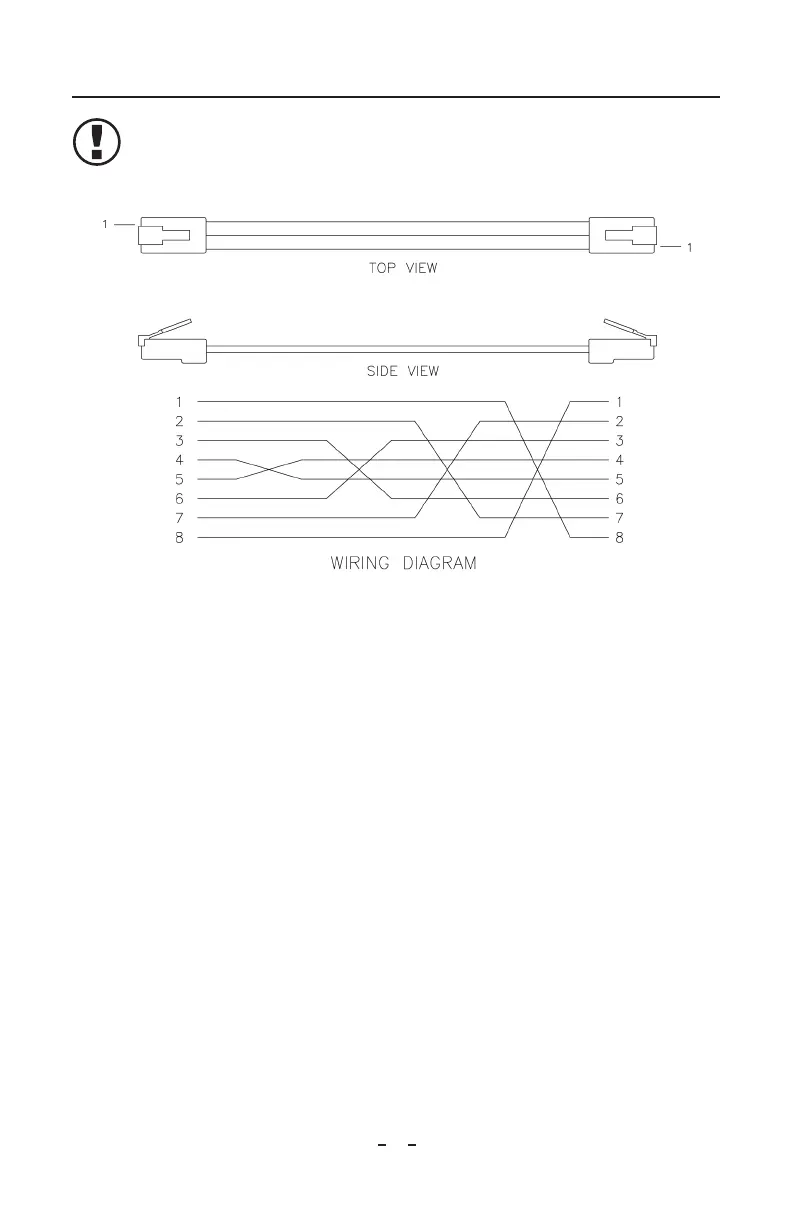
NOTE – DO NOT USE standard Ethernet cables with IQ Power systems.
Avoid permanent equipment damage by using only Simco-Ion modular
cables. (Refer to Section 8, Parts and Accessories).
Figure 1. IQ Power Crossover Modular Cable (black)
Mounting
Install the Control Station at a convenient place that keeps total overall cable length
to a minimum.
The black modular cable supplied with unit to connect the Control Station to an IQ
Power device is 2.13 meter [7 foot] long, however longer cables (not supplied) are
available. Cables must be 8-conductor modular cables with RJ-45 connectors wired
“crossover” (reference color: black, Figure 1).
Cables used to connect IQ Easy Static Bar, Sensor Bar or IQ Power MPS are
available in a variety of standard lengths with straight M12 connectors at the Control
Station end and with a straight or right angle M12 connector at the device end.
Secure Control Station to the mounting surface using M6 or M5 [1/4” or #10]
hardware (not included).
A small stylus and self-adhesive mounting clip are included with the unit. Remove
the protective backing from the mounting clip and place it adjacent to, or on the
side of, the Control Station.



 To Next Page